The Tektronix TDS 220 is a two-channel digital oscilloscope designed for measuring and visualizing electrical signals. It features an LCD display that replaces the traditional cathode-ray tube, offering digital readouts of various settings and menu options. This device is particularly useful for engineers and technicians working with RF circuits and systems, providing a clear and detailed view of waveforms.
Function Description
The primary function of the TDS 220 is to display voltage waveforms over time, allowing users to analyze signal characteristics such as frequency, period, amplitude, and shape. It operates as a digital sampling oscilloscope, capturing and digitizing input signals for display and analysis. The device supports two input channels, CH1 and CH2, enabling simultaneous observation of two different signals or comparison of a signal with a reference.
Triggering is a crucial function, determining when the oscilloscope begins painting a trace across the display. The TDS 220 offers automatic and manual triggering options, suitable for both periodic waveforms and single events. Users can set the trigger level and direction (rising or falling edge) to capture specific points of interest in a waveform. The device can trigger from either CH1, CH2, or an external trigger input (EXT TRIG). A unique feature is the ability to display the triggering signal by holding down the TRIGGER VIEW button, which helps in fine-tuning trigger settings.
The oscilloscope also includes automated measurement capabilities, providing digital readouts of key signal parameters. These include frequency, period, mean (average) voltage, and peak-to-peak voltage. This automation simplifies the analysis process, reducing the need for manual calculations.
Usage Features
The TDS 220 is designed with user-friendly controls grouped for easy navigation. The front panel includes dedicated sections for vertical, horizontal, and trigger controls, along with menu function buttons and the oscilloscope display itself.
- Oscilloscope Display: The LCD screen provides a visual representation of the waveforms. It displays channel voltage scales (e.g., CH1 2.00V), time scales (e.g., M 250ns), and zero baselines for voltage. The display also indicates trigger points and voltage thresholds, along with side-screen menu functions relevant to the currently selected menu.
- Vertical Controls: These knobs adjust the vertical position and scaling of the traces. The POSITION knobs move the zero voltage level for each channel up or down, allowing users to position waveforms precisely on the screen. The VOLTS/DIV (volts-per-division) knobs control the gain applied to the signals, effectively setting the vertical axis scale. The values are displayed at the bottom of the screen. The CH1 MENU and CH2 MENU buttons toggle the respective channel traces on/off and bring up channel-specific menus on the side-screen. These menus allow users to configure coupling (DC or AC), bandwidth limits (BW Limit), and probe attenuation settings (e.g., 10X probe).
- Horizontal Controls: These controls manage the horizontal position and scaling of the waveform traces. The POSITION knob moves traces left and right across the screen. The SEC/DIV (seconds per division) knob sets the time interval represented by each major grid division, affecting the overall time window displayed. This setting is common to all active channels. The HORIZONTAL MENU button provides access to additional horizontal functions.
- Trigger Controls: The TRIGGER LEVEL knob sets the voltage level at which triggering occurs. The TRIGGER MENU button allows selection of trigger source and edge type (rising/falling). The HOLDOFF function sets a time delay before another trigger can occur, useful for stabilizing complex waveforms. The SET LEVEL TO 50% button automatically sets the trigger level to the midpoint between the signal's peaks and valleys. The FORCE TRIGGER button initiates manual triggering.
- Handy Buttons: The AUTOSET button is a powerful feature that automatically adjusts vertical, horizontal, and trigger settings to provide an optimal display of the input signal. This is particularly useful when first connecting to a new circuit point. The RUN/STOP button toggles between freezing the display and allowing it to update in real-time. The HARDCOPY button enables printing a copy of the display to a connected printer.
- Manual Measurements using Cursors: The TDS 220 allows for precise manual measurements using horizontal and vertical cursors. By pushing the CURSOR button, users can activate the cursor menu and select between voltage or time measurements. The CURSOR 1 and CURSOR 2 knobs, located in the vertical controls section, are then used to position the cursors on the waveform. The side-screen menu displays the values at each cursor and the "Delta" value, representing the difference between the two cursors (e.g., peak-to-peak voltage or time period).
Maintenance Features
While the manual does not explicitly detail maintenance features, the design of the TDS 220 implies certain aspects related to its upkeep and reliable operation:
- Probe Connection: The device uses standard BNC input connectors for CH1, CH2, and EXT TRIG, ensuring compatibility with a wide range of oscilloscope probes. Proper connection of the probe point to the signal source and the black wire lead to a suitable ground (e.g., ground pin of an IC) is emphasized to minimize noise pickup and ensure accurate measurements.
- Warning Messages: The manual includes warnings regarding potential user errors, such as moving traces completely off-screen with the POSITION knob or improper time base settings leading to aliasing of high-frequency signals. These warnings serve as a guide for users to maintain proper operation and avoid misinterpretations of data.
- Automatic Setup: The AUTOSET function, while a usage feature, also contributes to ease of maintenance by quickly restoring optimal display settings, which can be helpful if the device's configuration becomes disoriented due to incorrect manual adjustments.
- Troubleshooting Guidance: The advice to "try pushing this button before calling your TA" when the display is "crazy" suggests a self-help approach to common operational issues, implying that many problems can be resolved through basic user interaction rather than requiring technical service.
Overall, the Tektronix TDS 220 is a robust and user-friendly digital oscilloscope, well-suited for educational and professional environments where accurate and efficient signal analysis is required. Its combination of digital display, automated measurements, and intuitive controls makes it a valuable tool for understanding and troubleshooting electronic circuits.

 Need help?
 General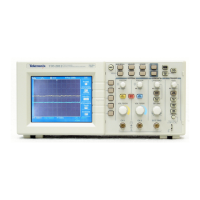




 To Next Page