62
GB
AUTOMATION OF 1 MOTOR WITH ELECTRIC LIMIT SWITCHES OR ENCODER
SIMPLE PROGRAMMING - dip-switch 9 to OFF - det. 14 fig. 1*
1
2
3
4
5
6
7
8
9
10
11
12
13
14
TYPE 4
Before programming:
- Make sure that dip-switch n. 11 is set to the OFF position (det. 14 fig.1)
- Make sure the motor is connected to M1 (terminals 1 - 2 and 3 )
- Adjust the limit switches before performing the self-learning procedure.
he optional anti-crushing module MAS200 may be connected only after the self-learning procedure has been
carried out.
Programming:
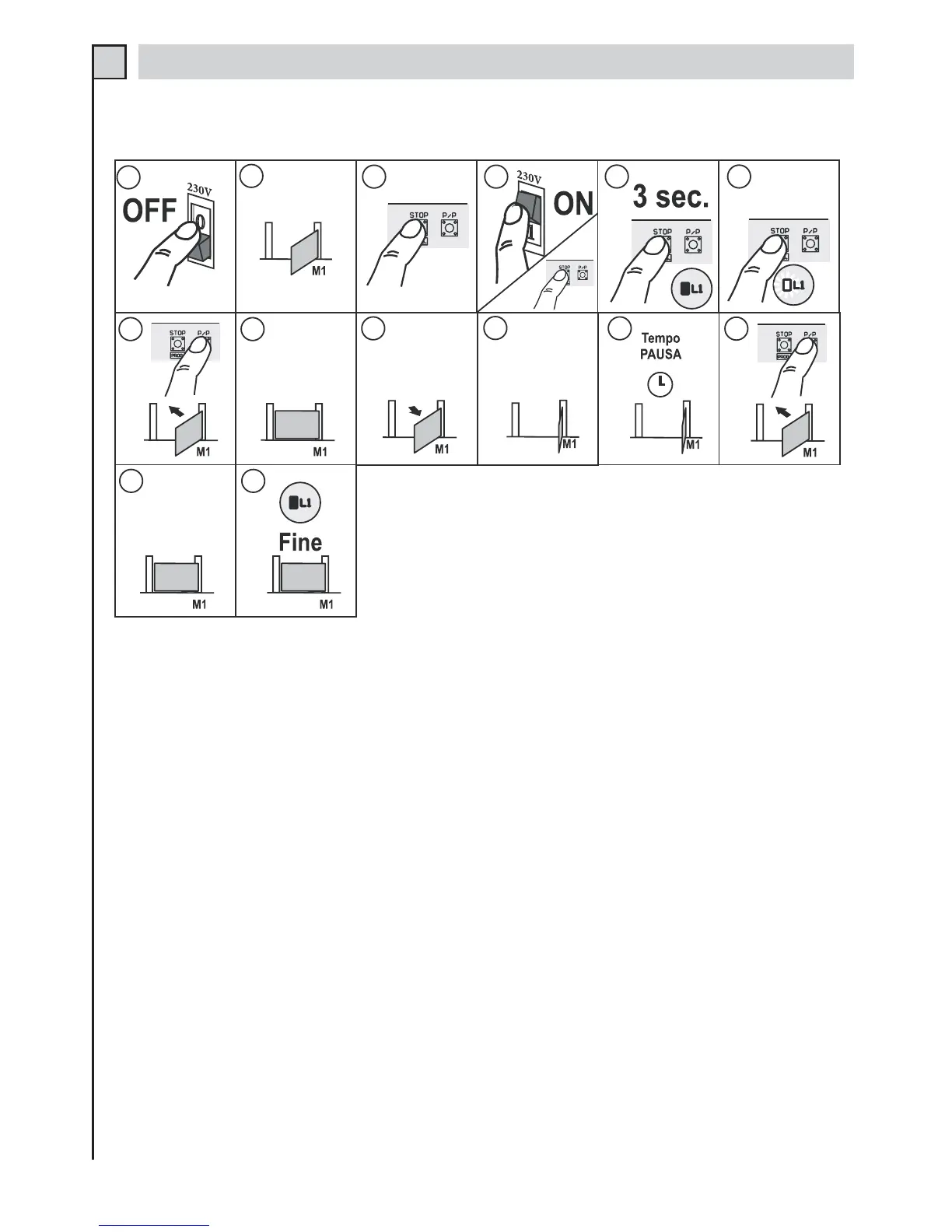
1 - Disconnect the power supply to the control unit.
2 - Bring the gate to mid-travel position.
3 - Press the STOP/PROG. button (det. 21 fig.1)
4, 5 and 6 - Power the control unit while holding down the STOP/PROG. button until Led L1 lights up (det. 8 fig. 1).
7 - Press the P/P button (det. 20 fig. 1); the motor will start closing. (if the motor rotates in the reverse direction,
disconnect the power supply, exchange the motor phase wires and repeat the procedure)
8 and 9 - When it reaches the stop point the motor will stop and then will automatically start opening.
10 - When the gate has opened all the way the motor will stop.
11 - Allow the desired pause time to elapse before re-closing.
12 - When the desired pause time has elapsed, press button P/P: the gate will close again.
13 and 14 - When the gate has closed all the way the motor will stop and Led L1 will go out.
*Note: if dip-switch 9 is set to the ON position after the programming procedure has been completed, the
control unit will execute factory-set decelerations. To modify the deceleration settings, see the chapter
titled DECELARATION TIME PROGRAMMING.


 To Next Page
 Loading...