63
GB
DECELARATION TIME PROGRAMMING
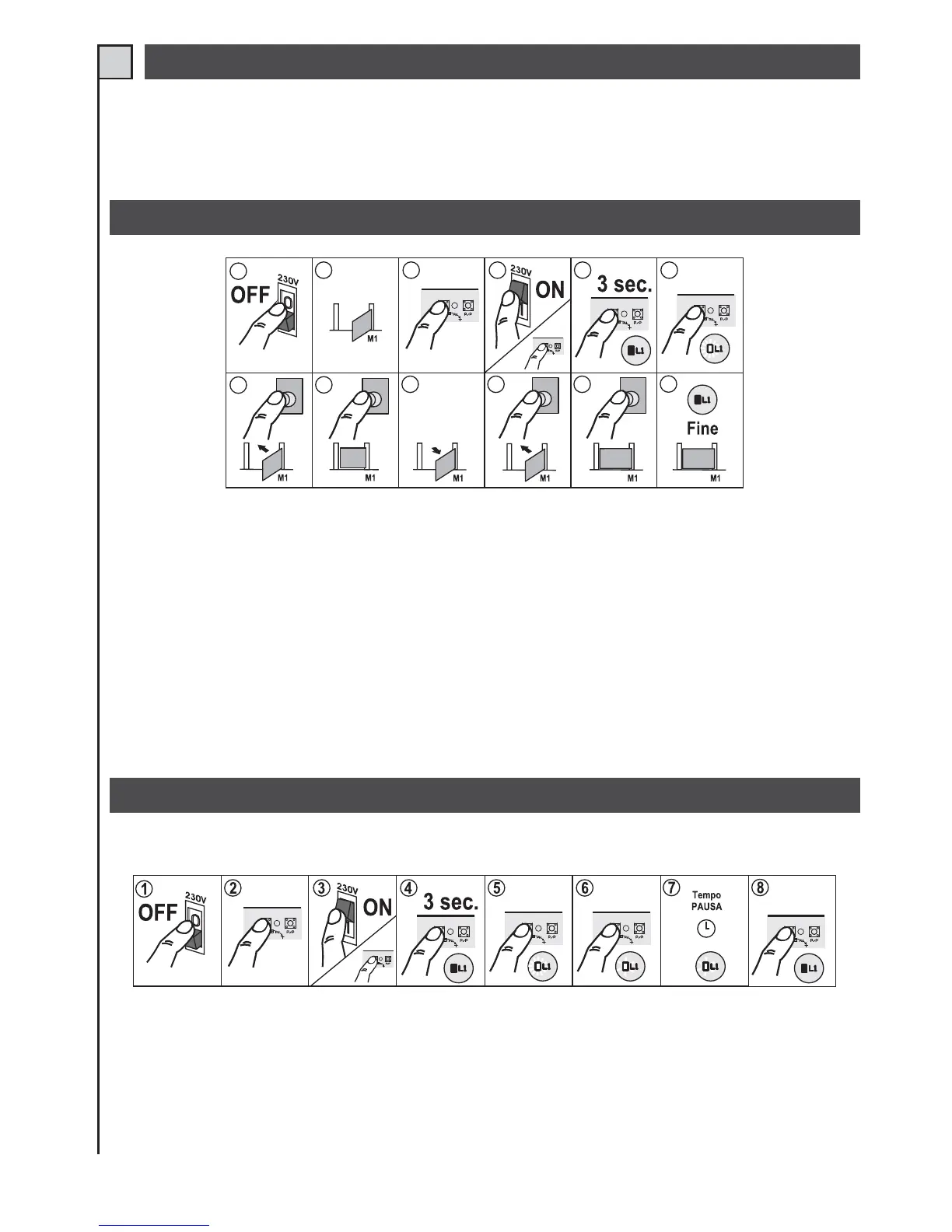
PROGRAMMING OF PEDESTRIAN OPENING (only for automations with one motor, dip-switch 11 to OFF)
INDEPENDENT PAUSE TIME PROGRAMMING
If you wish to have decelerations values different from the factory settings, you must execute the time learning stage with
dip-switch n. 9 (det. 14 fig. 1) set to ON.
During the learning stage you must press button P/P (det. 20 fig 1) at the point where you wish the deceleration to start,
before the wing reaches the end-of-travel position.
1
2
34
5
6
7
8
9
10
11
12
PED
PED
PED
PED
1 and 2 - When the gate is in mid-travel position, disconnect the power supply to the control unit.
3 - Press the STOP/PROG. button (det. 21fig. 1).
4, 5 and 6 - Power the control unit while holding down the STOP/PROG. button for at least 3 seconds. Programming Led L1 will
light up (det. 8 fig. 1). The same function can be obtained by pressing and holding down the STOP/PROG. button, momentarily
short-circuiting the reset pins (det. 15 fig. 1), and then releasing the STOP/PROG. button when Led L1 lights up.
7 - Activate the pedestrian control. The gate will close.
8 - When the gate strikes the closing stop, activate the pedestrian control again if there are no limit switches or encoder or MAS200.
9 - The gate will start opening.
10 - When the desired pedestrian opening position is reached, activate the pedestrian control. The gate will stop and start closing again.
11 - When the gate strikes the closing stop, activate the pedestrian control again if there are no limit switches or encoder or MAS200.
12 - The motor will stop and Led L1 will go out.
This procedure allows you to modify the pause time without having to completely re-.program the control unit.
1 - With the gate closed disconnect the power supply to the control unit.
2 - Press the STOP/PROG. button (det. 21 fig. 1).
3, 4 and 5 - Power the control unit while holding down the STOP/PROG. button for at least 3 seconds. Programming Led
L1 will light up (det. 8 fig. 1).


 To Next Page
 Loading...