4 TeleCorder # TCwL-B4, V2.43, Revision 4, USA
1. Identify the Front and Rear Panel Connections
Unpack and check the contents of the TeleCorder package. Locate the master password page and keep it in
a secure place.
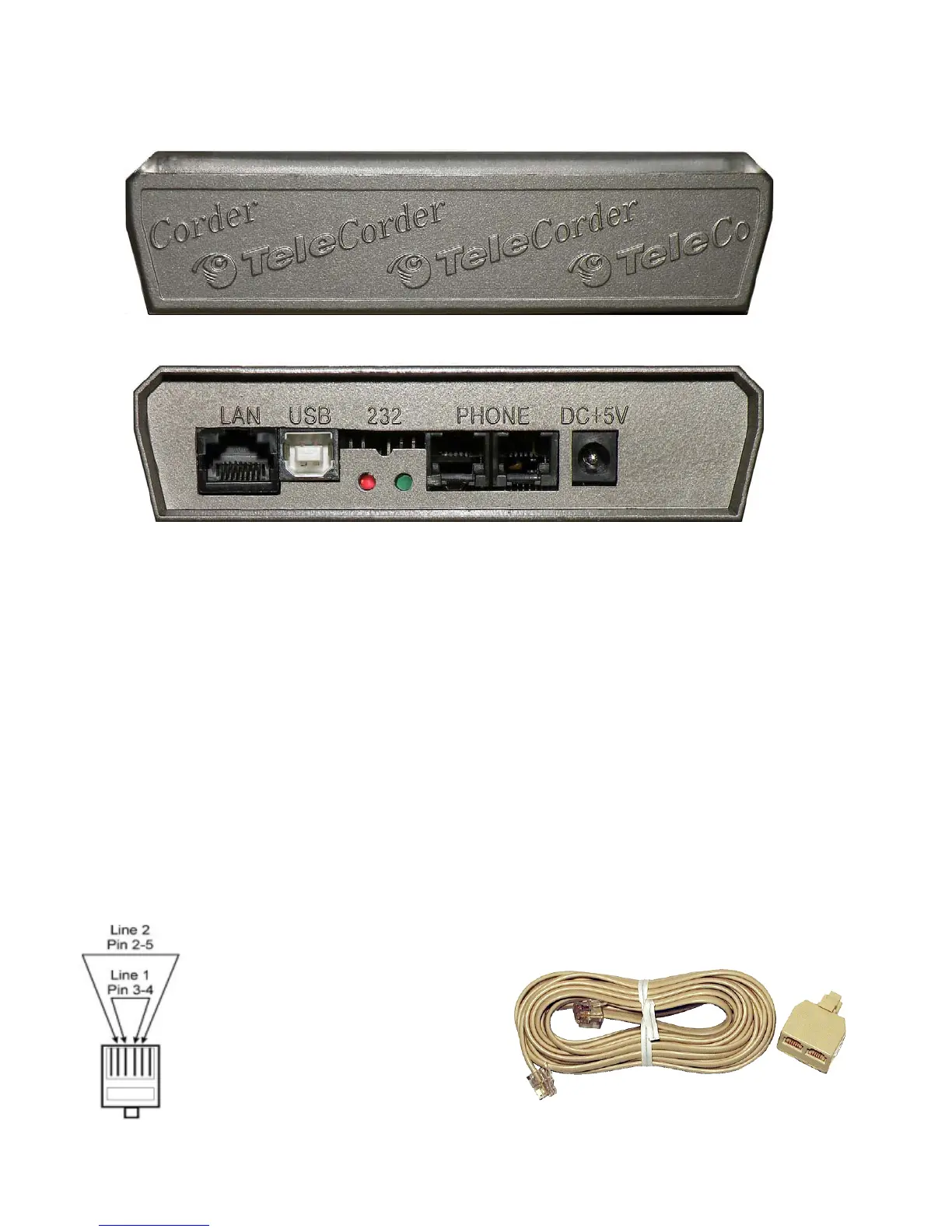
Front view — top bar has LED’s that light to indicate power, HDD, and channel status.
Rear view — RJ-45 LAN jack for connecting to a computer network, USB jack for connecting
to a computer via USB, red LED to indicate an active 100Mbps LAN connection, green LED to show
LAN activity, two modular phone jacks for connecting to the source of the conversations to be
recorded (two channels per jack, image at right), and +5vDC input jack for connecting to power
using the supplied AC adapter.
2. Cable Connections and Testing
2.1 Connecting to Phone Lines and other Audio Sources
TeleCorder inputs require 2-wire analog audio such as a direct connection to analog phone lines, two-
way radios, amplified microphones, telephone handset or headset audio (analog or digital phones,
using direct connection to earpiece audio or optional TSA-3LM or TSA-SLM adapters), etc.
2.1.1 Connecting Audio Sources to the Four Channel TeleCorder Model TCwL-B4
Each modular phone jack on the back of the TeleCorder TCwL-B4 has connections for two
phone lines or other audio sources. When looking at the back panel, the jack on the left is for ports or
channels 1 and 2, the jack on the right is for ports or channels 3 and 4.
The modular jacks use pins 3 & 4 for the first input (center pair), and pins 2 & 5 for
the second input (see drawing at left). Each individual input can be referred to as either a
Channel or Port.
Four T-18 cables (18' phone line
cable with T-adapter, photo at right) are
supplied with the recorder. You can use
these or other suitable cables to connect to
your phone lines or other audio sources.
Connect audio sources for channels
one and two using the left jack, and
channels three and four to the right jack in a similar manner. The TCwL-B4 is supplied


 To Next Page