Telecrane USA
2400 N Lincoln Ave, Ste. 113, Altadena, CA 91001. www.TelecraneUSA.com support@TelecraneUSA.com Ph: (626) 710 4197
F24 Series
Copier Manual
I. Description
F24 copier is a synchronizing (Pairing) device designed for F21 crystal series 2S/D, 4S/D, and F24 6S/D, 8S/D, 10S/D,
12S/D, and F24-60 Joystick models. The data of the transmitter or the receiver could be transferred from one to
another by using this device. It can be used to transfer the data from Tx to Rx, Rx to Tx, Rx to Rx, and Tx to Tx as
long as they are the same model. Copier is a fast way to synchronize transmitters and receivers.
Three buttons are available on the copier, and each button is capable of storing one set of data at a time and the
previously saved data will be erased automatically once new data is stored.
II. How to use
Step 1. Battery Installation
Remove four screws on the bottom cover of
copier with Philips screwdriver, and insert
2 AA-size 1.5V Alkaline batteries.
IMPORTANT!
Both transmitter and receiver's power must
remain OFF during the reading and writing
process. (Remove the transmitter's batteries
and disconnect the receiver from the power source).
Step 2. Reading data
Place the magnetic key into the key holder and do
NOT remove it until the reading process is fully
completed.
Connect the six-pin cable to the transmitter or
receiver. Press and hold the button you wish to store
the data and release the button when the green LED
stops flashing.
Disconnect cable when the LED remains OFF
completely.
Step 3. Writing data
Remove the magnetic key of the copier from the key
holder and do NOT put it back until the writing
procedure is fully completed.
Connect the six-pin cable to the transmitter or
receiver. Press and hold the button you wish to write
the data and release the button when the green LED
stops flashing.
Disconnect cable when the LED remains OFF.
III. Attention:
I. Make sure the transmitter or receiver, which
you are synchronizing is in the same model.
Otherwise, the system may not work correctly.
2. Remove the transmitter's batteries or switch off
receiver power during synchronization
otherwise, it may damage the memory.
3. Any of the three buttons can be used for storing and
reading the data, but always remember which button
was used last to avoid wrong data transfer.
Each button only stores the last data copied. The old
data will be erased automatically once the new data is
stored.
4. Writing an empty data may damage the
transmitter or receiver.
5. Make sure the six-pin cable is firmly connected to
the transmitter or receiver before use.
Flashing red LED indicates six-pin cable
is not well connected during the reading or
writing process.
6. When battery power is low, a yellow LED
will flash until the batteries are replaced with new ones.

 Need help?
 General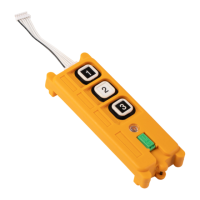

 To Next Page