8
CONTROL FUNCTIONS
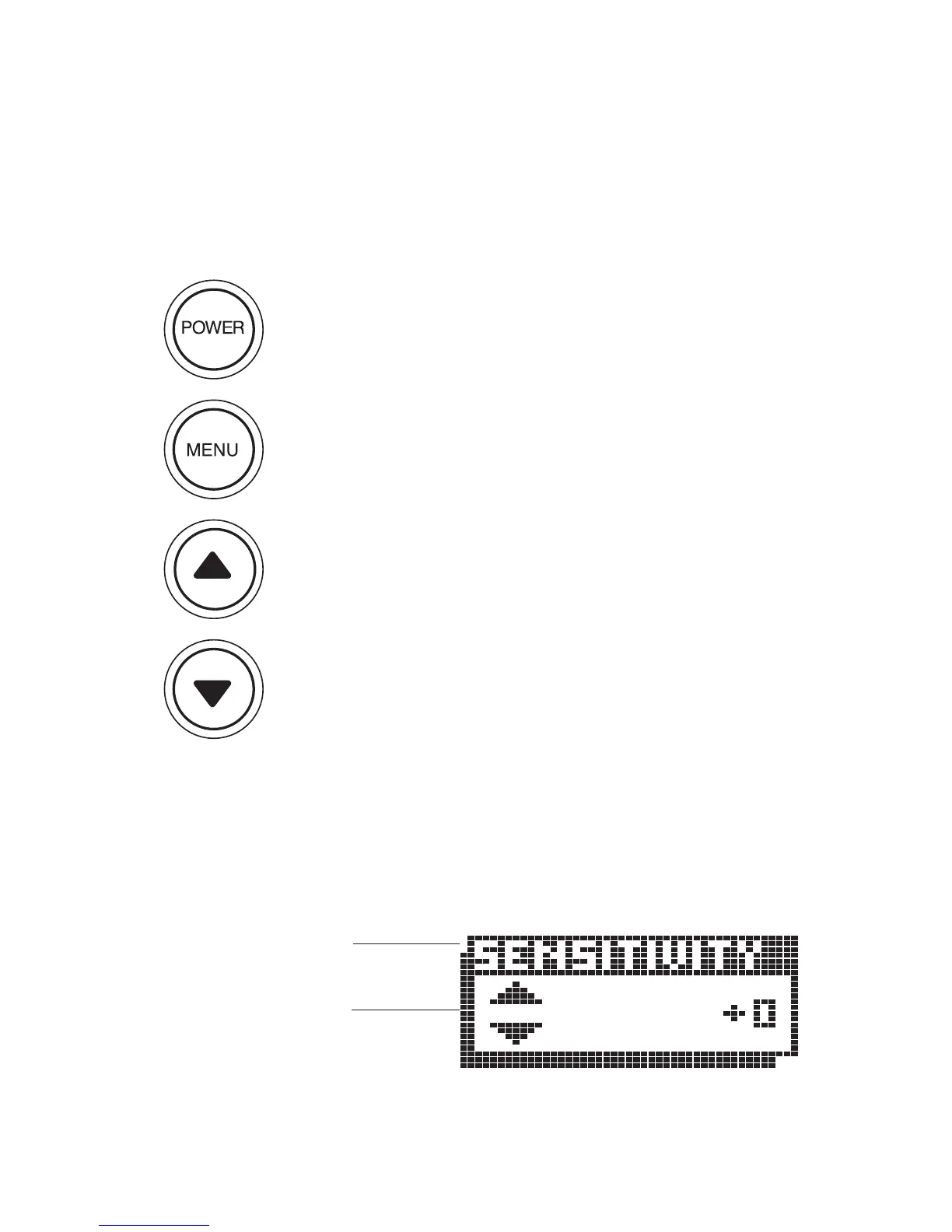
The 100ID unit uses only four buttons to control all functions. When any
button is pressed, an audible “chirp” will verify the control input.
POWER, as previously discussed, powers the 100ID for
normal operation. Also, if the unit is powered off, press and
hold
POWER until you hear a continuous “chirp” to enable
simulator operation as discussed in “Simulator Operation.”
Pressing
POWER when the unit is in normal or simulator
operation will power the unit off.
MENU brings a menu on-screen for adjustment, or if a menu
is already present, the next menu in sequence will appear.
Menus will go off-screen and normal operation will resume
after a short period of time.
UP arrow selects the next larger or next sequential adjust-
ment within the menu. Holding an Arrow button down will
cause the unit to continue to make the adjustment, until a
limit is reached, and the limit alarm sounds.
DOWN arrow selects the next smaller adjustment within
the menu.
All menus use the same general layout as shown in the sample menu. The
heading of the menu is at the top. The area at the bottom is controlled by
the
UP and DOWN arrows.
USING THE 100ID SERIES
CONTROL FUNCTIONS
Menu Heading
Arrow Key
Functions


 To Next Page