9
MENU FUNCTIONS
The following section explains each menu in
detail, and how these adjustments can be
used to obtain the maximum information
from the sonar returns.
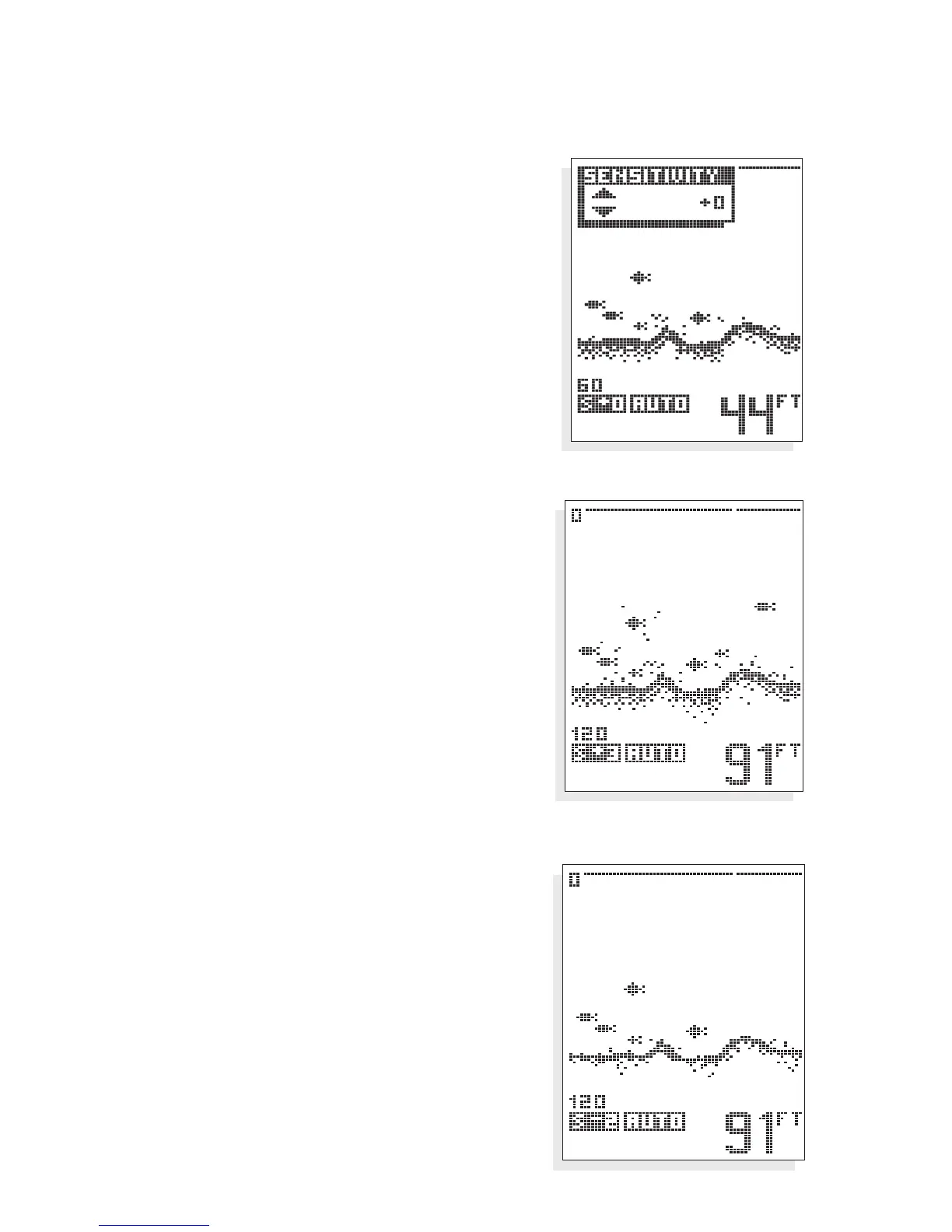
SENSITIVITY. As the 100ID receives returned
signals, the sensitivity of the receiver is
adjusted automatically based on a number of
factors such as the depth of the water, and
the signal clarity. In murky water, full of
debris, the
100ID will select a lower sensitivity
setting. In clear water, where there is little
debris to reflect the sonar signal, the sensitivity
is set higher.
The Sensitivity menu allows you to “bias” this
automatic setting up or down based on
personal preference.
You can select a bias of +5 to -5, for 11 differ-
ent bias settings. A bias setting of “0” has no
effect on the automatic function. A +3 setting
selects a sensitivity setting three steps higher
than the unit would normally select, so even
the smallest returns are displayed on-screen.
A setting of -2 sets the sensitivity two steps
below what the unit would normally select,
so only the largest targets or other returns
are displayed.
USING THE 100ID SERIES
MENU FUNCTIONS
Sensitivity bias of -2
Sensitivity bias of +3


 To Next Page