THE ROUND BUTTON EXPLAINED
TELEPHONE SETTINGS
Telefonica Domo2 Rapid Guide in English Telefonica Domo2 Rapid Guide in English
6
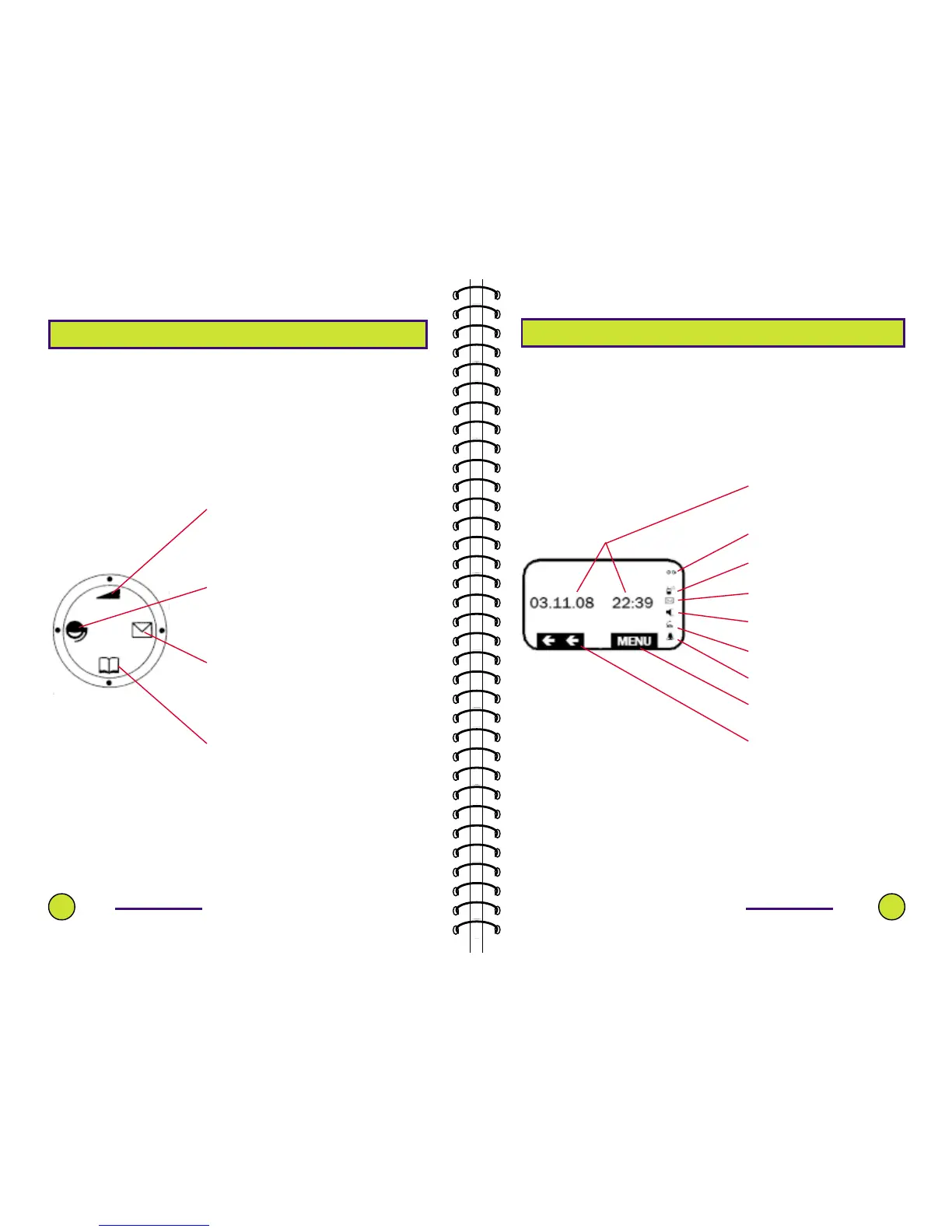
The round button in the centre of the handset provides
many options, most of which depend on that shown in
the viewer.
On the Domo2, the Viewer is used to indicate the status
of your actions.
6
This takes you back to a previous option or list.
You can scroll up in text messages.
You can change caller during a multi-call conversation
or call-waiting.
You can increase the volume when that mode is
selected.
This option moves the cursor to the left when editing
messages and telephone contacts list.
It is also a short-cut to receive text messages and/or
incoming calls.
This option takes you back to previous option or list.
You can scroll up in text messages.
You can access your list of telephone contacts.
You can decrease the volume.
This option moves the cursor left when editing text
messages, date and time.
It also duplicates the red, blue and green service
buttons.
Displays Date & Time when no
other message is displayed.
Indicates when you can
retrace your actions.
This indicates that Menu
options are available.
Displayed when the Answering
Machine is activated and
blinks when there is a
message to listen to.
Displayed when an
unanswered call was received.
Displayed when there is a
message(s) to be read.
Displayed when telephone is
used hands-free.
Displayed when telephone is
busy.
Displayed when Alarm is
activated.



 To Next Page