33
Up to 10 stations can be saved to the memory (
P01
to
P10
).
To recall a programmed radio station, simply press repeatedly
the SET / MEM / M+ (2) button to cycle through the preset
radio stations.
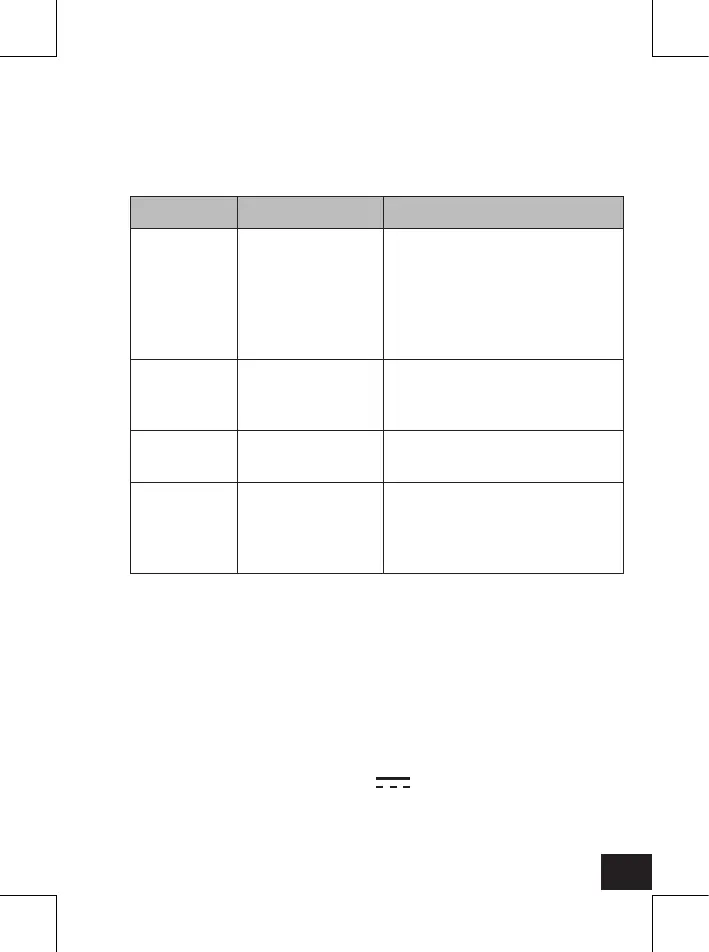
8. TROUBLESHOOTING
Problem Possible cause Solution
Appliance
does not
function
after
pressing
buttons.
Malfunction due
to electrostatic
discharge.
Disconnect the appliance from
the wall outlet. Connect the
power plug again to a wall
outlet.
Appliance
does not
work.
The power plug is
not connected to
the wall outlet.
Check if the power plug is
connected to the wall outlet.
No sound. Volume is set too
low.
Increase the volume level.
Bad FM
reception.
Bad sound
quality.
FM antenna (14)
is not unrolled.
Unroll the FM antenna (14) for
best reception.
9. CLEANING AND CARE
Pull the power plug from the wall outlet before cleaning.
Clean the housing with a slightly dampened cloth.
Never use strong cleaning agents.
Never use chemicals (such as gasoline, alcohol) to clean the
housing.
10. TECHNICAL DATA
Power supply
Operation voltage : AC 230 V~, 50 Hz, 5 W
Backup battery : 1 x 3 V 1 x CR2032 Flat Lithium
button cell (not supplied)
Frequency band : 87.5 - 108 MHz (FM)


 To Next Page