33
EN
9. CONNECTING EXTERNAL APPLIANCES
External appliances, e.g. MP3 players or similar, can be connected via the 3.5 mm
(13) socket.
Note: A suitable connection cord is needed (not included).
Connect the external appliance to the (13) socket and press repeatedly
FUNCTION (6 or 28) until the indicator
appears on the display (23).
When an external appliance is connected, all playback functions will be managed
through the external appliance's controls. The volume control will keep working normally
and can be controlled using Volume control knob (1) or VOL- and VOL+ (37) keys on the
remote control, however all the other playback operation controls will stop functioning as
long as the external appliance is connected.
10. CONNECT HEADPHONES
Set the volume to a lower level. Listening with too high level might lead to hearing
damage.
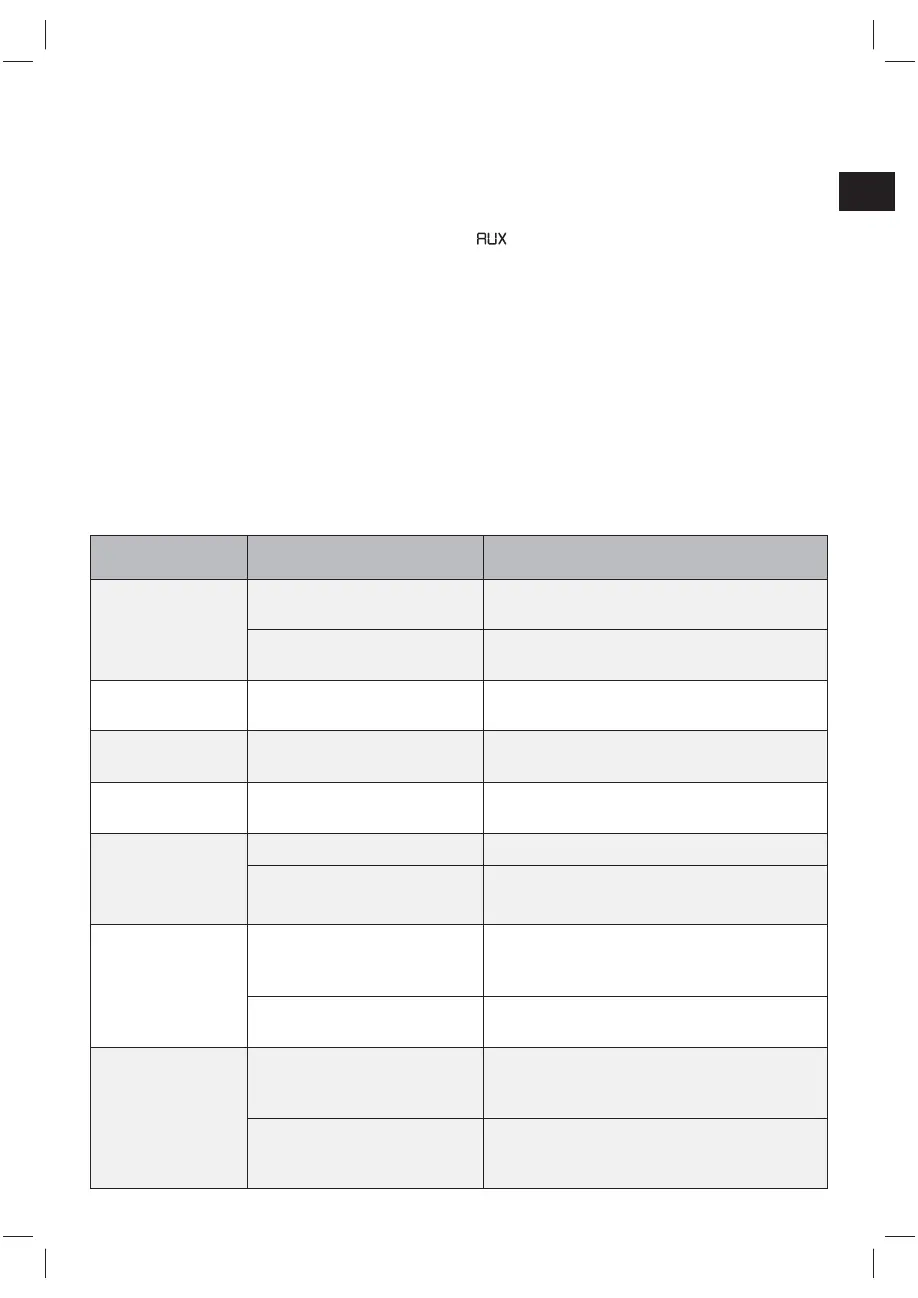
11. TROUBLESHOOTING
Problem Possible cause Solution
Appliance does not
work.
Power cable (44) is not
connected properly.
Check if the power cable is properly
connected a electrical outlet.
Batteries are discharged and/
or not inserted correctly.
Check if batteries are inserted correctly or
empty.
Bad audio quality. Inserted CD is dirty or
scratched.
Clean the disc with a soft cloth or insert
another CD.
Bad FM reception. FM antenna (9) is not pulled
out.
Pull out completely and rotate the FM
antenna (9) for best reception.
Jumping of tracks
during playback.
Inserted disc is dirty or
scratched.
Clean the disc with a soft cloth or insert
another CD.
Speaker cannot
be connected to
external device via
Bluetooth.
Audio source is switched off. Switch on the audio source.
Bluetooth is switched off at the
audio source.
Switch on the Bluetooth function of the audio
source.
No audio signal
via the Bluetooth
connection.
Speaker is not paired to the
audio source.
Check whether a connection exists. If
necessary, pair the speaker again to the audio
source.
Volume too low. Increase the volume on the device and/or on
the audio source.
Bad audio quality.
Bad Bluetooth reception. Shorten the distance between the Bluetooth
device and the boombox and make sure no
obstacles are disturbing the connection.
3.5 mm audio cable is not
inserted correctly to external
device.
Ensure that the connecting 3.5 mm audio
cable is correctly plugged in on both devices
and plugs are fully inserted.
(IM_for_approval)953-000067_RC1002BM_GB_V03_080115_2010955.indd 33 1/9/15 8:35 PM


 To Next Page