24
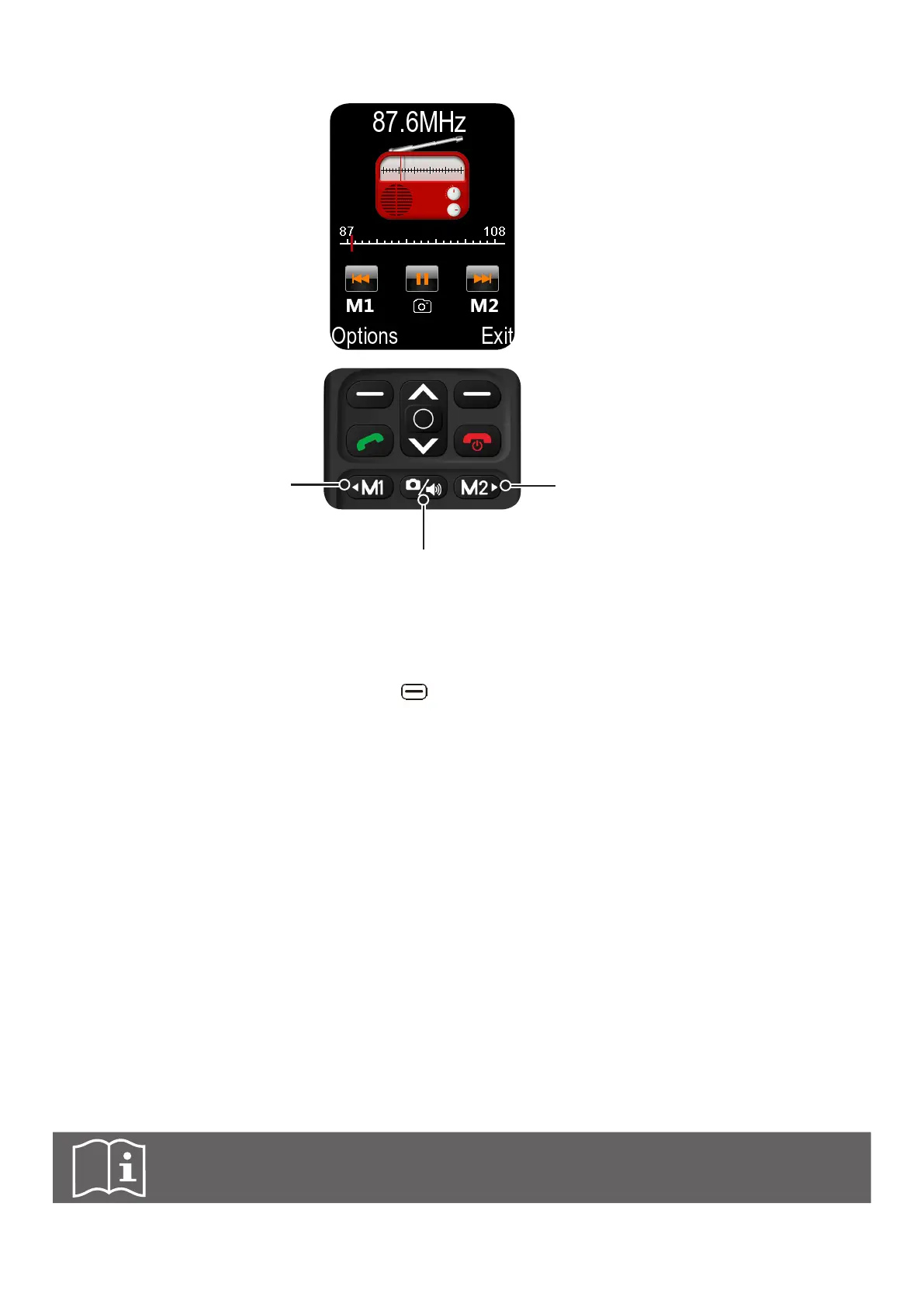
6.10 Using FM radio
f Switch to a lower-
frequency radio
station
f Press to start or pause
the radio playing
f Switch to a higher-
frequency radio station
This phone is equipped with a FM radio, which can be used with or without connected earphones.
Connecting earphones is however recommended as they can act as an external antenna.
h When in FM radio menu, press the left key to browse available Options:
Auto search and save Automatically search and save radio stations in your area.
Channel list Show list of saved radio stations.
Save Assign a channel number to current radio station you are
listening. 40 channel numbers can be assigned.
Manual search Directly input its frequency to search a radio station.
Open speaker Access the loudspeaker.
Background play Select turn on or turn off this feature.
6.11 Connecting to PC/MAC
Connect the USB cable to a computer port rst, and then connect the micro USB to the phone
charging port. Once connected, a menu prompts the user to select one of 3 options:
1. Charging - use for charging. Access to media is possible only via phone itself.
2. U Disk - use for copying/deleting files and media from phone to computer and vice versa.
Access to media is possible only via computer.
3. PC connecting - connect to the computer, but does not allow copy/deleting.
Note: Phone is also being charged when it is connected to PC/MAC.



 To Next Page