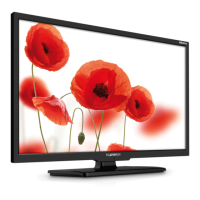
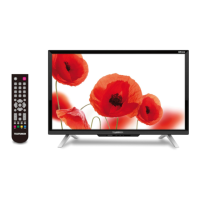
This document describes the TELEFUNKEN TF-LED32S35T2 LED TV, a color liquid crystal display television. It serves as both an instruction manual and a guide for operation and maintenance.
Function Description
The TELEFUNKEN TF-LED32S35T2 is a versatile LED TV designed for displaying color images from various sources. It functions as a standard television receiver (DTV/ATV), a monitor for external devices like DVD players, VCRs, camcorders, and PCs, and a multimedia playback device via USB. The TV supports digital program recording (PVR) and a Time Shift function, allowing users to pause and resume live TV broadcasts. It also includes a Common Interface (CI) slot for accessing encrypted services from digital TV providers.
Important Technical Specifications
- Size (diagonal): 32" (81 cm)
- Response time: 8 ms
- Resolution: 1366 x 768
- Aspect ratio: 16:9
- Color system: PAL, SECAM
- View angle: Vertical 176°; Horizontal 176°
- Sound system: B/G, DK, I, L
- NICAM Stereo: Yes
- Audio output: 2 x 8 W
- Inputs:
- Component video input (YPbPr/YCbCr): Yes
- AV RCA input: Yes
- USB port: Yes (USB 2.0 standard, max. 500 GB capacity, DC5V, 500 mA)
- VGA input: Yes
- HDMI input: x3 (one with MHL, one with ARC function)
- Outdoor antenna connection: 75 Ohm co-axis cable
- Outputs:
- Headphone jack: Yes
- Digital coaxial audio output: Yes (PCM/RAW modes)
- Signal reception: DVB-T/DVB-T2/DVB-C
- CI slot: PCMCIA (CI, CI+ support)
- OSD languages: Russian and English
- Progressive scan: Yes
- Digital comb filter: 3D
- Sleep timer: Yes
- Quantity of channels (ATV/DTV): 199/400
- Teletext pages: 1000
- PVR function: Yes
- Time Shift function: Yes
- USB movie, photo and audio support: Yes
- Electric shock protection class: II
- Nominal voltage range: ~100-240 V; 50/60 Hz
- Unit dimensions (with stand): 737 x 483 x 78 mm
- Unit dimensions (without stand): 737 x 437 x 78 mm
- Net weight: 6.0 kg
The LED panel is a high-technology product with thin film transistors, providing fine picture details. The presence of a few non-active pixels (fixed points of blue, green, red, black, or white) is considered normal and does not affect performance. Specifications are approximate and subject to change without prior notice for improvement reasons.
Usage Features
The TV offers a comprehensive set of features for user convenience:
- Control: The TV can be operated via front panel buttons or a remote controller.
- Power Management: Includes standby mode, automatic standby after 5 minutes of no signal in TV mode, and a power switch for complete disconnection.
- Volume and Channel Control: Standard VOL+/-, CH+/-, and mute functions.
- Aspect Ratio: Multiple screen aspect ratios are available (Auto/4:3/16:9/Cinema/Subtitle/PC Mode), which may vary by signal source.
- Picture Modes: Pre-set video picture modes (Standard, Soft, User, Dynamic) with customizable contrast, brightness, saturation, sharpness, and tint (NTSC only) in User mode. Color temperature settings include Standard, Warm, and Cool. Noise reduction (Off/Low/Middle/High/Default) is also available.
- PC Setting: In PC mode, offers auto-adjust, horizontal/vertical position, size, and phase adjustments.
- Sound Modes: Pre-set sound modes (Standard, Music, Movie, Sports, User) with customizable bass and treble in User mode. Surround sound effect can be toggled on/off.
- AD Switch (Audio Description): An auxiliary audio function for visually challenged persons, available in DTV mode, allowing control over AD volume.
- SPDIF Mode: Digital audio output can be set to PCM or RAW.
- Timer Functions: Includes clock display (DTV stream time or system time), off time, on time (requires TV in standby), sleep timer, and time zone selection.
- OSD Language: Selectable on-screen display language (Russian, English).
- Audio Language: Selectable audio language for DTV channels.
- Hearing Impaired: Displays textual information for the hearing impaired when enabled.
- PVR File System: Allows selection of storage disc, Time Shift size, formatting of USB, and speed check for PVR.
- Lock System: Prevents unauthorized operation with a 4-digit password (default 0000). Includes options to set a new password and block specific programs.
- Electronic Programme Guide (EPG): In DTV mode, provides detailed channel information for up to eight days, with options to record, view info, schedule, and set reminders.
- Digital Program Recording (PVR): Records TV programs to a USB storage device. Recording starts with the REC button and stops when the STOP button is pressed or memory is full. Recorded files can be played, viewed, or deleted.
- Time Shift Function: Allows pausing and resuming live TV broadcasts.
- CI Information: In DTV mode, enables viewing of encrypted services by inserting a CI card into the PCMCIA slot.
- USB Operation: Supports playback of video (3GP, ASF, AVI, MKV, MPG, DAT, M2TS, MP4, TS, VOB with WMV V9, H263, MPEG-4, MPEGII, XVID codecs), audio (PCM, WAV, MP3, DD(AC3) codecs), and photo files. File systems supported include NTFS, FAT16, FAT32. Playback features include play/pause, stop, previous/next file, repeat modes, background music for photos/text, playlist display, file information, image rotation, fast forward/backward, slow playback, step playback, zoom in/out, and fragment repeat.
Maintenance Features
- Troubleshooting Guide: A table of common symptoms, causes, and solutions is provided for user self-service. Issues covered include no picture/sound, abnormal picture/sound, VGA mode abnormalities, spotted/snowy picture, blue background, no sound, and remote controller malfunction.
- Interference Mitigation: The TV incorporates measures to eliminate interference, but local electromagnetic radiation can still affect picture quality. Recommendations include relocating the TV, using a better antenna, and proper aerial positioning to minimize effects from RF interference, diathermy equipment, weak signals ("snow"), reflected signals ("ghost"), and car ignition.
- Battery Replacement: Instructions for changing AAA batteries in the remote controller, including polarity observation and warnings against mixing old/new or different battery types.
- Software Update (USB): The TV's software can be updated via a USB storage device.
- Restore User Default: Option to reset all parameters to initial factory settings.
- Safe Handling: Emphasizes unplugging the power cord during storms or prolonged disuse, avoiding contact with wet hands, and proper handling of the power cord and antenna cables.
- Installation Safety: Guidelines for base installation and wall mounting, stressing the use of appropriate brackets and ensuring stable placement to prevent damage or accidents.
- Ventilation: Advises placing the product in a well-ventilated location, keeping it away from heat sources, direct sunlight, vibration, high temperature, and humidity, and maintaining at least 10 cm clearance around the TV.
- CI Card Handling: Warnings against inserting or pulling out the CI card when the power is on, or too frequently, to prevent damage.
- USB Device Handling: Recommends using licensed USB devices from famous brands, avoiding non-standard devices, and formatting problematic storage devices. Warns against disconnecting during formatting and against using USB drives with BIN files in the root directory.

 Need help?
 General



 To Next Page