Before you start
5
4
Before you start
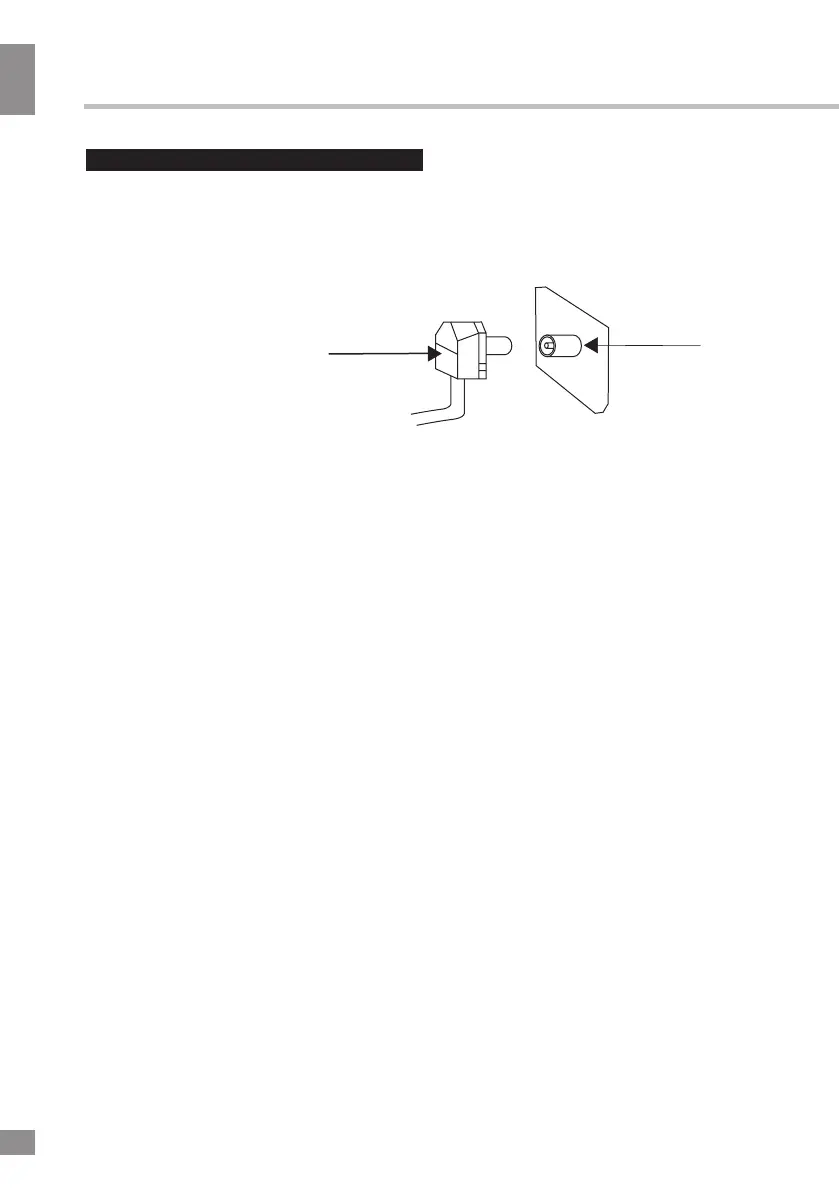
Connection
75 Ohm co-axis cable
TVRF antenna jack
Antenna cable connector
Outdoor Antenna Connection
Use 75Ω coaxial cable plug or 300-75Ω
impedance converter to plug in antenna input
terminal on the rear of the cabinet.
Other connections
• If the video source has a HDMI output
jack, you can connect the signal to the
monitor with the HDMI cable (not included).
• Optical output is intended for
transmitting multi-channel sound to an external
decoder (e.g. in 5.1-CH format). An optical
cable should be used for connection (not
included).
• PCMCIA slot is used for CI modules that
are obtained from your digital TV provider.
• Connect your headphones or earphones
(not included) to the headphone socket of
this unit. When earphones are connected, the
sound output through the built-in speakers of
this unit is mute.
• Plug the power cable in the electric outlet,
making sure the current voltage is supported.
• When using the LED as a computer
screen, connect the PC to the VGA
input using
a VGA cable (not included).
• This unit has a PC audio in jack. Connect
this jack to a PC using an audio cable (not
included) in PC mode and adjust the
volume to the desired level.
• Connect the video source to the
AV input using a CVBS cable (not included).
•
Component input YPbPr is
intended to receive component video signal
from the external device. Connection is made
with the help of a mini component cable (not
included).
• Connect the audio source to the
Left and Right stereo audio inputs
.



 To Next Page