Operation
8
Operation
General operations
TELETEXT operations (option)
• Select the TV source mode. Then press
CH-/CH+ buttons to select TV channel in order
to pick up the picture signal of Teletext.
• Use two AAA batteries for the RC. The RC
should be pointed at remote sensor within 8
meters and within 30 degrees at the lef
t or the
right side.
• Take the battery out of the RC if it is not
used for a long time.
• Do not mix new and used batteries or
different types of batteries. Weak batteries can
leak and severely damage the RC.
• Do not expose the RC to shock, liquids,
and do not place it in an area with high
humidity.
CAUTION!
Incorrect installation of the batteries may
lead to an explosion.
Please replace used batteries with the
batteries of the same or comparable type.
• Teletext button functions are as follows:
TEXT: Press this button to enter into Teletext
mode. Follow the guides on screen and use
the color buttons to navigate the Teletext.
Red/Green/Yellow/Blue buttons: Press
these 4 color buttons to access directly to
corresponding color page displayed at the
lower parts of teletext screen.
REVEAL: press this button to display and
reveal hidden information.
SUBPAGE: press to access a subpage
of the Teletext.
HOLD: press this button to stop the move
to the next page. Press this button again to
cancel operation.
INDEX: press this button to go to the
index page.
• Press button on the unit or on the RC
to switch on the power. Press POWER button
again to switch the unit off and go the the
stand-by mode. To completely power off the unit
unplug the power cable from the outlet.
• Press VOL- button repeatedly to decrease
the volume; press VOL+ button repeatedly
to increase the volume.
• Press MUTE button to cut off sound, press
8
this button again or adjust volume to resume
sound.
• Select the TV function mode. Press
CH-/CH+ buttons to select previous or next
channels; or press number buttons to enter a
channel number directly.
Signal sources
Press
INPUT button, then press DOWN/UP
cursor buttons on the RC or CH+/CH- buttons
on the panel to select a source from available
source list. Press OK button on the RC or
MENU button on the panel to confirm. Press
EXIT to exit.
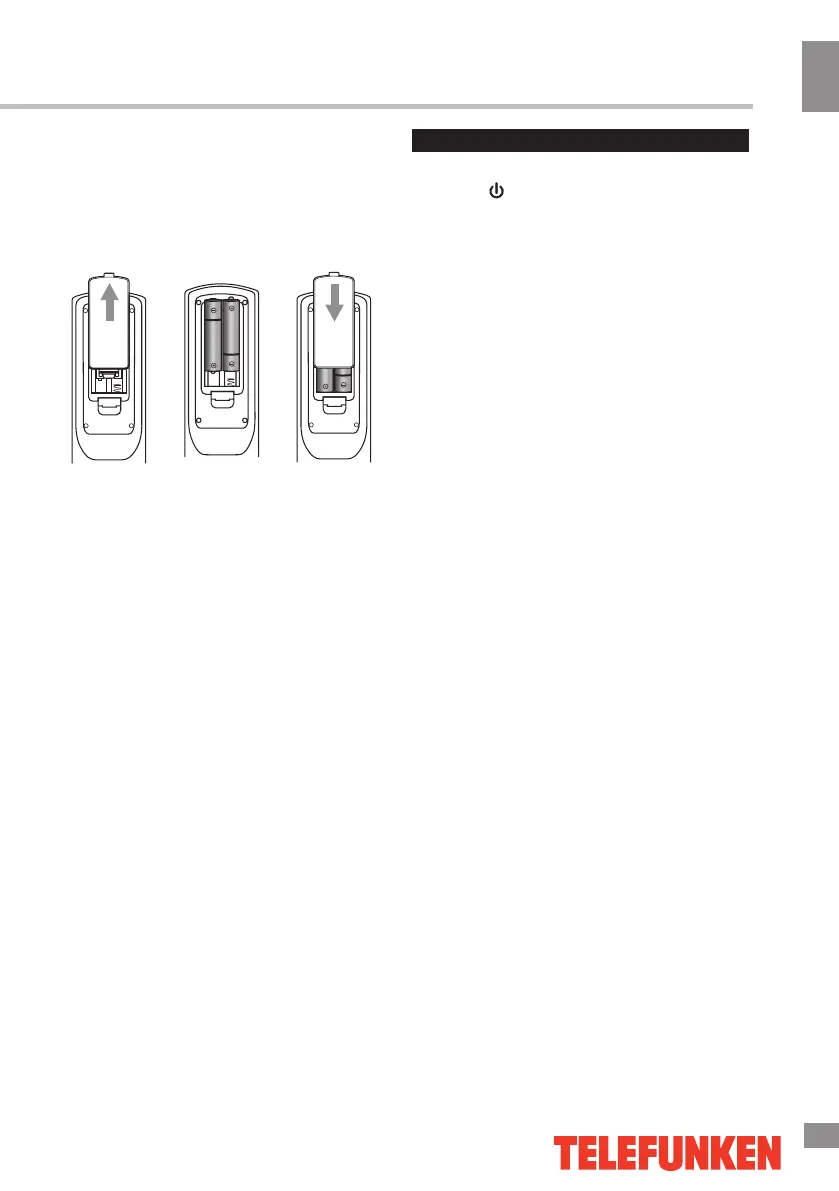
Changing the battery
1. Remove the battery compartment cover
on the back of the RC.
2. Insert the batteries into the battery
compartment making sure that the correct
polarity is observed.
3. Install the cover back.
1 2 3




 To Next Page