5
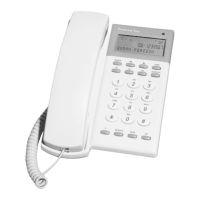
1. Handset hook Take out and rotate 180° to get a hook if you wall
mount the phone.
2. Hook knob
3. LED Flashes for new calls.
4. LCD
5. RADERA Delete button, also used to confirm settings.
6. Scrollkeys Used to scroll memory and select value in settings.
7. NAMN To enter phone book. Hold this key down for 6s to
start adding a name to shown number (add to phone
book).
8. TELESVAR Direct access to Telia TeleSvar (mailbox).
9. M1, M2, M3 Memory keys.
10. INT Temporary dialling without prefix.
11. SEKR. Mic mute.
12. SENASTE At off hook condition it is last number redial
At on hook will the last number be displayed and you
can scroll the 12 latest numbers using scroll keys.
13. R Flash.
14. HS Volume Receiving volume adjustment.
1. Hold the wall mount bracket to the wall and mark out the holes..
2. Drive 2 screws into the wall so that the wall mount bracket will fit the
screws.
3. Attach the bracket onto the phone and hook the whole unit to the
screws.
4. Rotate the handset hook 180° so that the handset will fit on the hook.
Overview
Wall mounting


 To Next Page