Telepass SAT
Quick Guide
Technology ETOLLK1TL
IT
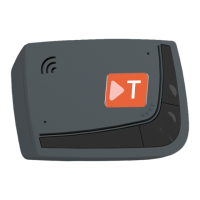
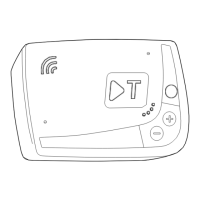
A: LED di stato (rosso/verde)
B: Pulsante funzioni/conferma
C: Pulsanti di regolazione (+/-)
D: LED di comunicazione (rosso/giallo/verde)
EN
A: Status LED (red/green)
B: Function button
C: Adjustment buttons (+/-)
D: Communication LED (red/yellow/green)
DE
A: Status-LED (rot/grün)
B: Funktionstaste
C: Einstelltasten (+/-)
D: Kommunikations-LED (rot/gelb/grün)
PL
A: Kontrolka LED sygnalizująca stan
(czerwona/zielona)
B: Przycisk funkcji
C: Przyciski regulacji (+/-)
D: Kontrolka LED komunikacji (czerwona/
żółta/zielona)
Telepass SpA - Via Laurentina, 449 - 00142 Roma - Italia - www.telepass.com K1-QG-1.1-A4-ItEnDePl-0123 © 2023 Telepass SpA
IT
IT
DE
DE
EN
EN
PL
PL
LED A
LED D
Dispositivo in
attesa o spento
Gerät im Stand-by
oder
Device in standby
or switched off
Urządzenie w trybie
oczekiwania
Anomalia
dispositivo
Anomalie am GerätDevice fault
Nieprawidłowość w
urządzeniu
Telepedaggio
non attivo
Elektronische
Mauterhebung nicht
E-toll payment is
not active
Elektroniczny pobór
opłat
Dispositivo attivo Gerät aktiv
Device switched
on
Urządzenie włączone
Eingabe bestätigt
Polecenie
potwierdzone
Comando
confermato
Command
conrmed
x1
Dispositivo in
disattivazione
Gerät wird deaktiviert
Device
deactivated
Urządzenie w trakcie
wyłączania
x3
Valore
confermato
Wert bestätigtValue accepted
Wartość
potwierdzona
Messaggio
vocale in lettura
Sprachansage wird
ausgegeben
Voice message
being read
Odczytywany
komunikat głosowy
Valore
riutato
Wert abgelehnt
Value
refused
Wartość
odrzucona
IMPOSTAZIONI / SETUP / EINSTELLUNGEN / USTAWIENIA
Consulta i manuali, e ricorda che non è possibile
utilizzare il dispositivo nché non viene eseguita
la procedura guidata di installazione sul Self Test
Tool https://self-test-tool.telepass.com/
Congurazione pedaggio / Tolling
conguration / Mautkonguration /
Konguracja opłat
Menù di congurazione della lingua
/ Language selection menu /
Sprachauswahlmenü / Menu wyboru
języka
Congurazione assi / Axles
conguration / Achsenkonguration /
Konguracja osi
Congurazione pesi / Weight
conguration / Gewichtskonguration /
Konguracja wagi
Congurazione K1 / K1 Conguration
K1-Konguration / Konguracja K1
Informazioni K1 / K1 Information / K1-
Informationen / Informacje o K1
Segnali acustici al transito / Sound signals
at transit / Akustische Signale beim
Durchfahren / Sygnały dźwiękowe przy
przejeździe
!
€
Dati del fabbricante / Manufacturer’s data /
Herstellerdaten / Dane producenta
Telepass SpA - Via Laurentina, 449 - 00142 Roma
(RM) - Italia - www.telepass.com
Esce dalle funzioni.
Exits the functions.
Verlassen der
Funktionseinstellungen.
Wyjście z funkcji.
B
x 30 s.
Torna alla funzione precedente.
Returns to the previous function.
Rückkehr zur vorherigen
Funktion.
Powrót do poprzedniej funkcji.
B
x 2
Scarica l’ App Telepass Truck, registrati e
utilizza il tuo dispositivo!
Download the Telepass Truck App, register and
use your device!
Telepass Truck App herunterladen, registrieren
und Gerät nutzen!
Pobierz aplikację Telepass Truck App, zarejestruj
się i korzystaj ze swojego urządzenia!
Modica congurazione assi
/ Modify axle conguration /
Achsenkonguration ändern / Zmiana
konguracji osi
Modica congurazione peso /
Modify weight conguration /
Gewichtskonguration ändern / Zmiana
konguracji wagi
B
B
B
B
+/-
B
+/-
+/-
+/-
+/-
+/-
+/-
x1
x2
x4/
Consult the manuals, and remember that you
cannot use the device until the installation wizard
is run on the Self Test Tool https://self-test-tool.
telepass.com/
Lesen Sie die Anleitungen und denken Sie daran,
dass Sie das Gerät erst verwenden können, wenn
Sie den Installationsassistenten im Self Test Tool
https://self-test-tool.telepass.com/ ausgeführt
haben.
Zapoznaj się z instrukcjami i pamiętaj, że nie
możesz korzystać z urządzenia, dopóki nie
przeprowadzisz procedury instalacji przy pomocy
kreatora na https://self-test-tool.telepass.com/


 To Next Page
 Loading...