EasyManua.ls Logo

Telstra BUZZ - Page 96

Telstra BUZZ
133 pages
Print Icon
To Next Page IconTo Next Page
To Previous Page IconTo Previous Page
Loading...
email,
or
the
details
of
a
calendar
event.
For
more
information,
see
Help
Center.
App
Notifications.
Modify
the
notification
settings
individu
ally
for
apps
such as
Gmail.
The
setting
under
When
device
is
locked
will
always
take
precedence
over
the
setting
for
an
individual
app.
Notification
access.
See
which
apps
can
access
your
notifications.
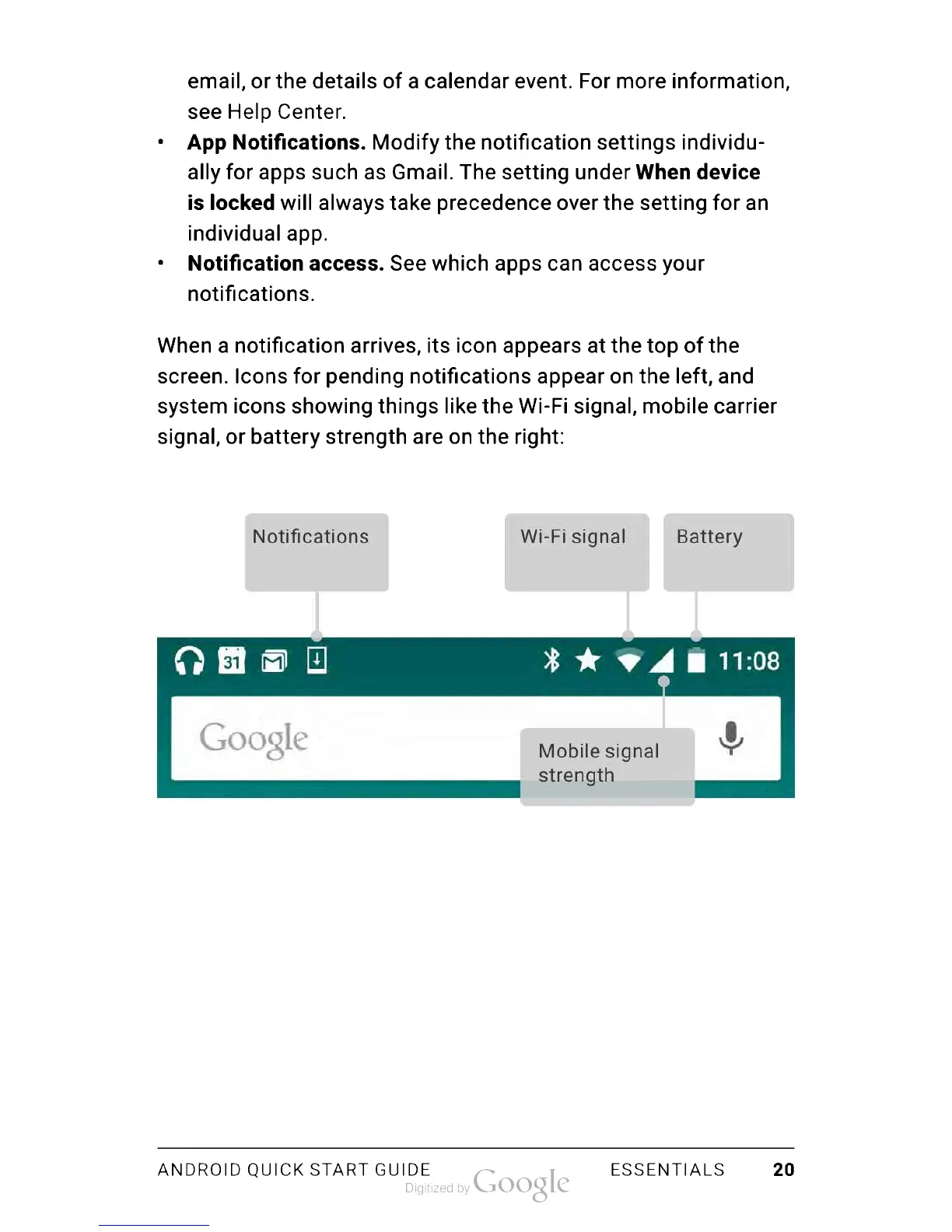
When
a
notification
arrives,
its
icon
appears
at
the
top
of
the
screen.
Icons
for
pending
notifications
appear
on
the
left,
and
system
icons
showing
things
like
the
Wi-Fi
signal,
mobile
carrier
signal,
or
battery
strength
are
on
the
right:
Notifications
Wi-Fi
signal
Battery
Mobile
signal
strength
ANDROID
QUICK
START
GUIDE
ESSENTIALS
20

Table of Contents

Related product manuals