17
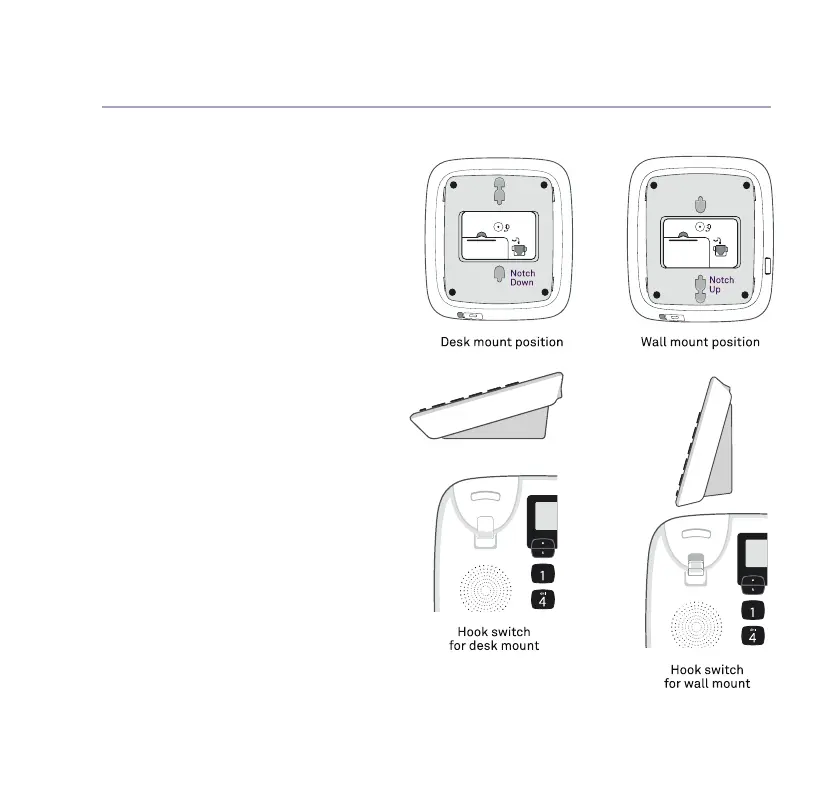
Wall mounting
Your phone will come ready to be
placed on a table, but converts
easily for wall mounting as follows:
1. Turn the phone so that base faces up
(notches point downward).
2. Remove the detachable base bracket.
3. Rotate base bracket 180 degrees,
so that wedge is now at the base of
phone. Place it back onto the phone
unit and click in place (notches point
upward).
4. Change hook switch position for hanging
up the handset. Use nger pad to push
down the base of hook switch to ip
it into reverse position (with hollows
facing up).
5. Hang handset onto phone unit so that
it clicks into the hook switch hollow to
hold it rm.
6. Keep the phone and power cables
tidy by running them through the
provided space.
If you need some help, call us on 13 2200 or go to https://go.telstra.com.au/helpandsupport/home-phone/



 To Next Page