
 Need help?
Do you have a question about the Teltonika RUT240 and is the answer not in the manual?
General safety advice and warnings before using the device.
Guidelines for device safety, handling, and electrical precautions.
Visual guide for connecting the router and initial setup steps.
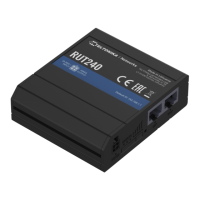
Introduction to the RUT240 router and its technical specifications.
Steps for router installation, hardware setup, and logging in.
Explanation of router operation modes and powering methods.
Router status overview and detailed system information.
Information on Mobile, WAN, LAN, and Wireless interface statuses.
Details on ARP tables and IP/IPv6 routing configurations.
Visualizations of mobile signal, CPU load, and network traffic.
Configuring the router's wireless functionality as AP or client.
Setup and management of VLAN and additional LAN networks.
Configuring general firewall, DMZ, and port forwarding rules.
Setting up traffic rules and custom firewall policies.
Protection against SYN flood, ICMP, and SSH attacks.
Configurations to prevent HTTP, HTTPS, and port scan attacks.
Setting up and managing static and dynamic routes.
Configuring VRRP protocol and monitoring internet connection.
Setting up rules to block specific websites and URL content.
Configuring the router's time synchronization with NTP servers.
Setup for OpenVPN, IPSec, GRE, PPTP, and L2TP VPN connections.
Setting up dynamic DNS hostnames for remote access.
Configuration for SMS/Call utilities and user groups.
Configuring SNMP for network monitoring and management.
Configuring SMS gateway, scheduled messages, and auto-replies.
Configuring hotspot access points, access restrictions, and logging.
Guide to accessing and utilizing the router's Command Line Interface.
Configuring automatic router reboots via Ping or schedule.
Managing and configuring router input/output states and parameters.
Setting up QoS for traffic shaping and prioritizing network traffic.
Using the setup wizard and configuring general administration settings.
Configuring system log levels and including diagnostic information.
Procedures for backing up and restoring router configuration files.
Configuring general access controls and safety measures.
Using network utilities for diagnosing connectivity issues.
Enabling and using the MAC address cloning feature.
Customizing which tables are displayed in the overview section.
Configuring remote monitoring and executing custom user scripts.
Procedures for updating router firmware and FOTA settings.
Methods for rebooting the router through its interface.
Using the reset button and bootloader WebUI for device recovery.
 General
| DSL WAN | No |
|---|---|
| Ethernet WAN | Yes |
| Wi-Fi band | Single-band (2.4 GHz) |
| Wi-Fi standards | 802.11b, 802.11g, Wi-Fi 4 (802.11n) |
| Top Wi-Fi standard | Wi-Fi 4 (802.11n) |
| WLAN data transfer rate (max) | 150 Mbit/s |
| Networking standards | IEEE 802.11b, IEEE 802.11g, IEEE 802.11n, IEEE 802.3, IEEE 802.3u |
| Ethernet LAN data rates | 10, 100 Mbit/s |
| Ethernet LAN interface type | Fast Ethernet |
| Ethernet LAN (RJ-45) ports | 2 |
| 4G standard | LTE |
| 2G standards | EDGE, GPRS, GSM |
| 3G standards | DC-HSPA+, UMTS |
| Data network | 2G, 3G, 4G, EDGE, GPRS, GSM, LTE, UMTS |
| GSM bands supported | 850, 900, 1800, 1900 MHz |
| EDGE multislot class | 12 |
| UMTS bands supported | 850, 900, 2100 MHz |
| Number of simultaneous SIM cards | 1 |
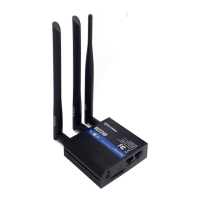
| Antennas quantity | 3 |
| Antenna connector type | RP-SMA |
| Security algorithms | 64-bit WEP, 128-bit WEP, WPA, WPA2 |
| Cables included | LAN (RJ-45) |
| Storage temperature (T-T) | -45 - 80 °C |
| Operating temperature (T-T) | -40 - 75 °C |
| Storage relative humidity (H-H) | 5 - 95 % |
| Operating relative humidity (H-H) | 10 - 90 % |
| Output voltage | 9 V |
| AC input voltage | 100 - 240 V |
| Power source type | AC |
| Device type | Cellular wireless network equipment |
| Product color | Black |
| LED indicators | WLAN |
| Processor frequency | 400 MHz |
| Product type | Tabletop router |
| Harmonized System (HS) code | 85176990 |
 Weight and Dimensions
| Depth | 74 mm |
|---|---|
| Width | 83 mm |
| Height | 25 mm |
| Weight | 125 g |
| Dimensions (WxDxH) | 83 x 74 x 25 mm |




 To Next Page


