2
User Manual
For tempmate.®-M1 Data Logger
01. Technical data
Temperature sensor NTC internal and external optional
Measuring range –30 °C to +70 °C
Accuracy ±0.5 °C (at –20 °C to + 40 °C)
Resolution 0.1 °C
Data storage 32,000 values
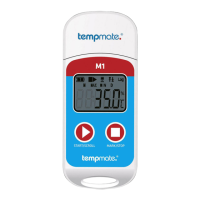
Display Multifunction LCD
Start setting
Manually by pressing a button or
automatically on programmed start time
Recording time
Freely programmable by customer/
up to 12 months
Interval 10 sec. - up to 24 hours
Alarm settings Adjustable up to 5 alarm limits
Alarm type Single alarm or cumulative
Battery CR2032 / replaceable by customer
Dimensions 79 mm x 33 mm x 14 mm (L x W x D)
Weight 25 g
Protection class IP67
System Requirements PDF Reader
Certification 12830, calibration certificate, CE, RoHS
Software
TempBase Lite 1.0 software /
free download
Interface to PC Integrated USB port
Automatic PDF Reporting Yes
Technical Specifications
02. Device operation instruction
(1) Install tempbase.exe software, insert the tempmate.®-M1 logger to the computer via USB port, finish USB driver
installation directly.
(2)
Open tempbase.® data management software, after connection the logger with your computer, the data
information will be automatically uploaded. Then you can click the “Logger Setting” button to enter the parameter
configuration interface and configure the parameters according to specific application.
(3)
After finishing configuration, click the “Save“ button to save the parameter setting, then it will open a window
“Parameter Configuration completed”, click OK and close the interface.
03. Initial use
03.1
Configuration operation
Open tempbase.exe software, after connecting the tempmate.®-M1 logger with the computer, the data information
will be automatically uploaded. Then you can click the “LoggerSetting” button to enter parameter configuration
interface and configure the parameters according to the specific application. After finishing the configuration, click the
“Save” button to save the parameter setting, then it will open a window “Parameter Configuration completed”, click
OK and close the interface.
03.2 Logger start operation
The tempmate.®-M1 supports three start modes (manual start, start right now, timing start), the specific start mode
is defined by the parameter setting.
Manual start: Press the left key for 4 seconds to start the logger.
Start right now: Immediately start after the tempmate.®-M1 is disconnected with the computer.
Timing start: tempmate.®-M1 starts when the set start time is reached
(Note: The set start time needs to be at least one minute).


 To Next Page