G5 Pro User Manual
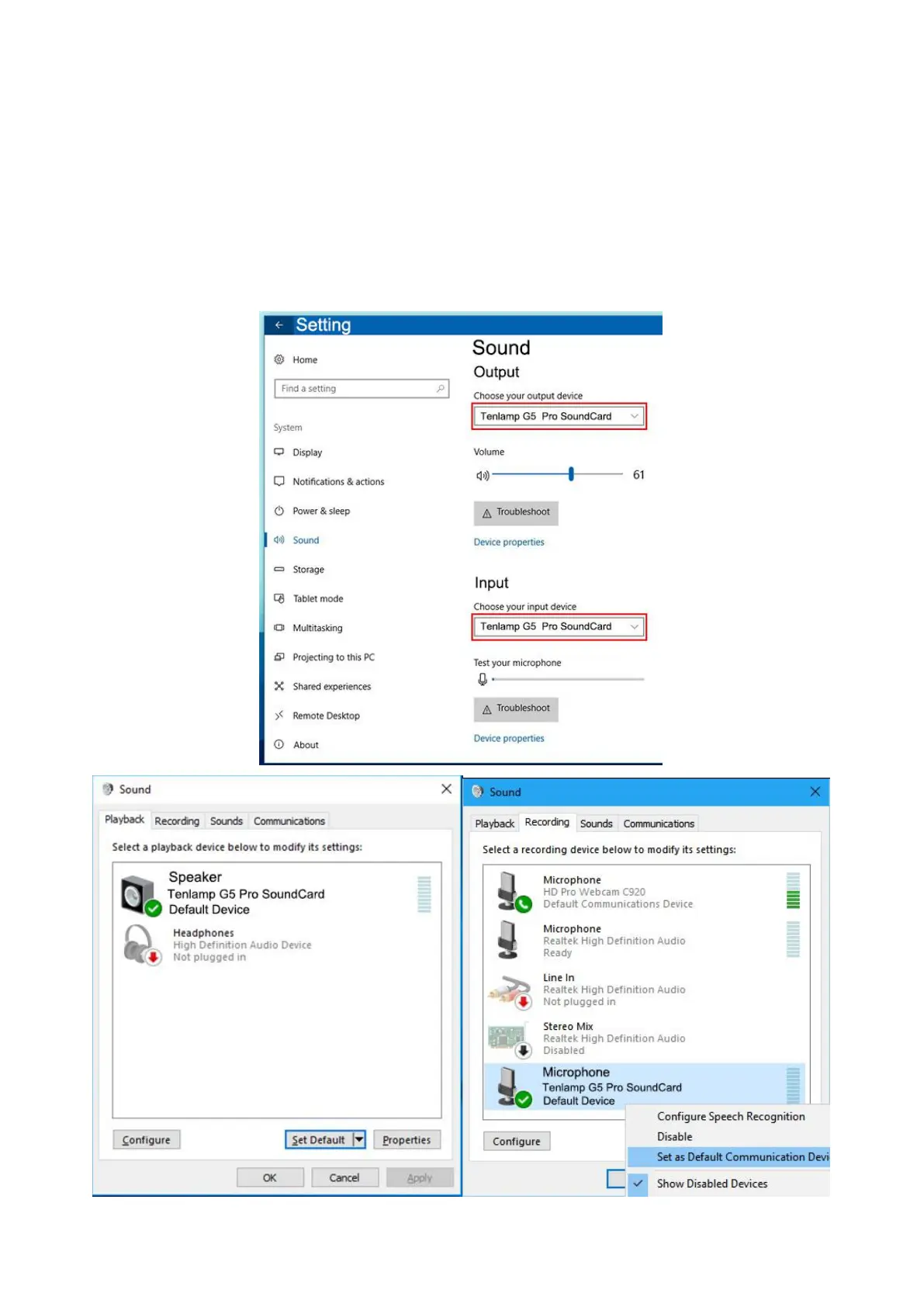
After connected, find the small speaker in the lower right corner of the computer screen, right-click---select the Open
Sound Setting, if not, you can select playback device and the recording device. Then set both the input and output (or
speaker on the playback page and the microphone on the recording page) to: "Tenlamp G5 Pro SoundCard" or
"MV-AP82X". After setting, click Apply to confirm.
The software used by the computer also needs to be set, such as accompaniment software and live stream software. In
the software-"Settings", set the audio input and output of "sound card", "audio output", "microphone", etc. to: "Tenlamp G5
Pro SoundCard" or "MV-AP82X", click Apply and confirm.
Warm Tip:Above
.....
setting
.......
is
..
for
...
USB
...
digital
.......
connection
..........
when
....
live
....
streaming
.........
or
..
playing
.......
musi
....
on
..
PC
..
.


 To Next Page