STX-1 Series Instrument www.tensitron.com pg. 8
5. BASIC OPERATION
• Charging Instrument Batteries
1. Use only a Tensitron power supply to avoid damage to instrument.
2. Connect power supply to the instrument. Plug the power supply into a
power source with input voltages between 100 – 240 VAC.
3. A full charge of the battery assembly requires several hours of
charging.
4. Battery pack assembly cannot be overcharged.
5. Instrument will remain on while connected to its power supply.
6. Battery charge level is indicated in upper, right-hand corner of display.
• Quick Start Instructions
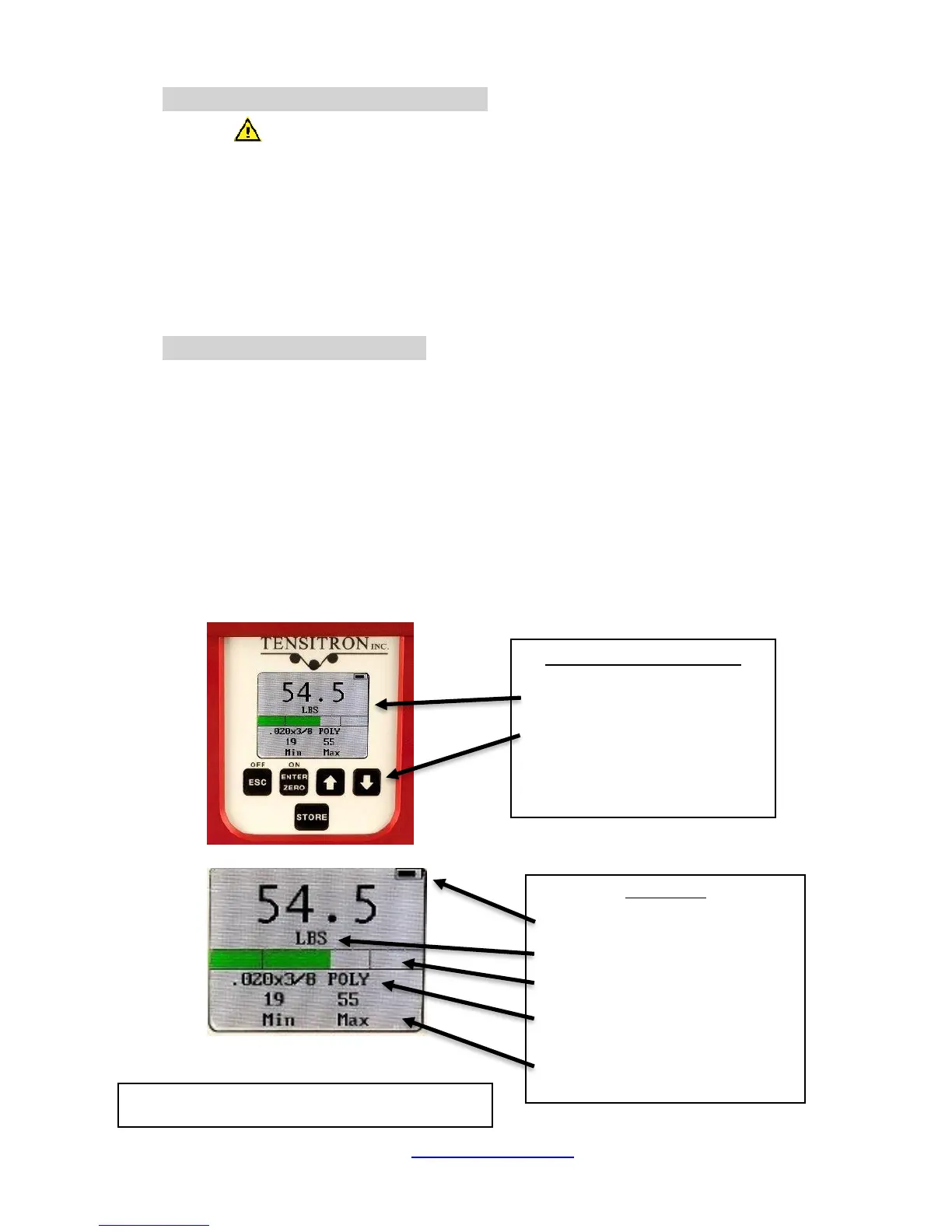
1. Power unit on by pressing ON button. Main display will indicate:
Tension, Material, Min and Max readings and other information. (See
Figure 3.)
2. Select a screen:
a. Move between screens by using the up (↑) and down (↓)
buttons.
b. Make or enter a selection by pressing the Enter/Zero button.
c. Exit a setting by pressing the Escape (ESC) button.
Main Display
Battery Charge Level
Selectable Units in Kg, daN, Lbs.
Set Point Display
Select Strap Size – Instrument
automatically adjusts calibration
Store and Display Max and Min Tension
Readings.


 To Next Page
 Loading...