3-103-10
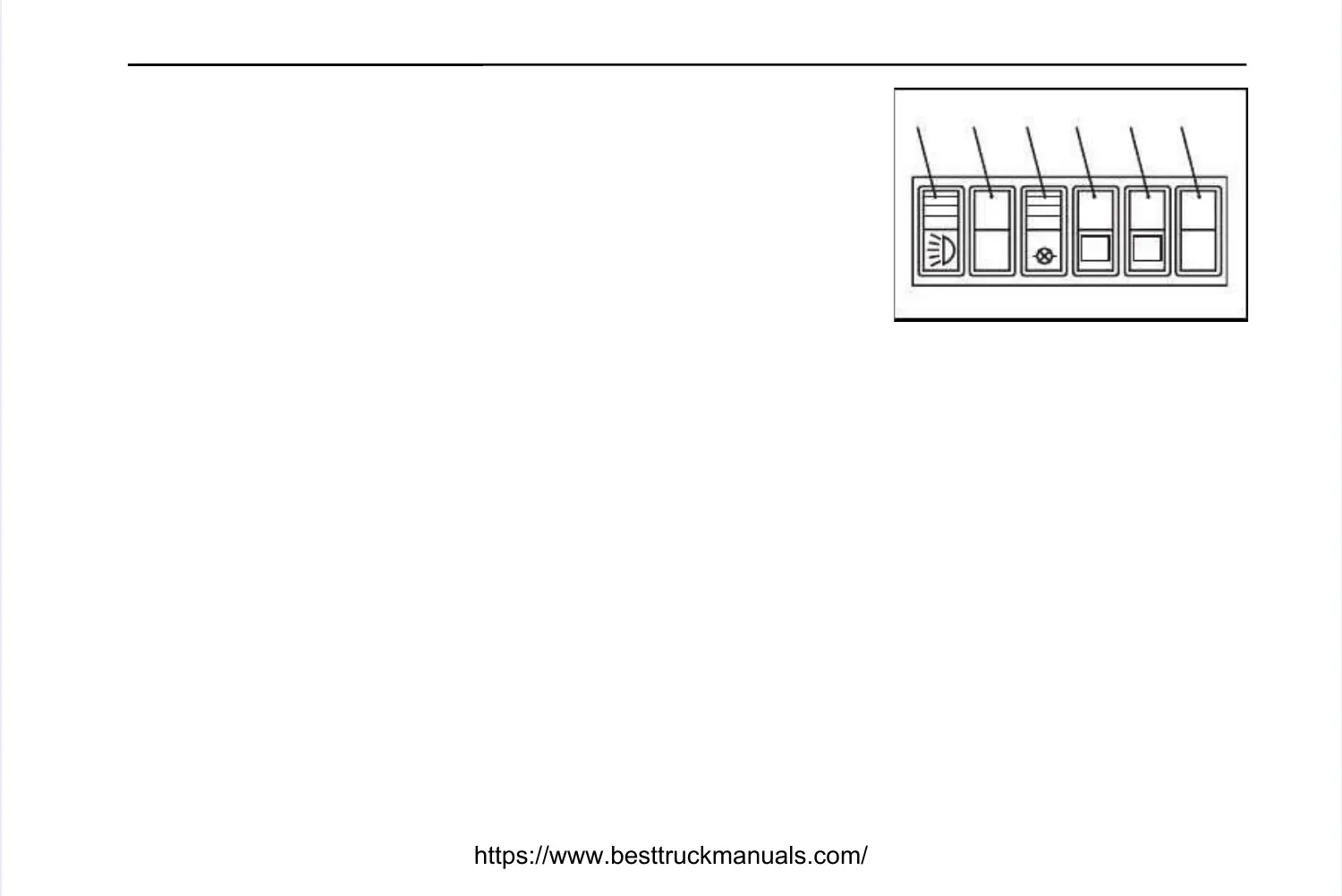
7. Sidelight and Headlight -7. Sidelight and Headlight -
Press bottom of switch to the first position to operatePress bottom of switch to the first position to operate
side, tail and panel lights. The lights in the other switches will illuminate. Pressside, tail and panel lights. The lights in the other switches will illuminate. Press
switch to the second position to operate the headlights. To switch lights off; pressswitch to the second position to operate the headlights. To switch lights off; press
the top of the switch.the top of the switch.
8. Position not used.8. Position not used.
9. Warning Light Test Switch -9. Warning Light Test Switch -
Pressing the switch with the ignition switched onPressing the switch with the ignition switched on
will illuminate warning lights 1, 2, 3, 4, 5, 9, 10, 11, 17, 18, 20, 22 and 23 and thewill illuminate warning lights 1, 2, 3, 4, 5, 9, 10, 11, 17, 18, 20, 22 and 23 and the
buzzer will sound, to provide a bulb and system check. Refer to 'Warning Lights'buzzer will sound, to provide a bulb and system check. Refer to 'Warning Lights'
section on pages 4, 5 and 6 for details. The light in the switch will illuminate withsection on pages 4, 5 and 6 for details. The light in the switch will illuminate with
the panel lights.the panel lights.
10. Diagnostic Request Switch -10. Diagnostic Request Switch -
To check for active fault codes:To check for active fault codes:
a. - turn the ignition key switch to the 'OFF' ('0') position.a. - turn the ignition key switch to the 'OFF' ('0') position.
b. - press the diagnostic switch to the 'ON' position.b. - press the diagnostic switch to the 'ON' position.
c. - turn the ignition key switch to position '1'.c. - turn the ignition key switch to position '1'.
If no active codes are recorded the 'Stop', 'Warning' and 'Fluid' lights will illuminateIf no active codes are recorded the 'Stop', 'Warning' and 'Fluid' lights will illuminate
and stay on. If active codes are recorded the 'Stop', 'Warning' and 'Fluid' lights willand stay on. If active codes are recorded the 'Stop', 'Warning' and 'Fluid' lights will
illuminate momentarily. The yellow 'Warning' and red 'Stop' lights illuminate momentarily. The yellow 'Warning' and red 'Stop' lights will begin to flashwill begin to flash
the code of the recorded fault. Refer to pages 25 & 26 for details of the fault codes.the code of the recorded fault. Refer to pages 25 & 26 for details of the fault codes.
Note:Note:If switch is pressed 'ON' during normal operation, the 'Stop' light willIf switch is pressed 'ON' during normal operation, the 'Stop' light will
illuminate, however, this does not indicate an engine malfunction illuminate, however, this does not indicate an engine malfunction and the light will goand the light will go
out when the switch is pressed out when the switch is pressed 'OFF'.'OFF'.
11. Diagnostic Search Switch -11. Diagnostic Search Switch -When the engine is in diagnostic mode this switchWhen the engine is in diagnostic mode this switch
is used to search through a list of fault codes, ie. pressing the top of the switchis used to search through a list of fault codes, ie. pressing the top of the switch
momentarily will advance to the next active fault code, pressing the bottom momentarily will advance to the next active fault code, pressing the bottom of theof the
switch will go back to the previous code.switch will go back to the previous code.
On machines which have a Low Idle Adjustment feature, this switch can On machines which have a Low Idle Adjustment feature, this switch can also bealso be
used to increase or decrease (in increments of 25 RPM) the idle used to increase or decrease (in increments of 25 RPM) the idle or intermediateor intermediate
speed of the engine.speed of the engine.
12. Position not used.12. Position not used.
14781478
Right Right Hand Hand PanelPanel
TEST
TEST
77 88 99 1100 1111 1122


 To Next Page
 Loading...