15
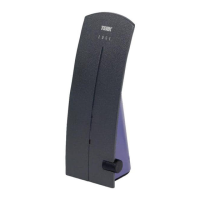
POWER indicator illuminates when the Trinity Xtend is
plugged in.
LINK indicator illuminates when the Xtend is linked to
your home network.
ACTIVITY indicator flashes to show that there is WiFi
activity.
RESET button returns the Xtend to its factory default
settings, clearing all of your network information.
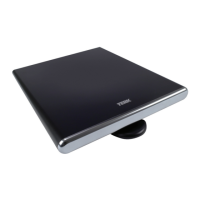
Reception elements pick up local television broadcast
and WiFi signals.
Mounting keyholes let you mount the Xtend to a wall
using the supplied mounting hardware.
SSID and password label gives you the information
necessary to set up the Xtend with your WiFi network.
This label also has QR codes for quick access to the
XTEND App for Android or iOS devices.
Top
Bottom
Mounting
keyhole
SSID / password
label
Reception element
TOUR OF THE TRINITY XTEND
Using browser-based setup
The Terk Xtend WiFi Extender can also be set up via web browser on your computer.
1. In your computer’s WiFi connection menu, choose the Wi-Fi Name (SSID) from the bottom
sticker of the Terk Xtend. The password is also on the bottom sticker.
Give your computer a full minute to connect to this new network. You’ll see limited
connectivity.
2. Launch your web browser and enter the following URL:
http://192.168.168.1
If prompted for a user name and password, use admin for the user name and admin for the
password.
3. Follow the directions in the browser-based setup to configure the Xtend with your network.
4. When you’ve finished browser-based setup, wait for the Xtend to restart (about a minute or
so—the LINK light will turn solid blue), then connect the streaming devices you want to use
with the Xtend to the Xtend’s network.
AND ROID
Wi-Fi Name (SSID): XTN-000000
Web browser link: http://192.168.168.1/
User Name: admin Password: admin
Wi-Fi Password: 12345678
SN: GMA1B2T31E0001





 To Next Page
