16
User manual MEG, DRY, MOA, REG 2, REG 3
DRY
Funcons
Heater DRY has 1 xed temperature set- ng
(default temperature of 48° C) and an ad-
vanced range of automac switch o func-
ons aer 1-5 hours. This makes the prod-
uct convenient and user-friendly — perfect
for drying clothing and towels. The default
heang temperature for the towel rail can
be set to any of the following values: 43, 48,
52, 55 or 60° C. A built-in temperature sen-
sor protects the towel rail from freezing in
situaons where the temperature falls be-
low 5-7° C. The LED diode next to the on/o
buon will ash recurrently, indicang that
the an-freeze protecon is acve.
Heater use
The heater is turned on by pressing the on/o
buon. The LED diode at the on/o buon
lights up when the heater is on and the regu-
lator maintains the set heang temperature.
Aenon: the heater control panel turns the
device on only when radiator temperature
is lower than the set temperature (default
temperature of 48° C). On reaching the re-
quired temperature, the heater will turn on
recurrently to maintain the set temperature
only. This funcon allows much lower en-
ergy consumpon than calculaons based
on the heaters nominal heat output might
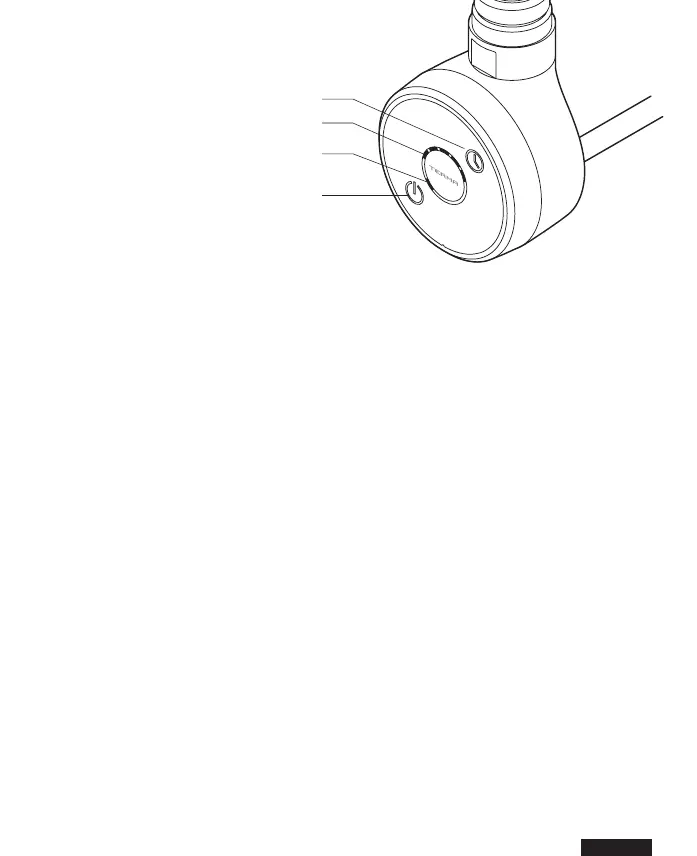
indicate. In the upper le part of the con-
trol panel, there is a (TIMER) buon which
can be used to set the automatic switch
o me of the device. Every subsequent
pressing of the buons will light up diodes
on the heang me indicator and allow the
user to preset the “switch o” me of the
device to between 1 and 5 hours from the
current me.
After this time, the heater will turn off
automacally.
TIMER buon
TIMER indicaon
Indicaon of heater current
working state
On / o buon


 To Next Page