MIDI Master PRO Keyboard
19
Rear Panel:
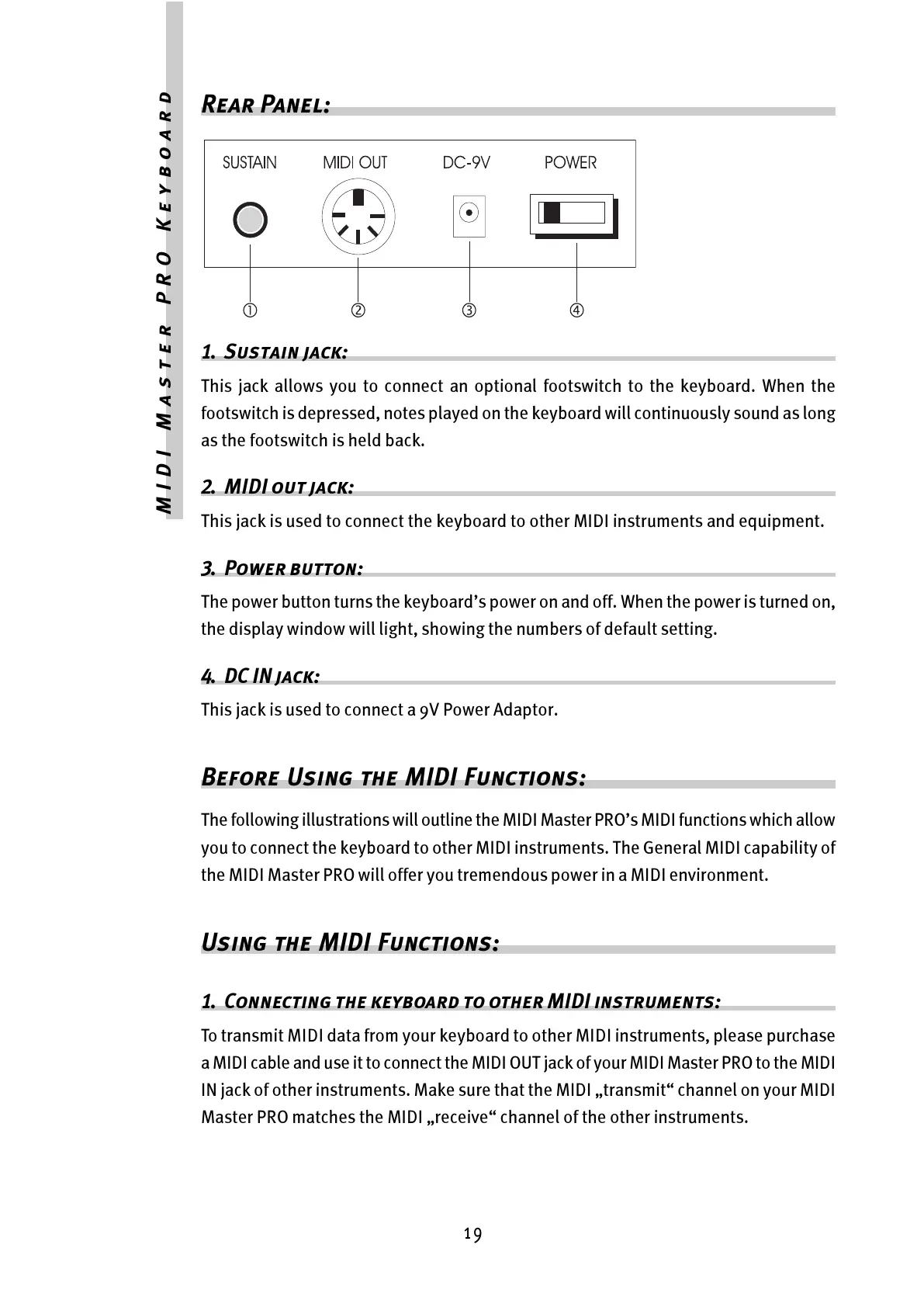
1. Sustain jack:
This jack allows you to connect an optional footswitch to the keyboard. When the
footswitch is depressed, notes played on the keyboard will continuously sound as long
as the footswitch is held back.
2. MIDI out jack:
This jack is used to connect the keyboard to other MIDI instruments and equipment.
3. Power button:
The power button turns the keyboards power on and off. When the power is turned on,
the display window will light, showing the numbers of default setting.
4. DC IN jack:
This jack is used to connect a 9V Power Adaptor.
Before Using the MIDI Functions:
The following illustrations will outline the MIDI Master PROs MIDI functions which allow
you to connect the keyboard to other MIDI instruments. The General MIDI capability of
the MIDI Master PRO will offer you tremendous power in a MIDI environment.
Using the MIDI Functions:
1. Connecting the keyboard to other MIDI instruments:
To transmit MIDI data from your keyboard to other MIDI instruments, please purchase
a MIDI cable and use it to connect the MIDI OUT jack of your MIDI Master PRO to the MIDI
IN jack of other instruments. Make sure that the MIDI transmit channel on your MIDI
Master PRO matches the MIDI receive channel of the other instruments.



 To Next Page