Need help?
Do you have a question about the TerraTec SoundSystem Aureon 5.1 PCI and is the answer not in the manual?
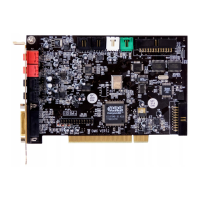
Identifies the physical connectors on the sound card from top to bottom.
Step-by-step instructions for physically installing the sound card into the PC.
Important safety instructions before opening the PC case and handling components.
Detailed steps for installing the sound card, including grounding and slot selection.
Explains the function of the JP1 port on the sound card.
Guides on connecting 6-channel, 4-channel, and 2/2.1-channel speaker systems.
Instructions for installing drivers and control panel software on Windows XP and Vista.
Defines the number of channels sent directly to the sound card.
Sets speaker configuration and updates the 3D speaker model.
Configures PCM output, sampling frequency, and S/PDIF loopback.
Simulates sound effects using different environment settings and equalization.
Adjusts volume based on room size for 5.1 speaker setups.
Adjusts audio signals across 10 frequency bands to emphasize bass or treble.
Displays application information and taskbar icon settings.
Configures speaker output and identifies audio jacks for Windows XP.
Manages PCM, S/PDIF settings, sampling frequency, and individual speaker volumes.
Controls master volume, individual inputs, and performs speaker self-tests.
Configures recording sources/gain and applies environment sound effects.
Adjusts room size simulation and audio frequencies using the equalizer.
Displays driver version and allows configuration of the taskbar icon.
Explains the classic XP control panel features, including master volume control.
Manages input signal levels, balance, and microphone boost function.
Configures signal sources and volume for recording audio.
Configures speaker output, digital output, acceleration, and virtual surround effects.
Manages digital I/O, loopback, monitoring, validity checks, and copy protection.
Accesses presets, color settings, taskbar icon, language, and version information.
Information on accessing the FAQ via the Autostarter and CD.
Information on contacting TerraTec hotline, BBS, and internet presence.
 General
| Brand | TerraTec |
|---|---|
| Model | SoundSystem Aureon 5.1 PCI |
| Category | Sound Card |
| Language | English |

 To Next Page