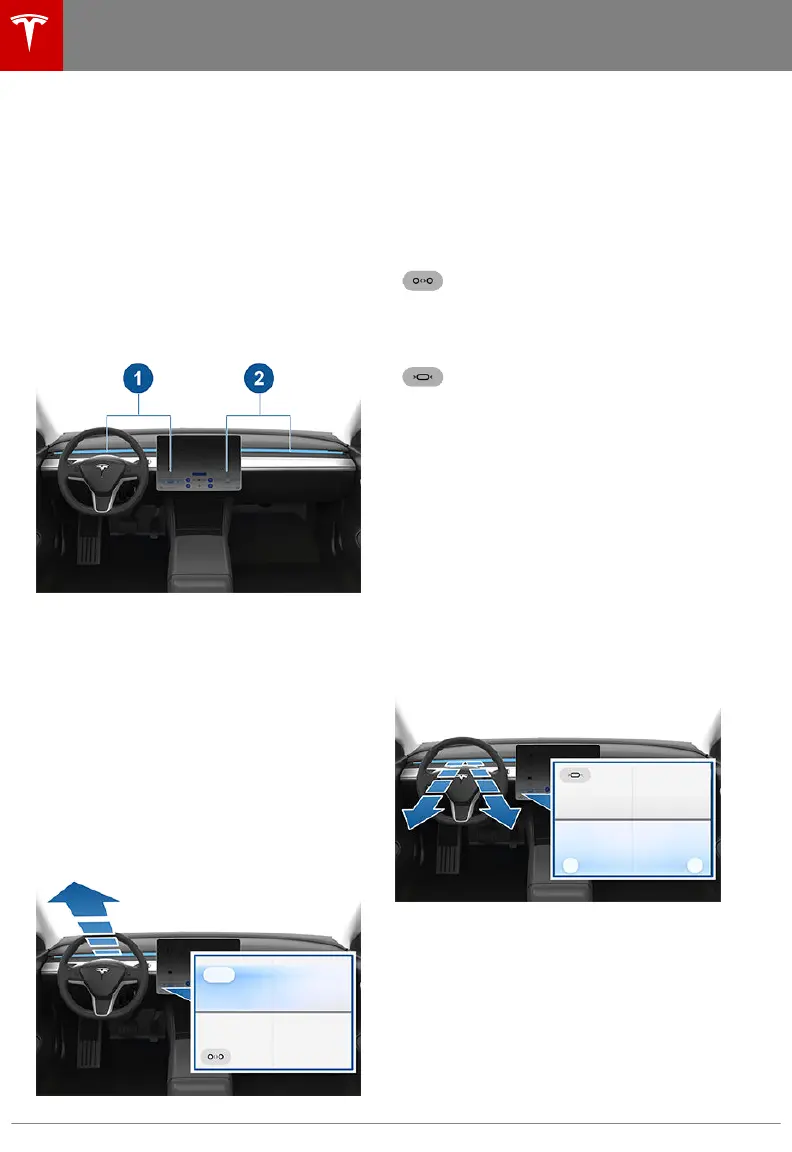
Operating the Face-Level Vent
Model 3 has a unique horizontal face-level
vent that spans the width of the dashboard.
Using the touchscreen, you can pinpoint
exactly where you want to direct the air
flowing from this vent when heating or cooling
the cabin area.
When the face-level vent is turned on (see
Customizing Climate Control on page 85), you
can control the driver and passenger side
separately using the corresponding grids that
appear on each side of the climate control
settings window.
1. Driver vent and control grid
2. Passenger vent and control grid
Simply drag the oblong or circle(s) on the
control grid to direct air flow from the
corresponding vent to wherever you want it.
You can also touch a location on the grid to
move the oblong or circle(s) to that location.
Note: The line across the center of the grid
represents the center of the headrest on the
corresponding front seat.
This example illustrates how moving the single
oblong in the driver's side control grid to the
top left directs all air from the driver's vent
upwards and to the left of the driver.
You can toggle between having the air
flow
from the vent in a single direction
(represented on the control grid by an oblong
shape) or in two mirrored directions
(represented on the control grid by two
circles). To do so, touch the combine/split
icon. The icon changes based on whether air
flow is combined or split.
When air flow from the vent is
combined, touching the split icon
causes the air to flow in two
directions. The control grid will then
display two circles.
When air flow from the vent is split,
touching the combine icon causes
the air to flow in a single direction.
The control grid will then display a
single oblong.
When splitting the vent, the two circles on the
control grid move in unison—when you move
one of the circles, the other circle mirrors it.
For example, when you move a circle to direct
air inward (towards your face) or outward
(away from your face), the other circle moves
accordingly.
This example illustrates how moving the two
circles in the driver's side control grid to the
bottom outward corners directs the air in two
directions, downward and outward (on either
side of the headrest).
Note: When you split a vent into two separate
air
flows, the air flow in each direction is not as
strong as when all air is flowing in a single
direction.
Note: Outside air is drawn into Model 3
through the grill in front of the windshield.
Keep the grill clear of obstructions, such as
leaves and snow.
Climate Controls
86 Model 3 Owner's Manual



 To Next Page