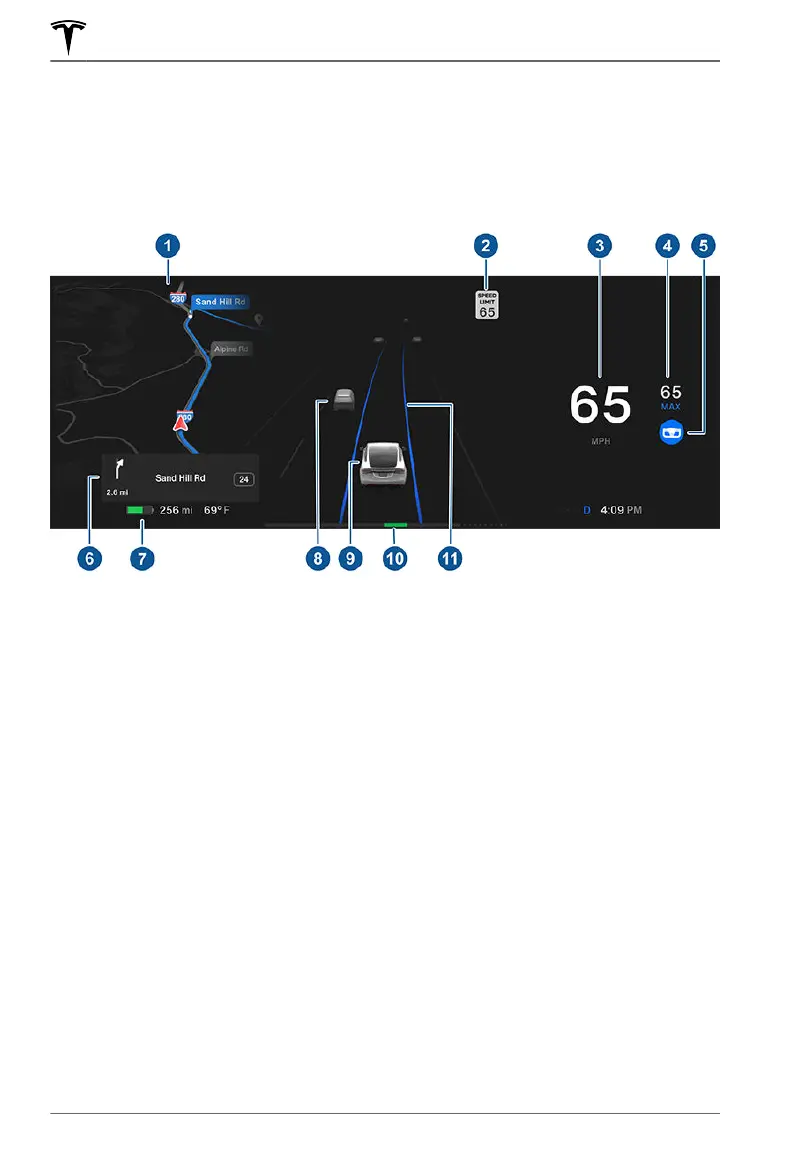
Instrument Panel - Driving
When Model X is driving (or ready to drive), the instrument panel shows your current driving
status and a real-time visualization of the road as detected by the Autopilot components (see
About Autopilot on page 103). The visualization automatically zooms in and out based on the
detected road type.
NOTE: Touch Controls > Autopilot > Full Self-Driving Visualization Preview (if equipped) to
display more details about the roadway and its surroundings, such as road markings, stop lights,
objects (such as trash cans and poles), etc.
1. The instrument panel displays your location on a map, a wiper menu, Auto Shift out of Park
instructions, etc. When a navigation route is active, the upcoming portion of the route
displays.
2. The speed limit (if available) that is currently being detected by Speed Assist (see Speed
Assist on page 146).
3. Current driving speed.
4.
The currently set cruising speed. When Trac-Aware Cruise Control is available but you
haven't set a cruising speed by engaging
Trac-Aware Cruise Control or Autosteer, the icon
is gray (see Trac-Aware Cruise Control on page 106).
5. Autosteer is actively steering Model X. When Autosteer is available but you haven't
activated it, the icon is gray (see Autosteer on page 112).
6.
When navigating, upcoming instructions in the navigation route appear here.
7. Total estimated driving distance (or energy) available. Instead of driving distance, you can
display the percentage of battery energy remaining (touch Controls > Display > Energy
Display).
NOTE: When anticipating when you need to charge, use estimates as a general guideline
only.
8. Surrounding road users are shown in their corresponding locations.
Instrument Panel
72 MODEL X Owner's Manual















 To Next Page