◦ Single-click to stop movement of the associated
falcon wing door. Subsequently double-clicking
reverses movement of the falcon wing door. For
example if the door was opening, it closes, and
vice versa.
NOTE: Falcon wing doors are designed to
proactively detect obstacles that prevent the
doors from moving when an obstacle is detected.
WARNING: Model X falcon wing doors have
several sensors to detect the presence of an
object in the door's path. In most cases,
when an object is detected, the door stops
moving. However, the sensors are unable to
detect all areas under all circumstances,
particularly when closing, Therefore, you
must monitor the movement of falcon wing
doors to ensure the door's path of
movement is free of obstacles, staying
prepared at all times to proactively
intervene to stop the door from contacting
an object (including a person). Failure to do
so can cause serious damage or bodily
injury.
You do not need to point the key at Model X, but you
must be within operating range (which varies
depending on the strength of the key’s battery).
If Model X is unable to detect the key, the touchscreen
displays a message indicating that a key is not inside.
Place the key where
Model X can best detect it, which is
below the 12V power socket (see Key Not Inside on
page 52).
Radio equipment on a similar frequency can aect the
key. If this happens, move the key at least one foot
(30 cm) away from other electronic devices (phone,
laptop, etc). If the key does not work, you may need to
change its battery. If the key’s battery is discharged,
you can open
Model X by following the unlocking
procedure (see Unlocking When the Key Doesn't Work
on page 13).
CAUTION:
Remember to bring the key with you
when you drive. Although you can drive Model X
away from its key, you will be unable to power it
back on after it powers o.
CAUTION:
Protect the key from impact, high
temperatures, and damage from liquids. Avoid
contact with solvents, waxes and abrasive
cleaners.
Replacing the Key Battery
The key’s battery lasts for approximately a year with
normal use. When the battery is low, a message
displays on the instrument panel. Follow these steps to
replace it:
NOTE: Tesla recommends replacing the battery in all
keys at the same time.
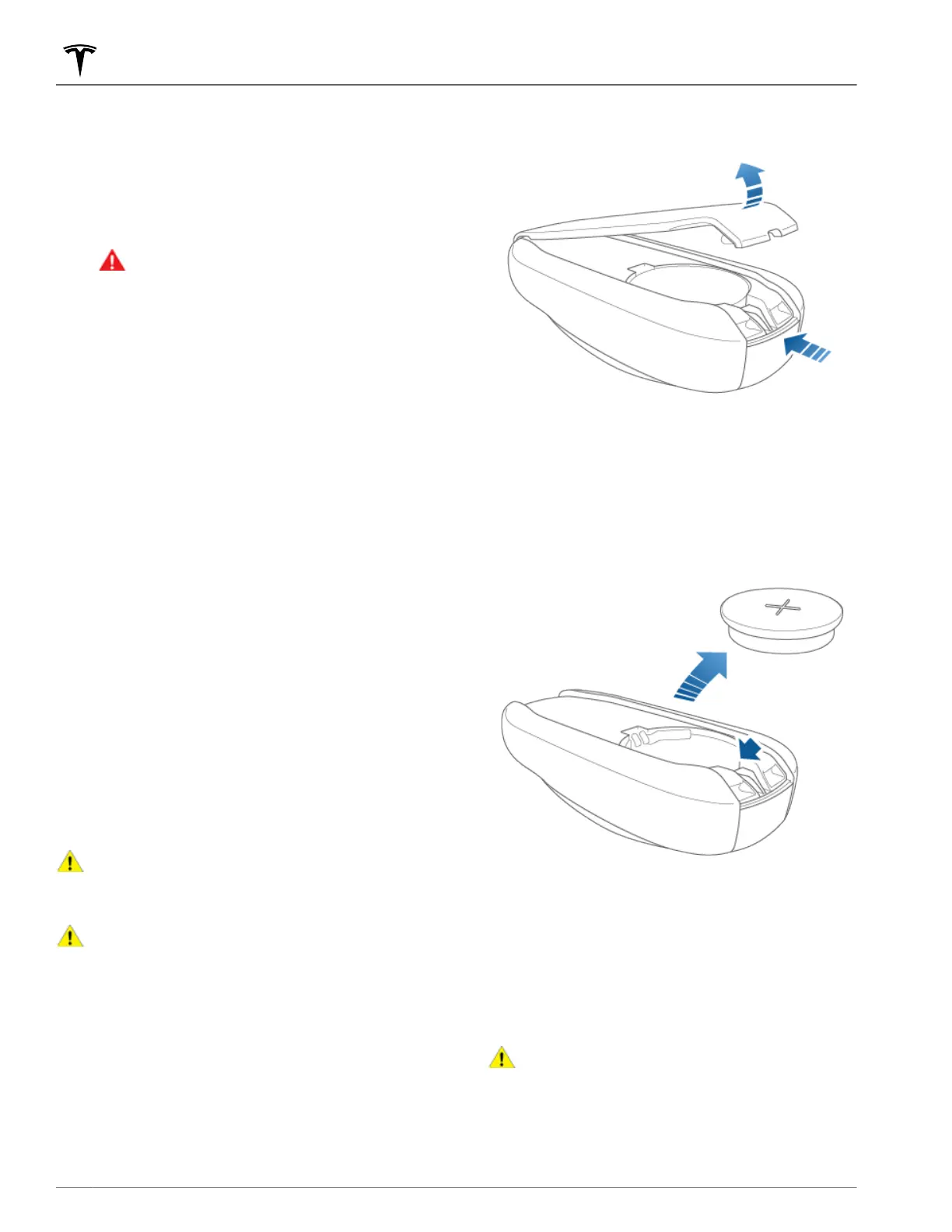
1. With the key placed button-side down on a soft
surface, use a small
flat-bladed tool or fingernail to
release the bottom cover.
NOTE: If a lanyard is attached to the key, you can
release the bottom cover by placing your thumb
against the "X" on the bottom cover, then
firmly
pulling the lanyard toward you (hence pushing the
key
o of its cover). You can also pry the cover o
by placing a small flat-bladed tool, a fingernail, or
the Tesla-provided tool against the lanyard cord.
2.
Remove the battery by carefully releasing it from the
retaining clips at an angle.
3.
Insert the new battery (type CR2354) with the ‘+’
side facing up. The battery fits snugly so you must
slide it into position at an angle toward the Positive
contact (the contact located near the center of the
key), then press down firmly on the other side,
ensuring it is held firmly in its intended position.
NOTE: Tesla recommends using Panasonic CR2354
batteries. These can be purchased through online
retailers, local supermarkets, and drug stores.
CAUTION:
The battery should press against
the spring on the positive contact. Do not
place the battery on top of the contact and
force it down vertically. Doing so may damage
the contact.
Keys and Doors
8 MODEL X Owner's Manual















 To Next Page