Trailer Mode is active.
Model X detects a connection for trailer
lights but Trailer Mode is disabled. It is
likely that a carrying accessory has been
connected.
Model X detects a faulty electrical
connection for the trailer lights. Some, or
all, trailer lights may not be functioning.
Pull over as soon as safety permits and
inspect the trailer lights for faulty cabling
or connections. If the issues are resolved
and the red icon still persists, turn Trailer
Mode
o and on again.
NOTE: In situations where Model X detects a heavy
load, it assumes that a trailer is connected and
automatically engages Trailer Mode. A message
displays on the instrument panel informing you that
Trailer Mode has been engaged. When Trailer Mode is
entered automatically due to detection of a heavy load,
you can change the Trailer Mode setting only by
stopping Model X, engaging Park or Neutral, then
manually applying the parking brake using the
touchscreen (Controls > Safety & Security > Parking
Brake).
Some Autopilot features (Autosteer, Summon, Lane
Assist, etc.), as well as rear parking sensor functionality,
may not be available when Trailer Mode is enabled. In
addition, some features may operate
dierently. For
example:
•
Trac-Aware Cruise Control increases the following
distance from the car in front of you.
•
The air suspension system will not make speed-
based adjustments from STANDARD to LOW.
•
The air suspension system does not automatically
raise ride height based on saved locations.
•
Side collision warnings are active but automatic
steering interventions are disabled.
•
The braking force provided by Automatic
Emergency Braking (see
Collision Avoidance Assist
on page 127) is significantly limited.
WARNING:
Do not rely on Model X to detect the
trailer and automatically engage Trailer Mode.
Always check that Trailer Mode is engaged before
towing a trailer.
WARNING:
Under no circumstances should you
exit Trailer Mode when towing a trailer. Doing so
can cause serious injury and/or death.
WARNING:
Do not use the suspension setting to
appropriately match the height of the hitch with
the height of the trailer. You must choose a trailer
hitch and trailer that have the appropriate height
for suitable axle loading and trailer balance.
Trailer Brakes
When towing a loaded trailer that weighs more than
1000 lbs (450 kg), Tesla recommends that the trailer be
equipped with its own brake system adequate for the
weight of the trailer. Ensure compliance with local
regulations. A brake controller must be purchased
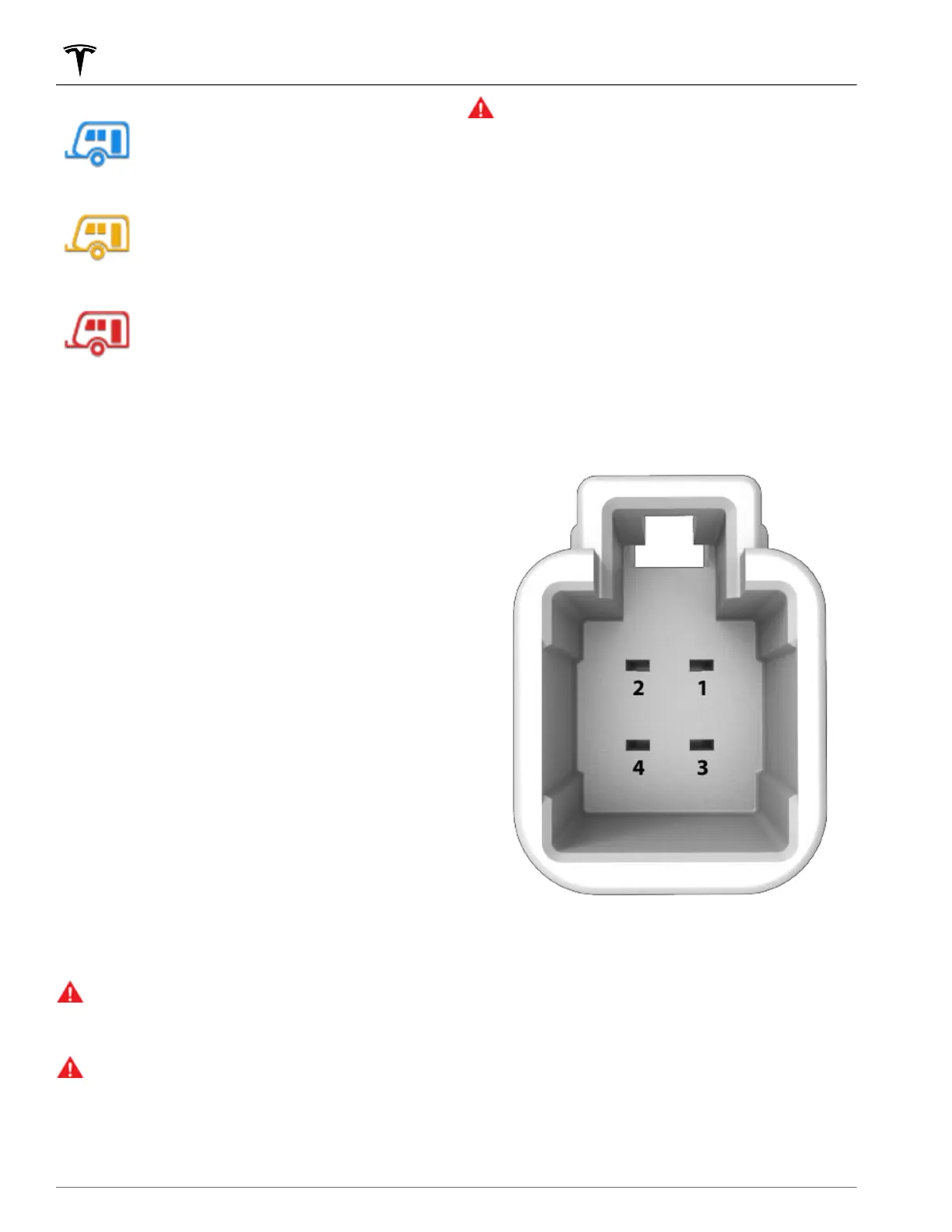
separately, and the required 4-pin pigtail connector can
be ordered from Tesla Service.
Follow these steps to connect a brake controller:
1.
Connect the wiring on the brake controller to the
appropriate locations on the 4-pin pigtail connector.
1 - Brake control output to trailer
2 - Ground
3 - Brake On Signal
4 - 12V Power (20A)
2. Remove the cover located under the dashboard in
the driver's side foot well.
Towing and Accessories
86 MODEL X Owner's Manual















 To Next Page