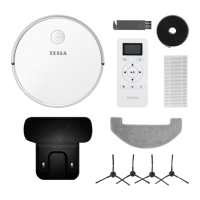
EasyManua.ls Logo

Tesla RoboStar iQ500 - User Manual

Tesla RoboStar iQ500
30 pages
Go to English
Print Icon
To Next Page IconTo Next Page
Loading...
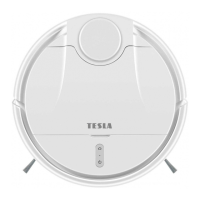
TESLA RoboStar iQ500
Vážený zákazníku,
děkujeme, že jste si vybral TESLA RoboStar iQ500.
Před použitím robotického vysavače si prosím důkladně pročtěte pravidla bezpečného používání a dodržujte všechna běžná
bezpečnostní pravidla.
Tento uživatelský návod si uschovejte.
Dodržujte pravidla uvedená v tomto návodu, pro snížení rizika poškození robotického vysavače nebo pro případ vašeho
zranění.
DŮLEŽITÉ BEZPEČNOSTNÍ UPOZORNĚNÍ
Tento přístroj je složité elektromechanické zařízení, věnujte prosím pozornost těmto pokynům:
Přístroj je určen pouze pro vnitřní použití při pokojové teplotě (max. 40°C).
Přístroj není určen pro používání venku ani v komerčním nebo průmyslovém prostředí.
Používejte robotický vysavač co nejčastěji pro maximální úklidový čisticí efekt.
Před použitím se ujistěte, že je zásobník na nečistoty a HEPA filtr správně nainstalován.
Používejte pouze originální příslušenství, které je určeno k tomuto modelu.
K nabíjení používejte pouze příslušenství dodávané výrobcem robotického vysavače. Použití neoriginálního příslušenství může vést k
poškození robotického vysavače, zásahu elektrickým proudem nebo i požáru.
Nedotýkejte se částí, které jsou připojeny do elektrické sítě, pokud máte mokré ruce.
Nenechávejte přístroj bez dozoru v přítomnosti dětí, nepoužívejte jej v místosti kde spí malé dítě.
Nedovolte používat robotický vysavač dětem a to ani za dohledu dospělé osoby.
Nesedejte si na robotický vysavač, ani na něj nepokládejte jiné předměty.

Questions and Answers

  • P
    palvarezAug 15, 2025
    Why is my Tesla RoboStar iQ500 not charging?
    • S
      Samantha TorresAug 15, 2025
      Your Tesla Vacuum Cleaner may not be charging because the charging station isn't properly connected to the mains. Ensure the power cord is securely plugged in. Another reason could be poor contact between the charging electrodes. Clean the electrodes on both the vacuum cleaner and the charging base to ensure a good connection.
  • S
    Sheri MooreAug 18, 2025
    What to do if my Tesla RoboStar iQ500 is offline?
    • S
      Sarah WatkinsAug 19, 2025
      First, make sure your WiFi network is properly set up and fully functional. Also, the Tesla Vacuum Cleaner should always be within range of a strong WiFi signal from your router. If the robotic vacuum cleaner battery is low, cleaning will not start. Please charge the battery to full capacity. Scheduled cleaning will not be properly synchronized between the robotic vacuum cleaner and your mobile phone if the robotic vacuum cleaner is disconnected from the WiFi network. Therefore, keep the robotic vacuum cleaner always within easy reach of a high-quality and strong WiFi signal from your WiFi router.
  • D
    Debra OrtizAug 22, 2025
    How to fix poor cleaning quality on Tesla RoboStar iQ500 Vacuum Cleaner?
    • V
      Victor BrownAug 22, 2025
      If your Tesla Vacuum Cleaner isn't cleaning well, start by emptying the dust tank. You should also clean or replace the HEPA filter and clean the center cleaning brush.
  • T
    Tammie RogersAug 26, 2025
    What to do if Tesla RoboStar iQ500 Vacuum Cleaner is very loud?
    • J
      Joshua HernandezAug 26, 2025
      If your Tesla Vacuum Cleaner is making a lot of noise, clean the main center brush, side brushes, wheels, front wheel, bottom of the robotic vacuum cleaner and front bumper.
  • T
    thompsonmeganAug 29, 2025
    Why won't my Tesla RoboStar iQ500 start cleaning?
    • M
      Mark DicksonAug 29, 2025
      Your Tesla Vacuum Cleaner might not start cleaning if the battery is weak. Charge it to full capacity before starting a cleaning cycle. Also, the battery may be too hot. Use the robotic vacuum cleaner at 0°C ~ 40°C.
  • J
    Jeremy WhiteSep 1, 2025
    What to do if Tesla Vacuum Cleaner makes a screeching sound?
    • C
      Catherine MooreSep 1, 2025
      If your Tesla Vacuum Cleaner is screeching, remove the front wheel and clean the centerline from hair and dust. If necessary, you can lubricate the wheel axis.
  • J
    josephbaileySep 4, 2025
    How to pair Tesla RoboStar iQ500 with the app?
    • H
      Heather LynchSep 4, 2025
      To pair your Tesla Vacuum Cleaner, ensure both the charging station and the vacuum are within reach of a strong WiFi signal. Press the two buttons on the top panel of the robotic vacuum cleaner for 3 seconds until the blue LED light starts flashing slowly. Then, start the TESLA application on your smartphone and follow the instructions.
  • M
    Matthew FletcherSep 7, 2025
    What to do if Tesla Vacuum Cleaner does not return to the charging base?
    • B
      Bruce AlexanderSep 7, 2025
      Ensure there is enough space around the charging station and that the charging station's detection zone is clean.
  • K
    kylietaylorSep 12, 2025
    What to do if my smartphone cannot detect Tesla RoboStar iQ500 Vacuum Cleaner?
    • A
      Angela PerezSep 12, 2025
      Reset the Tesla Vacuum Cleaner using the button under the top cover. Enable Bluetooth and GPS on your smartphone, and keep the vacuum cleaner close to your smartphone during pairing.

Summary

Important Safety Warnings

First Start

First Cleaning

Water Wiping

Routine Maintenance

Dust Tank - Clean After Every Cleaning

Instructions for cleaning the dust tank after each use.

HEPA Filter - Clean Once a Week

Guidance on cleaning the HEPA filter weekly.

Sensors - Clean Once a Week

How to clean cliff, wall following, and impact sensors weekly.

Main Central Cleaning Brush and Side Cleaning Brush - Clean Once a Week

Instructions for cleaning brushes and air intake weekly.

Front Wheel - Clean Once a Week

Procedure for cleaning the front wheel and its axis weekly.

Charging Contacts and Charging Base - Clean Once Every 14 Days

Cleaning schedule for charging contacts and base every 14 days.

Troubleshooting

Technical Support

Service and Spare Parts

Tesla RoboStar iQ500 Specifications

General IconGeneral
BrandTesla
ModelRoboStar iQ500
CategoryVacuum Cleaner
LanguageEnglish

Related product manuals