
 Need help?
Do you have a question about the Teslong NTE100 and is the answer not in the manual?
Portable, handheld USB otoscope camera with short focal length, compatible with various devices, offering high-resolution video and adjustable LEDs.
Warning to keep the device out of the reach of unsupervised infants and children.
Instructions for connecting the USB otoscope camera to a PC.
Guidance for connecting the otoscope camera to Android smartphones via Type-C or Micro USB.
Instructions on how to adjust the brightness of the LED lights on the camera tip.
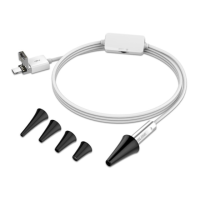
Description of the included ear canal adapters for different sizes.
Instructions for installing and using software on Windows, including PC connection steps.
Details on using the take photo and record video buttons within the Android application.
Instructions for rotating the captured image using the dedicated button in the app.
Guidance on how to delete or share photos directly from the app's album.
Steps to use the otoscope camera with Photo Booth on macOS.
Instructions for using the otoscope camera with QuickTime Player on macOS.
Details on sensor resolution and pixel count for both basic and HD versions of the camera.
Information on the camera's focal length range and LED light specifications.
List of compatible operating systems for the otoscope camera software.
Guidance on gently adjusting the otoscope for clear viewing of the eardrum.
Advice on adjusting LED brightness to prevent glare during use.
Tips on adjusting the camera distance for optimal focus.
 General
| Sensor Type | CMOS |
|---|---|
| Connectivity | USB |
| Light Source | 6 Adjustable LEDs |
| Frame Rate | 30fps |
| Focus Range | 3cm |
| Image Sensor | CMOS |
| Waterproof Rating | IP67 |
| Compatibility | Android |

 To Next Page