07
For Android devices(Android 4.4+):
Please confirm your Android Device has the function
of OTG and UVC.
You can install a free app “USB OTG Checker”which
provides a simple method to check.
Camera
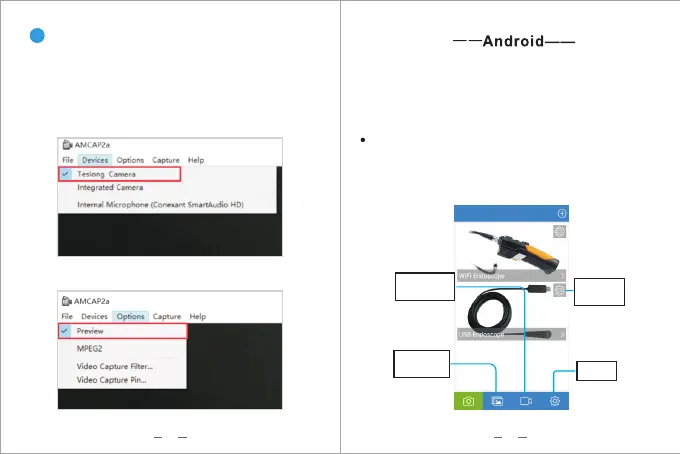
Download and install “Amcap”.
Please make sure to select the right device name
in the menu.
Plug the USB otoscope to your computer.
Download:http://gto.so/amcap.zip
Step 1: Click “Devices” in the menu, choose"Teslong
Camera"/"USB 2.0 PC Camera".
3
Please download the App “ Endoscope Camera” from
the Google Play Store , and Connect the camera to
your android phone . After you open the App , select
the device type : USB Endoscope . Then you can see
the video stream in the" Preview Area".
Step 2: Click “Options” in the menu, choose “Preview”.
06
Vide o
document ation
Photo
document ation
Device
Settings
Settings


 To Next Page