Setinitiallyalowlevelandthengraduallyincrease.Theintensitylevelmustbe
suchthatthetreatmentispleasant.
Symbolappearsonthedisplay(fig.F)andyoucannowadjusttheintensityusing
keys(from1to99).Theintensityrisesorfallsonalltheselectedchannelsat
thesametime.
Whenyousettheintensity,theclockbeginstoflashindicatingthattheequipmentis
providingenergy(fig.G).
Attention:Programs21to99arepresetwithdifferentstimulationsteps.
Eachphasealternatesmomentsofactivitywithmomentsofrest.Itisnotpossi
bletoincreasetheintensityduringthemomentofrest.Sodonotincreasethe
intensityintherestphasesduringprogramexecution,butonlyduringactive
phases.
Ifyoukeepalowintensity,forexampleatlevel1orlevel2,atthephasetransition
duringexecution,theprogrammaybereset.Inthiscase,restartwiththeprogram
andkeeptheintensityabithigher.
Youcan,however,accesseachchannelduringusetocontroltheintensityindependently:
simplypresskeytoselectthechannelwhoseintensityyouwanttochangeandthen
usekeystoincreaseordecreasethevalue.Fig.Hshowsthattheintensity
valuesforthe4channelscanbedifferent.Attheendofthetreatment,theTesmedclears
theintensitysettingforalloutputchannels;Youcannowswitchtheequipmentoffby
pressingkeyfor2secondsorsetnewparameterstobeginanewtreatment.Use
keystoincreaseordecreasethevalueofanyparameter,eachtimethesekeys
arepressed,theparameterisincreasedordecreasedinstepsofoneunit,keepthekeys
pressedforfasterincrease/decreaseoftheparameter.
3.Usemode
Switchingon
Pressthekeyforapproximately2seconds:thesystemrunsaselftestprocedure,during
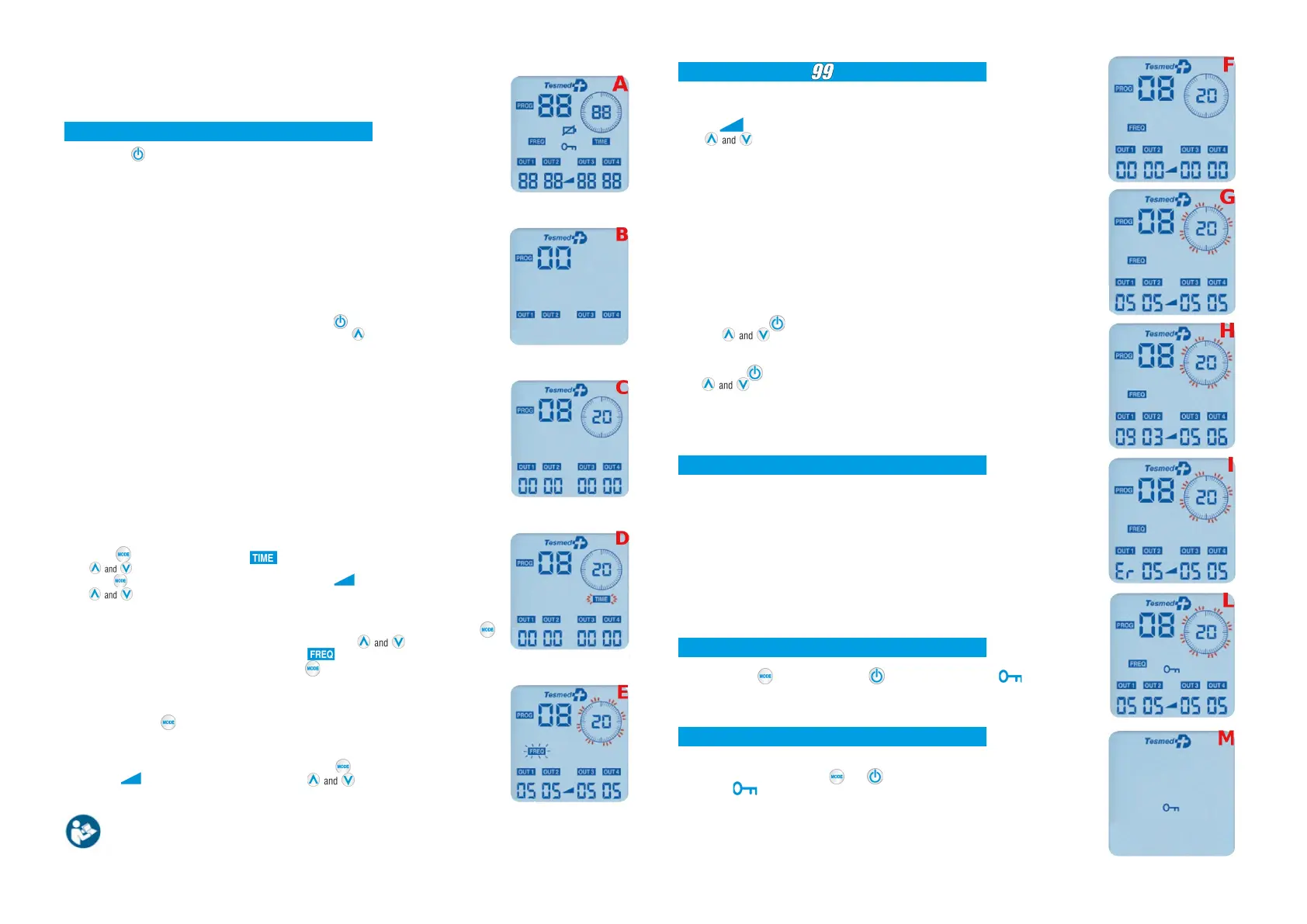
whichthedisplayshowsalltheavailablefunctions(fig.A);
thenappearsonthedisplaywhatshowninfig.B.
"Displaylighting"function
Thedisplayilluminationturnsoffautomaticallyafterabout20secondsintheabsenceof
interactions.
Thedisplayislitagainwhenyoupressanykey.
"Selfswitchingoff"function
TheTesmedautomaticallyswitchesoffisnotusedformorethan5minutesinordertosave
thebattery.
Afterswitchingonthedevice,pressinsuccessionkeytoselectthenumberof
channelsyouwanttousetosuitthetreatmentandthenkeytoselecttheprogram
(fig.C).
Attention:TheprogramsintheTesmedaremodulatestoprovidevariousstages(different
frequenciesofwaves)ofmassagerangingfrom1toamaximumof5stages.
SomeprogramshaveoneormoreWAIMSSYSTEM
®
stages.
Duringtreatment(andespeciallywiththeWAIMSSYSTEM
®
)wealwaysrecommendthat
youadapttheintensityofeachchannel,asyoursensitivitywillvaryvariousfromonegroupof
musclestoanother.
Programs
Onlyinprogramsfrom01to20youcanchangetimeandfrequency
Inprogramsfrom01to20,onceselectedtheprogram,it'spossibletocustomizethe
treatmenttimeandfrequency.
Presskeyandtherelevantsymbolstartsflashingonthedisplay(fig.D).Use
keystoadjustthetreatmenttime:frommin1minutetomax60minutes.
Presskeyagaintoswitchtotheintensityadjustment,whichisadjustedwiththe2
keys.
Youcanadjustthefrequencyonlyaftergivingintensityandstartedtreatment.Presskey
for3secondstoenterthefrequencycontrolmode.Presskeysrepeatedlyto
increaseortodecreasethefrequency.Thesymbolflashes(atavaryingspeed)to
indicatefrequencycontrolmode(fig.E).Presskeyoncetoquitfrequencycontrolmode.
Thefrequencyisthenumberofpulsespersecond.Whenyouchangethefrequency,youfeel
anincreaseordecreaseinthespeedofstimulation.
Attention:ifyouareinfrequencycontrolmodeduringatreatmentandyouwanttoclearthe
intensity,presskeytwice.
Programs21to99:presetwithdifferentstimulationsteps
Afterhavingselectedaprogramfrom21to99,presskeytogostraighttotheintensity
adjustment,whichisadjustedwiththe2keys.
Fortheprogramschoice,refertothetabsinthemanualwiththeindicationof
treatments,program,electrodesphotos,duration,phasesanddays.
Errorwarning(electrodesdisconnected)
Inthecaseofadetachedelectrode,thedevicegoesintoerror,displayingtheword"Er",
flashingforabout5",inthechannelwheretheproblemoccurred(fig.I).
Allpulsesarestoppedimmediatelyand"00"appearsastheinsensityvalueonthe
display.Theerrormessagecanmeanthat:
•Therearenoelectrodesconnectedtothechannelinerrormode.
•Theelectrodesarenotproperlyadheredtotheskin:repositiontheelectrodesor
replacethemiftheyaretooold.
•Thecableusedtoconnecttheelectrodesisfaulty:checkbyinvertingtwocables.
Thesystemautomaticallyresetsitselfoncetheintensityvalueincreases.
"Keyboardblock"function
Keepingthekeypressed,presskeyandreleaseit.Symbolwillappearon
thedisplay(fig.L).Followthesameproceduretounlockthekeyboard.
"ONblock"function
Usefultoavoidarandomswitchon.
Withthedeviceon,keepingtheandkeyspressedsimultaneouslyfor3seconds,
thesymbolandtheTesmedlogowillappearonthedisplay(Fig.M).Followthe
sameproceduretoswitchtheequipmenton.
2
3
Intensitycontrol:levels
Treatmenttimeadjustment
Frequencyadjustement


 To Previous Page
 Loading...