20
77.. PPrrooggrraammmmiinngg
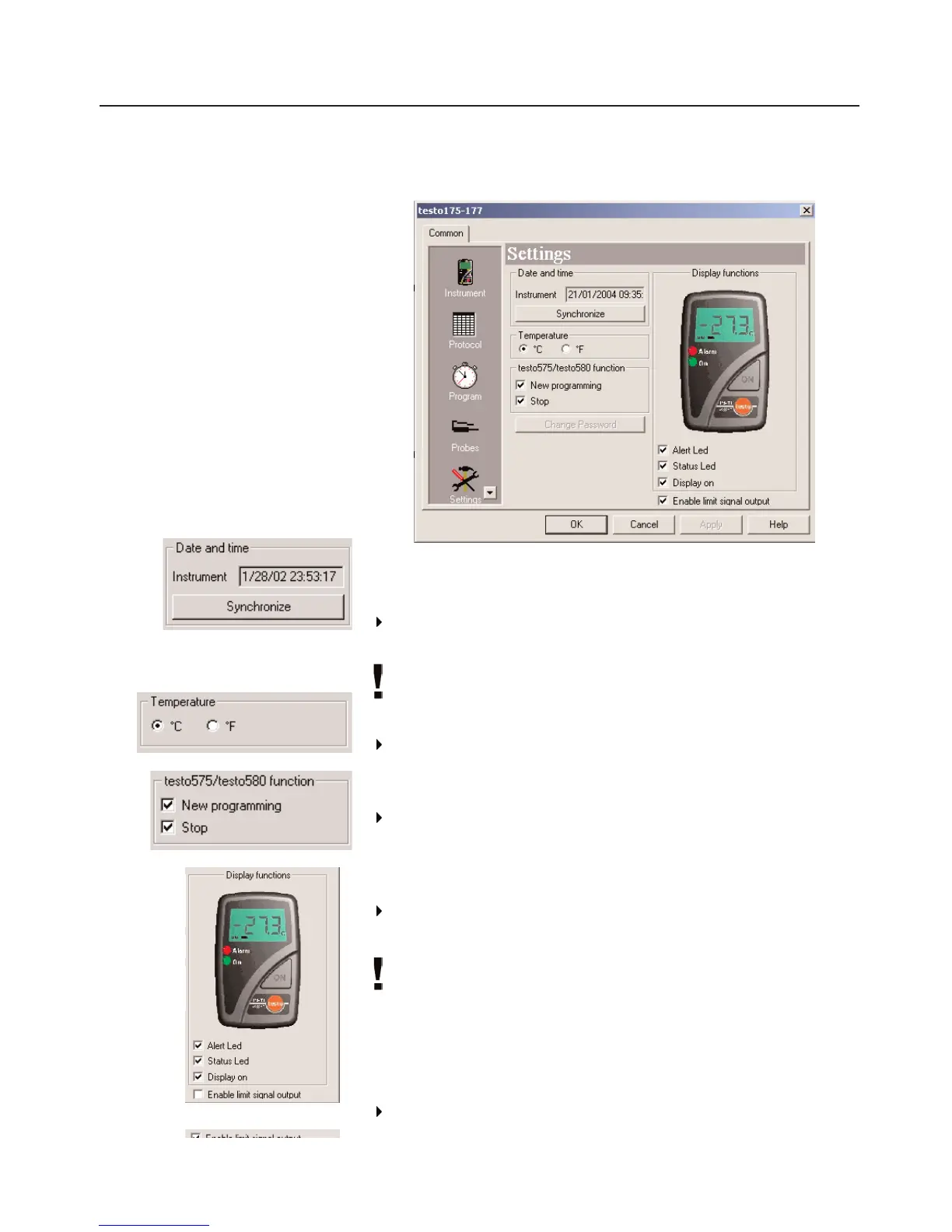
Settings
Date and time:
The set date and the time in the data logger are shown.
Select
Synchronize
to synchronize the date and the time in the
data logger with the clock in your PC.
Date/Time can only be synchronized when the data logger is in
the
Wait
or
End
mode.
Temperature:
Select the required temperature unit for the temperature
channels (
°C
or
°F
).
testo 575
/
testo 580
- Function:
Select whether the data logger is to be newly programmed (
New
programming
) and stopped (
Stop
) via the testo 575 fast printer
and the testo 580 data collector.
Display functions:
Select whether the LEDs, the
Alert led
, Status led and
Display
on are to be activated in the data logger.
Only the data display is deactivated when the display is
switched off. Status information on mode and battery capacity
are always shown.
Enable limit signal output
From ComSoft Version 3.4 on, the external alarm signal output
testo 581 can be activated if connected to a data logger.



 To Next Page