21
77.. PPrrooggrraammmmiinngg
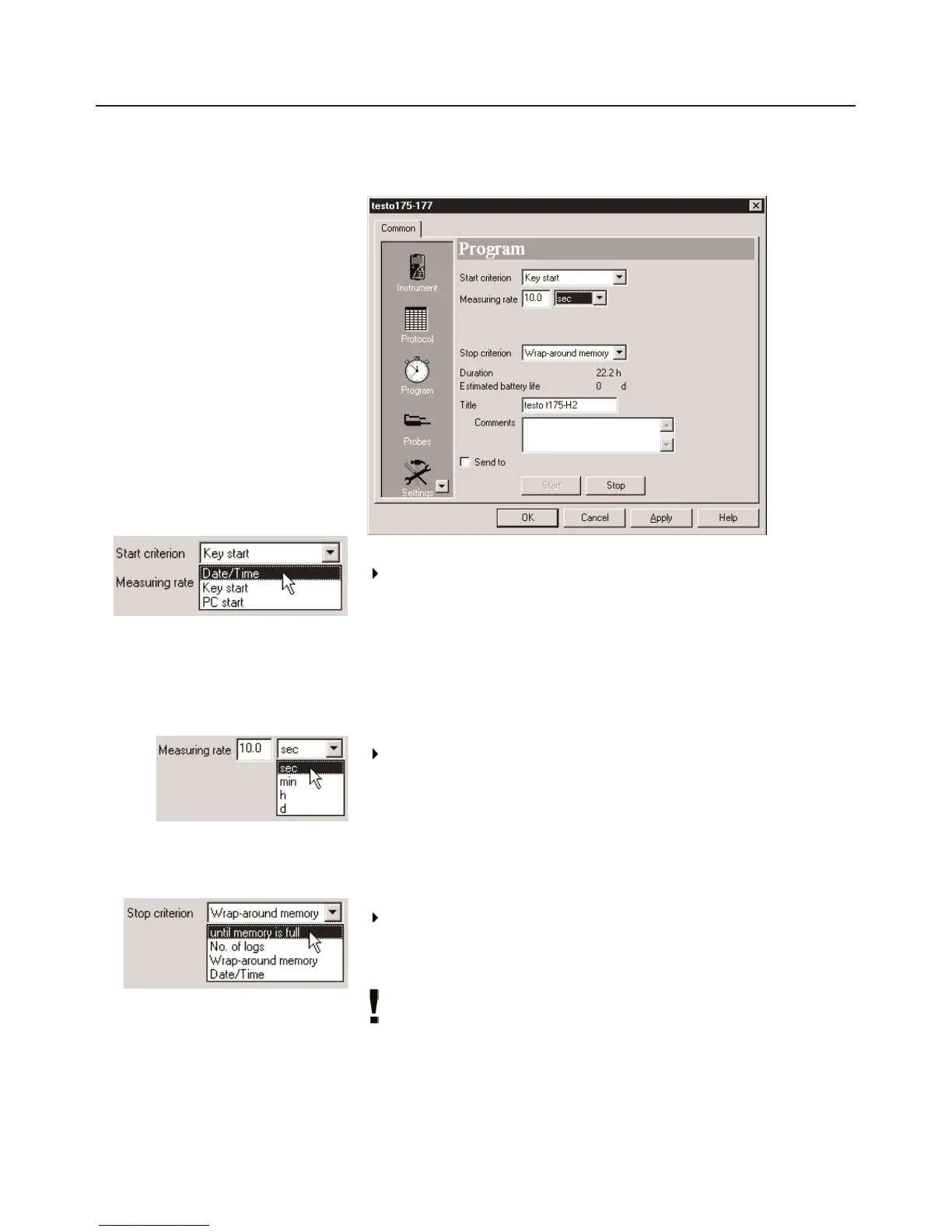
Program
Start criterion:
Select the required criterion for the start of the program.
You have the choice between
Date/Time
,
Key start
and
PC Start
.
If
Date/Time
is chosen, an additonal field appears in which you can
enter/select the required date/time.
Measuring rate:
Select the time cycle in which the measurements are to be
carried out.
You can choose between sec (seconds),
min
(minutes),
h
(hours)
and
d
(days).
The smallest/largest measuring rate differs depending on the
instrument type (Refer to
11. TTechnical ddata
, P. 27).
Stop criterion:
Select the required criterion to stop the measuring program.
You can choose between
Until memory is full
,
No. of logs
,
Wraparound memory
and
Date / Time.
It is only possible to select
Date/Time
if
Date/Time
is also
selected as
Start criterion
. If you choose
No. of logs
an
additional field will appear in which the number of
measurements required can be entered.



 To Next Page