Product description 5
Product description
At a glance
enfresitptsvnl????
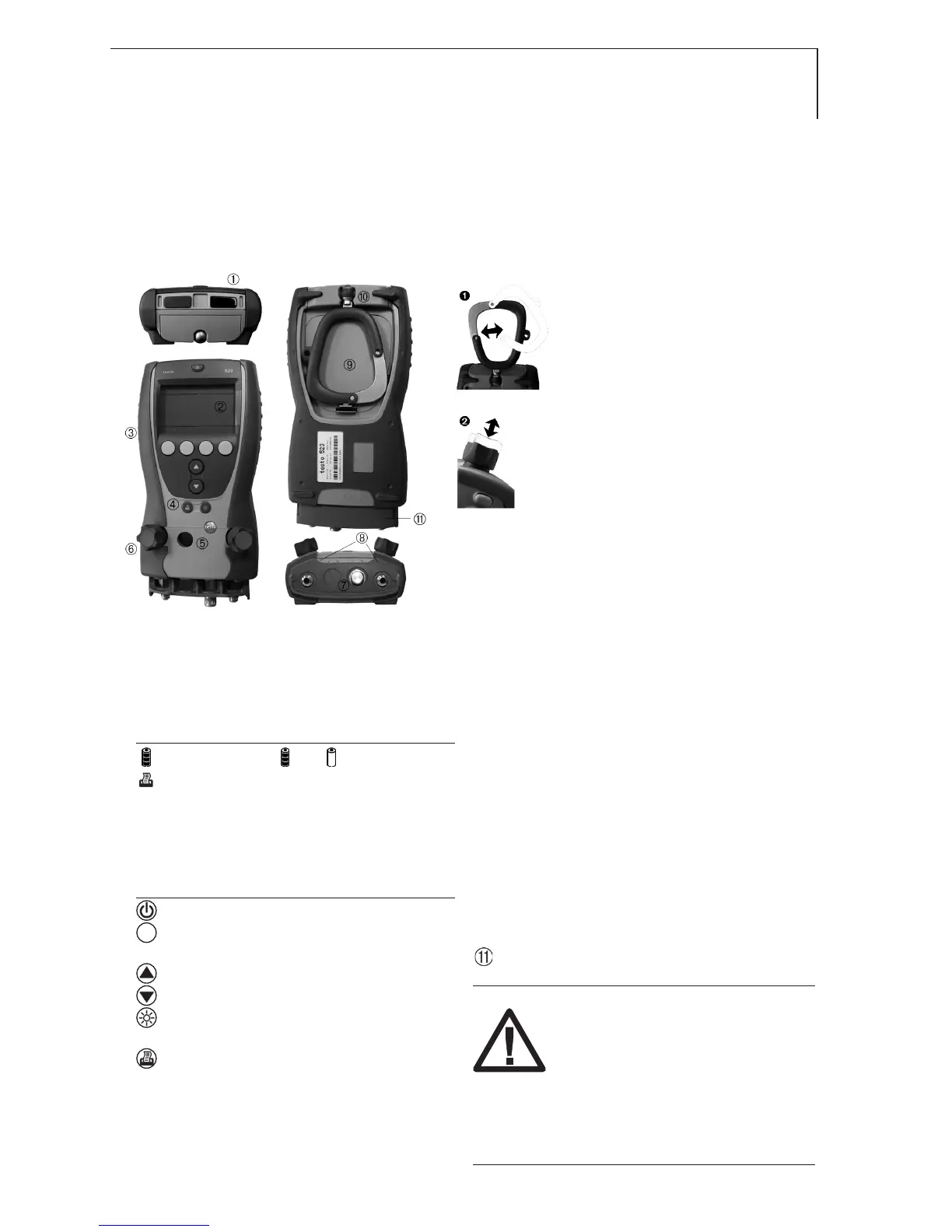
IR interface for connection to Testo report
printer
Display: low pressure side (blue), high
pressure side (red)
Display symbols
: Battery capacity ( : full, : empty)
: Print function: data are being transmitted
Probe socket mini DIN for Pt100
temperature probes, with socket cover
Operating buttons
Button functions
: On/Off button: switches instrument on/off.
: Function buttons (4x, orange): respective
function is shown in display.
: Up/Down buttons: change display view.
: Light button: switches display/sight glass
illumination on/off.
: Printer button: transmits data to Testo report
printer
Sight glass for refrigerant flow.
2x valve knobs, with two valve positions
(see ).
3x connections 7/16“ UNF (1/4 SAE), brass.
Left/right: low pressure /high pressure,
for refrigerant hoses with fast screw
connection, flow-through can be closed
with valve.
Centre: for e.g. refrigerant bottles, with
sealing cap.
2x Unlocking buttons for valve knobs
Battery compartment. Rechargeable
batteries cannot be charged in the
instrument!
Fold-away suspension hook, with eye for
a padlock (see ).
Plastic protector
Warning!
Do not remove fitting protector
during measurement and trans-
port. It protects the fittings at the
base of the instrument from un-
due strain or potential breakage.



 To Next Page