Short manual testo 810 13
Short manual testo 810
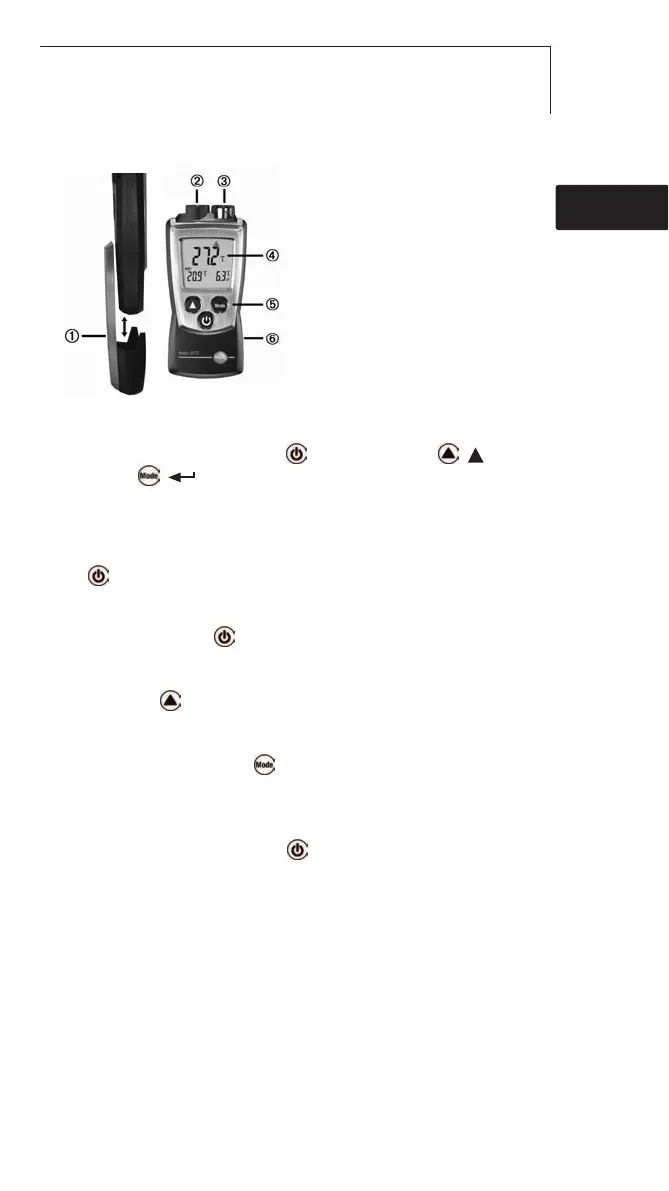
Protection cap: Park position
Infrared sensor
Air/temperature sensor
Display
Control keys
Battery compartment (on rear)
Basic ssettings
Instrument off >press and hold 2s > select with ( ),
confirm with ( ):
Unit of temperature: °C, °F > Differential temperature
∆
t: OFF, ON >
Emissonsfaktor: ε > Auto off-Funktion: OFF, ON
Switching tthe iinstrument oon
Press .
Switching tthe ddisplay llight oon ((for 110s)
Instrument on > press .
IR mmeasurements
Press and hold .
Select ddisplay mmode
Instrument on > select with
:
Hold: Readings are held > Max: Maximum values > Min: Minimum values
Switching tthe iinstrument ooff:
Instrument on >press and hold 2s.
de
enfresitptsvnl????



 To Next Page