Product description16
Product description
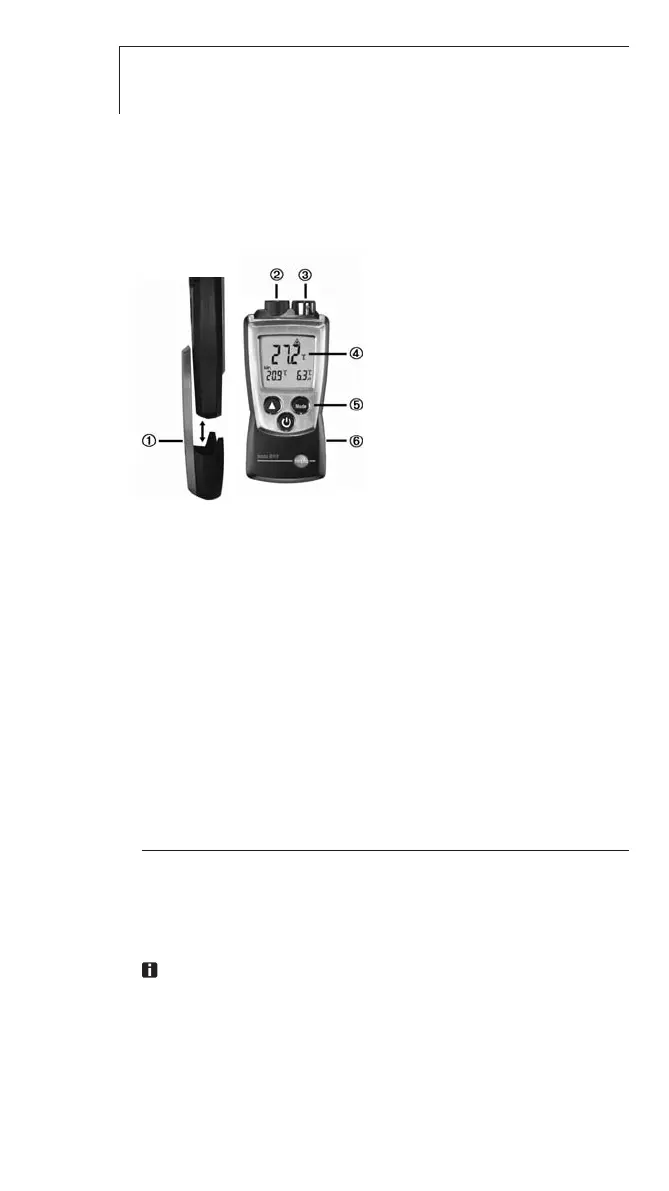
At a glance
Protection cap: Park position
Infrared sensor
Air/temperature sensor
Display
Control keys
Battery compartment (on rear)
First steps
²
Inserting bbatteries:
1 To open the battery compartment, push the battery cover
down.
2 Insert batteries (2x 1.5 V type AAA). Observe the polarity!
3 To close the battery compartment, push the battery cover
back on.
²
Basic ssettings ((configuration mmode):
Adjustable functions
· Unit of temperature: °C, °F
· Differential temperature
∆
t: OFF, ON
· Emission factor:
ε
· Auto off function: OFF, ON (instrument switches off automatically if no key is
pressed for 10 minutes)
The emission factor has a default setting of 0.95. This is
ideal for the measurement of non-metals (paper, ceramic,
gypsum, wood, paints and varnishes), plastics and
foodstuffs.



 To Next Page