Usage and Storage Instructions 7
EN
English
Intelligent Window Open Detection
Long press for 3 seconds to switch on window open
detection mode. It will work and start to count once
ambient temperature is found to drop as much as 5°C
within 10 minutes. 30 minutes later
1. If ambient temperature is lower than / or the same
as before, heater will switch to standby mode
automatically.
2. If ambient temperature is higher than before,
detection will go on.
Press again to switch o the window open detection
mode
Note: Intelligent window open detection mode
cannot work under program mode.
Note:
1. In manual mode and program mode, press , to
stop working. Towel heating function will not be
aected by this operation.
2. The appliance will not work when setting
temperature is lower than ambient temperature.
Towel heating function and cooling fan function will
not be aected by this operation.
3. The heater is switch o under whatever mode,
motor impeller will keep moving for extra 15
seconds to release internal heat before stop.
4. In whatever working mode, display screen and pilot
lamp become dark in 1 minutes when no operation
is conducted. Press any button to activate the
screen and pilot lamp to go on operation.
5. Long press SET for 5 seconds to recover factory
setting, which mean setting week and time recover
to factory setting.
Filter clean
Filter becomes dirty during use, or after 30 hours usage, the
indication ashes with sounds “BE, BE, BE…”. Press OK,
sounds stop while ash. Turn the appliance o, then
remove the lter on the back of the appliance. Clean the
lter directly under water. Do not use caustic or abrasive
material during cleaning, as this can damage the lter. Then,
have the lter dried naturally.
The machine can’t work until
disappear, which will
take around 15 minutes.
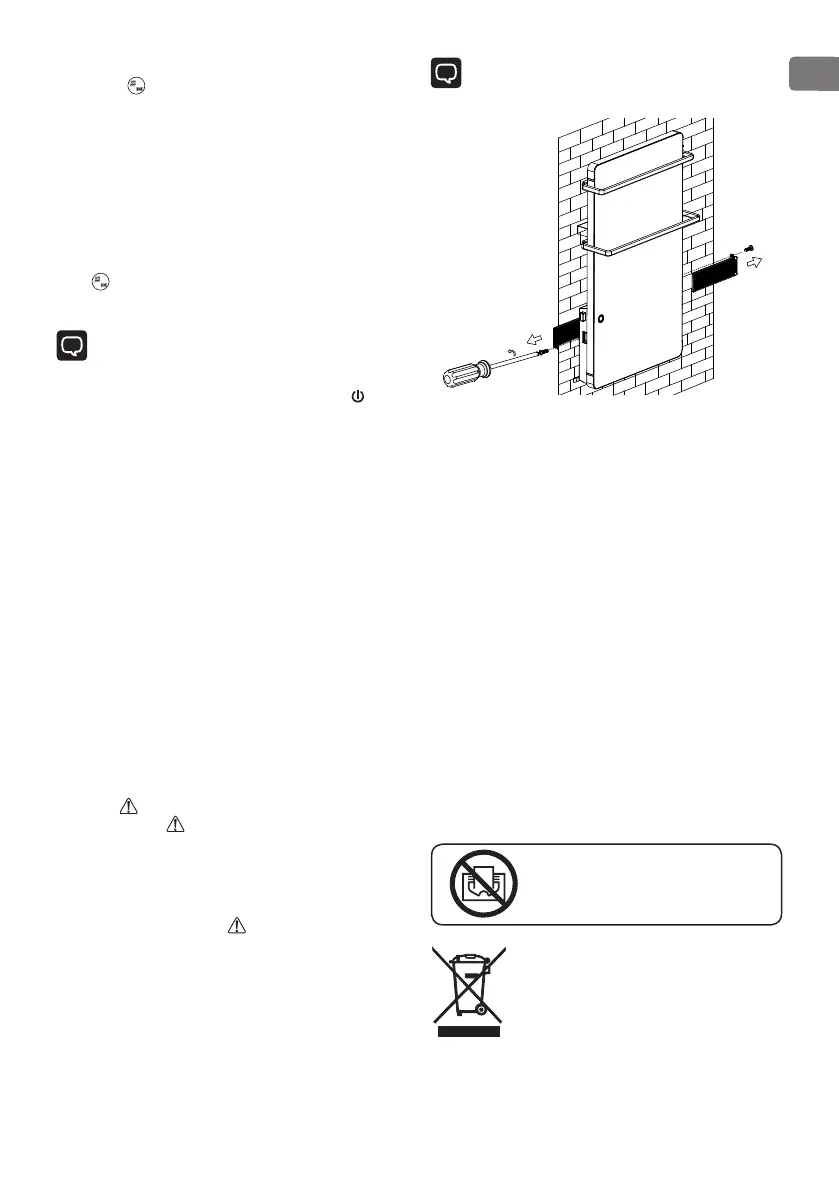
Then reassemble the lter according to the reference
line (see below drawing).
Push the lter to the end until it cannot move anymore.
Note: First, use the screwdriver to unscrew two
ST3X10 screws from lter, remove the left and right
lters.
OVERHEATING PROTECTION
The in-built overheating protection automatically turns
the appliance o in case of an error! In that situation
the plug must be disconnected from the mains and the
control switch put in position “0”. After a short period of
cooling the appliance is ready for operation (in about
10-15 minutes)! If that error is repeated – consult an
authorized service at your location!
CLEANING
•
You must rst turn o the appliance and disconnect its
plug from the socket. Do not use abrasive detergents!
•
Clean the body with wet cloth, vacuum cleaner or
a brush!
•
You must never submerge the appliance under
water – there is life danger!
•
If the appliance should not be used for a certain
period of time it must be secured from excessive
dirt and dust by placing it in its original package.
•
You must never place the hot appliance in its package!
Warning: in order to avoid
overheating do not cover the appliance!
Instructions for environment protection
Electric appliances out of use contain valuable
materials and hence must not be disposed in
domestic dumbs! We kindly ask you for cooperation
and active role in preservation of natural resources by
disposing the appliance to the organized buy-back
locations (if there are any).


 To Next Page