SAFETY INSTRUCTIONS
Carefully read this manual before using this Micro System. Make sure that you know how the unit
functions and how to operate it. Maintain this product in accordance with the instructions to ensure
that it functions properly. Keep this manual with the unit. If this Micro System is to be used by a
third party, this instruction manual must be supplied with it. The safety instructions, by themselves,
do not eliminate danger completely, and proper accident prevention measures must always be used.
BEFORE INITIAL USE
Remove all packaging. Carefully wipe the outer case with a soft damp cloth and dry it afterwards
with a dry towel. This will remove any dust from the unit that may have built up during transit. Do
not immerse any part of the Micro System in water or any other liquid. Check for any damage that
may have occurred during transit. Do not use if the unit is damaged in any way or if the supply cord
is damaged. Immediately return to supplier for replacement or repair.
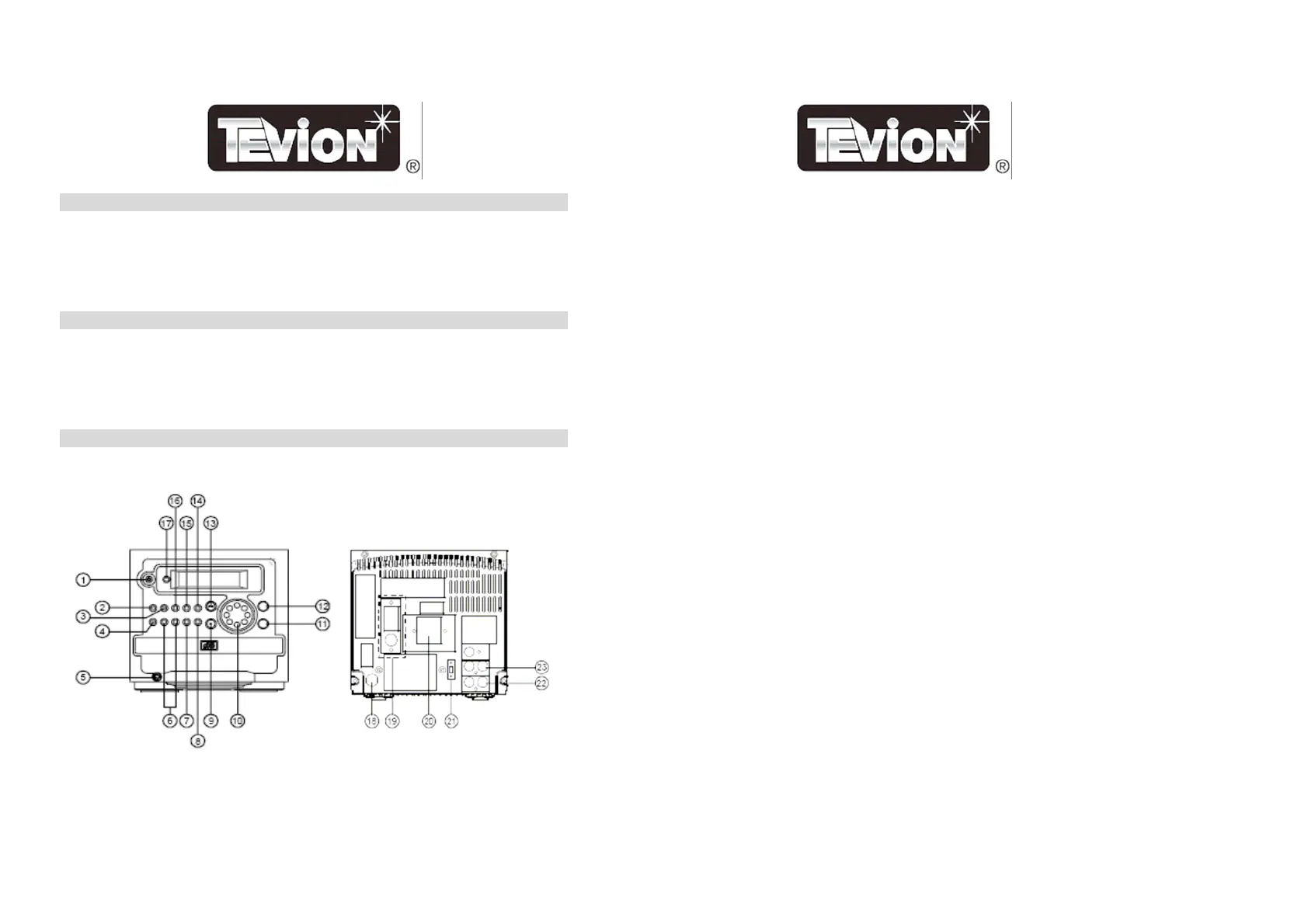
PARTS DETAIL
MAIN UNIT
2
1. POWER Key
• Press to turn the power ON/Stand-by.
2. CD Key
• For compact disc.
3. TUNER Key
• To select the Tuner source.
4. MEMORY/CLOCK ADJUSTMENT Key (MEM/CLK ADJ)
• In the Radio mode: the preset memory is called in ascending order.
• In the CD mode: for setting program.
• In the clock mode: for setting of the clock or timer adjustment.
5. PHONES JACK
• Connection for headphones.
6. SEARCH/CLK
7. SLEEP/TIMER
8. MUTE Key
• To terminate the sound output.
9. STOP/BAND Key
• In the CD mode: to stop the compact disc or clear program.
• In the Radio mode: to select the receiving band.
10. VOLUME Key
• To adjust the volume level.
11. PRESET EQUALIZER Key (EQ)
• For selecting Digital Sound Control: CLASSIC, ROCK, POP and FLAT.
12. OPEN/CLOSE Key
13. PLAY/PAUSE Key
• In the CD mode: to start or interrupt play.
14. MEMORY-UP/REPEAT Key (REPEAT/M-UP)
• In the Radio mode: for recalling the preset memory in order.
• In the CD mode: for selecting the all repeat or track repeat mode.
15. DISPLAY Key
• To indicate the functioning of the unit.
16. AUX Key
17. REMOTE SENSOR
• To receive signals from the remote control.
18. AC POWER CORD
19. ANTENNA
20. SPEAKER SOCKET
21. STEREO/MONO SELECTOR
22. AUX INPUT SOCKET
23. LINE OUT SOCKET
3



 To Next Page