DVD Operation
48 49
About MP3, JPG and MPG discs
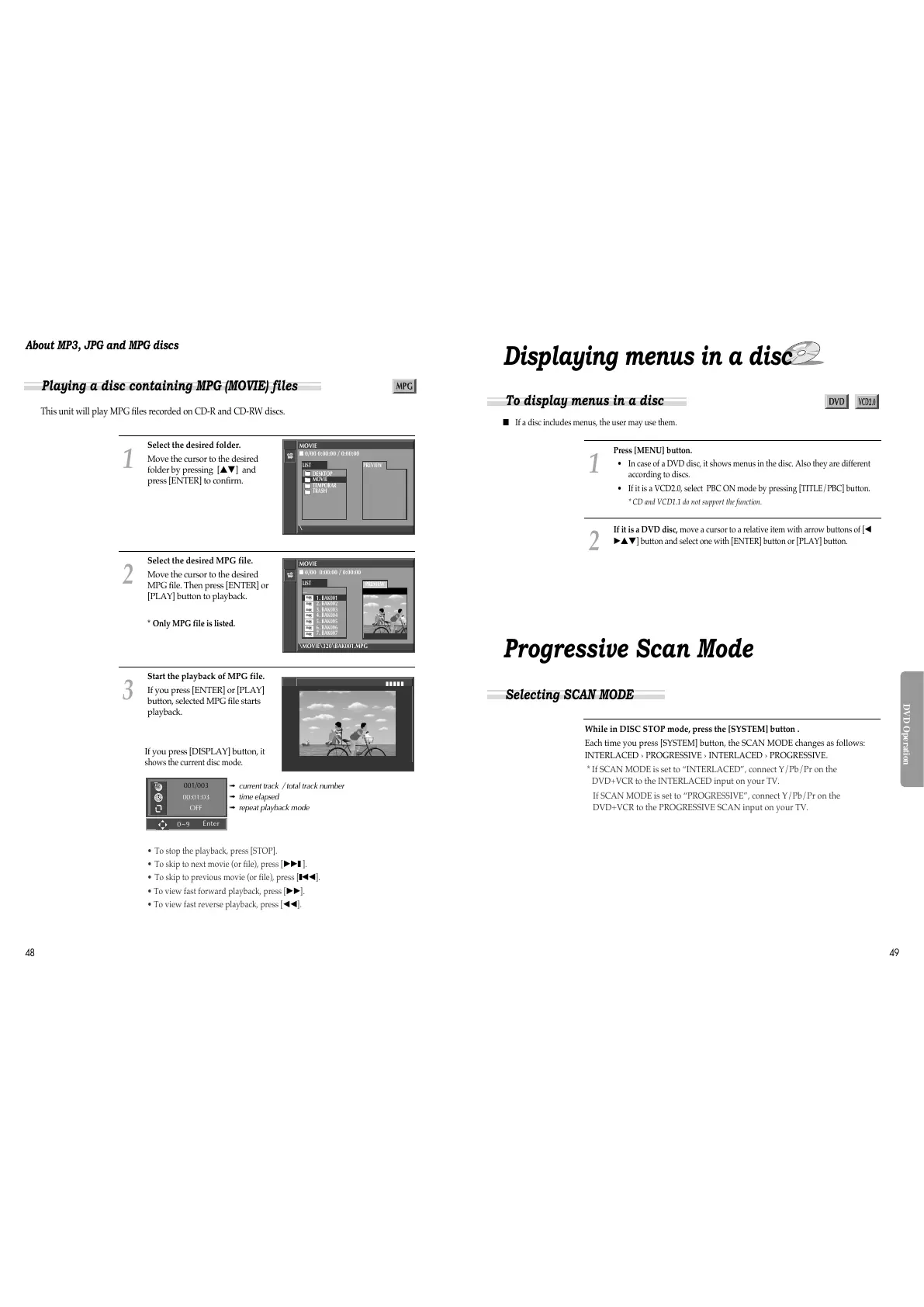
This unit will play MPG files recorded on CD-R and CD-RW discs.
Select the desired folder.
Move the cursor to the desired
folder by pressing […†] and
press [ENTER] to confirm.
1
Select the desired MPG file.
Move the cursor to the desired
MPG file. Then press [ENTER] or
[PLAY] button to playback.
* Only MPG file is listed.
2
Start the playback of MPG file.
If you press [ENTER] or [PLAY]
button, selected MPG file starts
playback.
3
MOVIE
■ 0/00 0:00:00 / 0:00:00
\
LIST
DESKTOP
MOVIE
TEMPORAR
TRASH
PREVIEW
MOVIE
■ 0/00 0:00:00 / 0:00:00
\MOVIE\320\BAK001.MPG
LIST
__
1. BAK001
2. BAK002
3. BAK003
4. BAK004
5. BAK005
6. BAK006
7. BAK007
PREVIEW
Playing a disc containing MPG (MOVIE) files
mpg
mpg
mpg
mpg
mpg
mpg
mpg
■ ■ ■ ■ ■
➟ current track / total track number
➟ time elapsed
➟ repeat playback mode
001/003
00:01:03
OFF
• To stop the playback, press [STOP].
• To skip to next movie (or file), press [
√√
❚
].
• To skip to previous movie (or file), press [
❚
œœ
].
• To view fast forward playback, press [
√√
].
• To view fast reverse playback, press [
œœ
].
If you press [DISPLAY] button,
it
shows the current disc mode.
■ If a disc includes menus, the user may use them.
Press [MENU] button.
• In case of a DVD disc, it shows menus in the disc. Also they are different
according to discs.
• If it is a VCD2.0, select PBC ON mode by pressing [TITLE/PBC] button.
* CD and VCD1.1 do not support the function.
1
If it is a DVD disc, move a cursor to a relative item with arrow buttons of [
œ
√…†
] button and select one with [ENTER] button or [PLAY] button.
2
To display menus in a disc
Displaying menus in a disc
Selecting SCAN MODE
Progressive Scan Mode
While in DISC STOP mode, press the [SYSTEM] button .
Each time you press [SYSTEM] button, the SCAN MODE changes as follows:
INTERLACED › PROGRESSIVE › INTERLACED › PROGRESSIVE.
* If SCAN MODE is set to “INTERLACED”, connect Y/Pb/Pr on the
DVD+VCR to the INTERLACED input on your TV.
If SCAN MODE is set to “PROGRESSIVE”, connect Y/Pb/Pr on the
DVD+VCR to the PROGRESSIVE SCAN input on your TV.
0~9
Enter



 To Next Page