56 57
About DVD
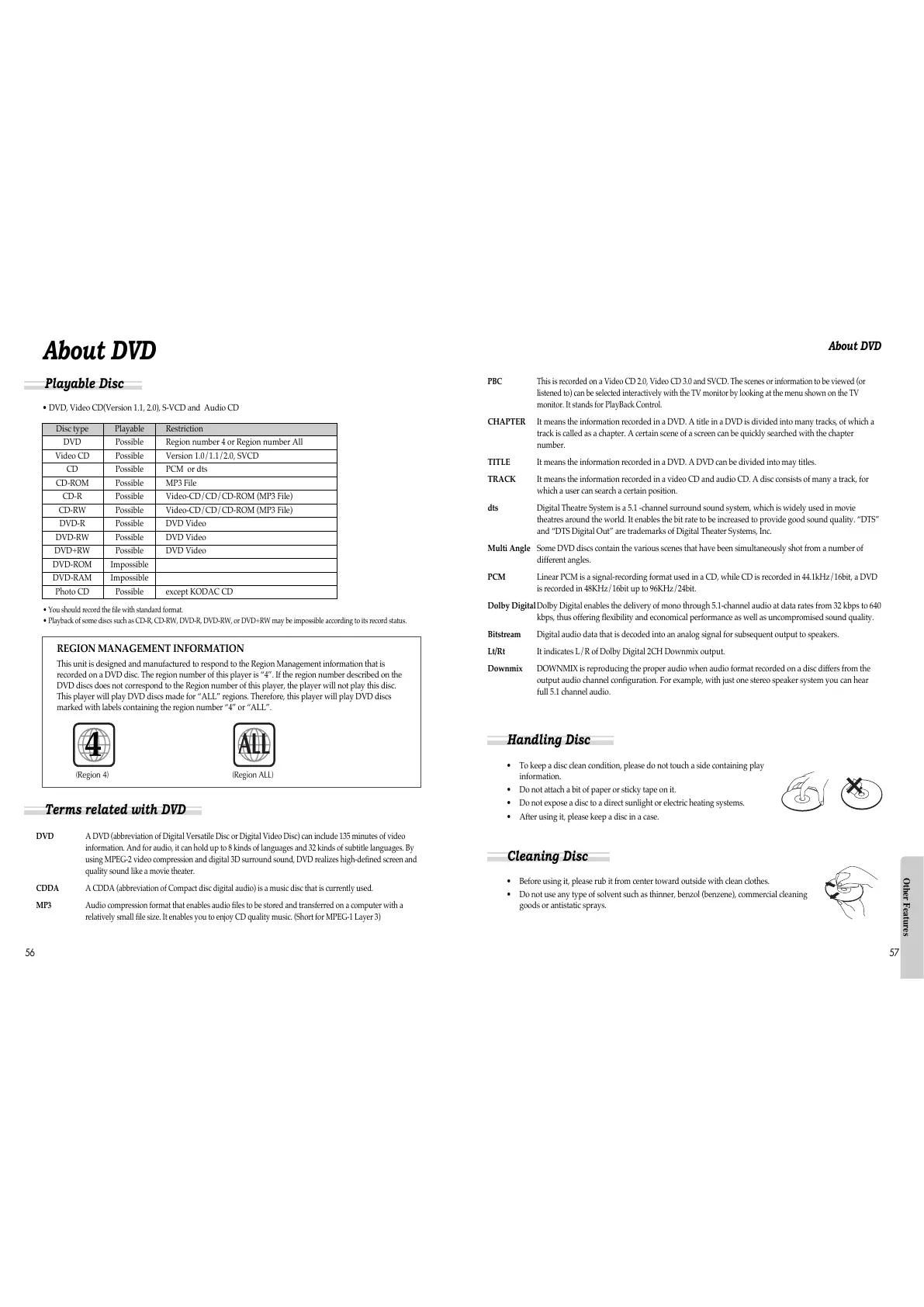
• DVD, Video CD(Version 1.1, 2.0), S-VCD and Audio CD
Disc type Playable Restriction
DVD Possible Region number 4 or Region number All
Video CD Possible Version 1.0/1.1/2.0, SVCD
CD Possible PCM or dts
CD-ROM Possible MP3 File
CD-R Possible Video-CD/CD/CD-ROM (MP3 File)
CD-RW Possible Video-CD/CD/CD-ROM (MP3 File)
DVD-R Possible DVD Video
DVD-RW Possible DVD Video
DVD+RW Possible DVD Video
DVD-ROM Impossible
DVD-RAM Impossible
Photo CD Possible except KODAC CD
REGION MANAGEMENT INFORMATION
This unit is designed and manufactured to respond to the Region Management information that is
recorded on a DVD disc. The region number of this player is “4”. If the region number described on the
DVD discs does not correspond to the Region number of this player, the player will not play this disc.
This player will play DVD discs made for “ALL” regions. Therefore, this player will play DVD discs
marked with labels containing the region number “4” or “ALL”.
(Region 4) (Region ALL)
4
ALL
Playable Disc
• You should record the file with standard format.
• Playback of some discs such as CD-R, CD-RW, DVD-R, DVD-RW, or DVD+RW may be impossible according to its record status.
Terms related with DVD
DVD A DVD (abbreviation of Digital Versatile Disc or Digital Video Disc) can include 135 minutes of video
information. And for audio, it can hold up to 8 kinds of languages and 32 kinds of subtitle languages. By
using MPEG-2 video compression and digital 3D surround sound, DVD realizes high-defined screen and
quality sound like a movie theater.
CDDA A CDDA (abbreviation of Compact disc digital audio) is a music disc that is currently used.
MP3 Audio compression format that enables audio files to be stored and transferred on a computer with a
relatively small file size. It enables you to enjoy CD quality music. (Short for MPEG-1 Layer 3)
About DVD
PBC This is recorded on a Video CD 2.0, Video CD 3.0 and SVCD. The scenes or information to be viewed (or
listened to) can be selected interactively with the TV monitor by looking at the menu shown on the TV
monitor. It stands for PlayBack Control.
CHAPTER It means the information recorded in a DVD. A title in a DVD is divided into many tracks, of which a
track is called as a chapter. A certain scene of a screen can be quickly searched with the chapter
number.
TITLE It means the information recorded in a DVD. A DVD can be divided into may titles.
TRACK It means the information recorded in a video CD and audio CD. A disc consists of many a track, for
which a user can search a certain position.
dts Digital Theatre System is a 5.1 -channel surround sound system, which is widely used in movie
theatres around the world. It enables the bit rate to be increased to provide good sound quality. “DTS”
and “DTS Digital Out” are trademarks of Digital Theater Systems, Inc.
Multi Angle Some DVD discs contain the various scenes that have been simultaneously shot from a number of
different angles.
PCM Linear PCM is a signal-recording format used in a CD, while CD is recorded in 44.1kHz/16bit, a DVD
is recorded in 48KHz/16bit up to 96KHz/24bit.
Dolby Digital Dolby Digital enables the delivery of mono through 5.1-channel audio at data rates from 32 kbps to 640
kbps, thus offering flexibility and economical performance as well as uncompromised sound quality.
Bitstream Digital audio data that is decoded into an analog signal for subsequent output to speakers.
Lt/Rt It indicates L/R of Dolby Digital 2CH Downmix output.
Downmix DOWNMIX is reproducing the proper audio when audio format recorded on a disc differs from the
output audio channel configuration. For example, with just one stereo speaker system you can hear
full 5.1 channel audio.
• To keep a disc clean condition, please do not touch a side containing play
information.
• Do not attach a bit of paper or sticky tape on it.
• Do not expose a disc to a direct sunlight or electric heating systems.
• After using it, please keep a disc in a case.
• Before using it, please rub it from center toward outside with clean clothes.
• Do not use any type of solvent such as thinner, benzol (benzene), commercial cleaning
goods or antistatic sprays.
Handling Disc
Cleaning Disc
Other Features



 To Next Page