
 Need help?
Do you have a question about the Texas Instruments TI-10 and is the answer not in the manual?
Covers power sources, on/off functions, automatic power down, two-line display, scrolling, and key indicators.
Explains the functions of the Clear, MR/MC, and AC keys for data management and device reset.
Details accessing calculator/problem solving menus, order of operations (EOS), and basic arithmetic key functions.
Explains QR division, decimal division, and memory operations using M+, M-, MR/MC keys.
How to store and repeat an operation with a constant value using the Op1 key.
Using the Fix key with Place Value keys to specify decimal places for rounding.
Practice problems with missing elements, select difficulty, and choose problem types.
Compose custom problems, enter solutions, and identify problem types (one/multiple/no solutions).
Analyze digits and place values within numbers in MAN mode.
Lists and describes common error types like Arith Error, Syn Error, Overflow, and Underflow.
Steps to take for unexpected results, including checking mode, rounding, reset, and battery.
Instructions for safely replacing the CR2025 battery and proper disposal.
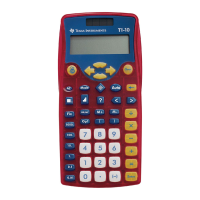
The TI-10 is a versatile calculator and arithmetic trainer designed to assist users with basic arithmetic operations and problem-solving skills. It features a two-line display, allowing for the simultaneous viewing of entries and results, and supports entries up to 88 characters long, with exceptions for specific modes. The device is powered by both battery and solar energy, ensuring functionality in various lighting conditions.
The TI-10 offers standard arithmetic operations including addition, subtraction, multiplication, and division. It adheres to the Equation Operating System (EOS™) for evaluating expressions, prioritizing operations in the following order: expressions inside parentheses, functions requiring a closing parenthesis, negation, multiplication (including implied multiplication) and division, and finally, addition and subtraction. The calculator also includes a "completes all operations" function.
A key feature of the TI-10 is its Problem Solving tool, which can operate in either AUTO (automatic) or MAN (manual) mode. In AUTO mode, the calculator presents problems with a missing element (e.g., 5+2=?) and allows users to select the type of operation (addition, subtraction, multiplication, division, or finding the operator) and choose from three levels of difficulty. The device provides immediate feedback on answers (YES/NO) and indicates if the correct solution is less than or greater than the entered answer. After three incorrect attempts, the correct answer is displayed. A scoreboard tracks performance, registering correct and incorrect solutions every fifth problem.
In MAN mode, users can compose their own problems, including those with missing elements. This mode supports non-negative integers and can indicate whether a problem has one, multiple, or zero solutions. It also allows for testing inequalities.
The TI-10 incorporates a memory function, enabling users to add or subtract the displayed result to/from memory and recall the stored value for subsequent calculations. The "M" indicator on the display signifies that a value other than zero is in memory.
The "Stored Operation" (Op1) feature allows users to store an operation with a constant value and repeat it multiple times by pressing a single key. This is particularly useful for repetitive calculations.
Rounding results is another capability, achieved using the "Fix" function in conjunction with Place Value keys. Users can specify the number of decimal places for rounding, from thousands to hundredths. The internally stored value remains unrounded, and zeros are padded as needed for display.
The Place Value menu, accessible in Problem Solving MAN mode, helps users understand the place value of digits within a number. It can identify the place value of a given digit, count how many ones, tens, hundreds, etc., are in a number, and determine which digit occupies a specific place.
 General
| Type | Scientific |
|---|---|
| Form factor | |
| Product color | Multicolor |
| Digits | 11 digits |
| Display number of lines | 2 lines |











 To Next Page