TI-73 / TI-83 Plus Logic Ladder Page 9
Completing the Factor Activity
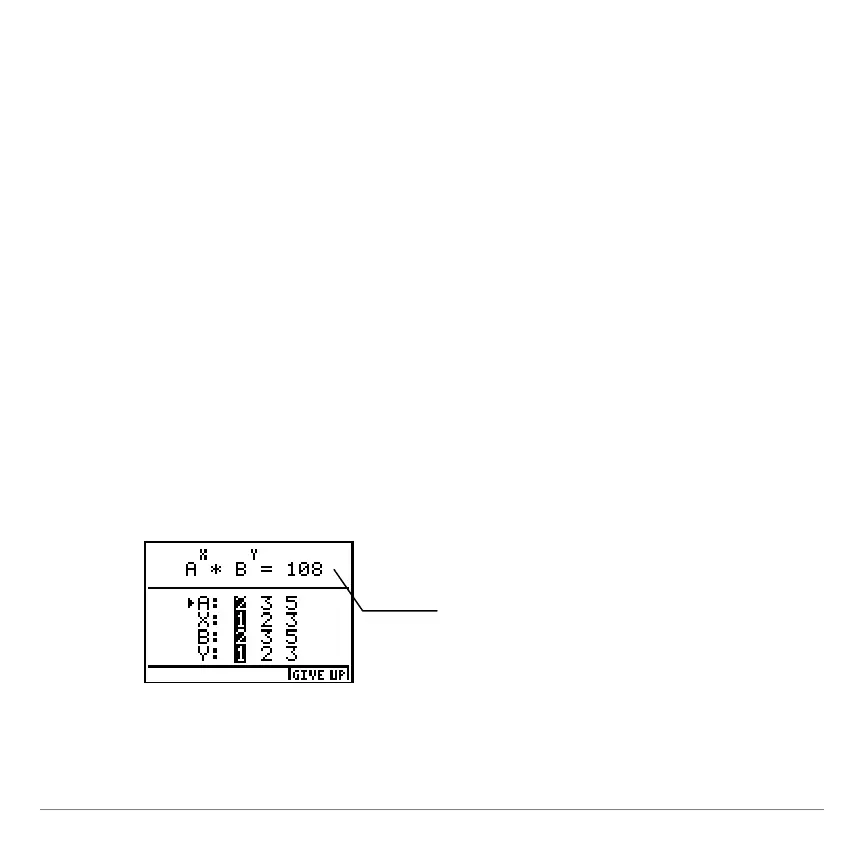
The Factor activity lets students practice factoring numbers into
the product of primes.
In the Factor activity, a random number with the prime
factorization of the form A
X
g
B
Y
is generated. A and B are the
prime bases; X and Y are the powers of the prime bases. You
determine which values for A, B, X, and Y create the correct
prime factorization of the number.
1. From the
MAIN MENU
, select
FACTOR
. The
FACTOR
menu is
displayed.
2. Select
START
to display the first number to factor. The arrow
is at
A
. The default selections for
A
,
X
,
B
, and
Y
are
highlighted.
A random number is
generated whose prime
factorization is of the form
A
X
g
B
Y
. Your number will
be different than this one.














 To Next Page