12 Chapter 0 – Introduction to TI Calculators
0.9 Using the Supplied Datasets
If you have the additional Connect cable and TI-Connect software, you can load the datasets for
all examples, exercises, and tables in the text easily without needing to retype all the numbers.
Datasets are also on the text’s accompanying web site. If you’re using the CD, insert it in the
drive – it should automatically open (you may get a warning about “dangerous content” – simply
click to continue. Click on the datasets link, then select PC or Mac TI-83 format. You may at
this point want to copy the folder to your desktop for easier future use. Click on the folder to
open it. Select the file you wish to use – names beginning with eg are examples, ex are
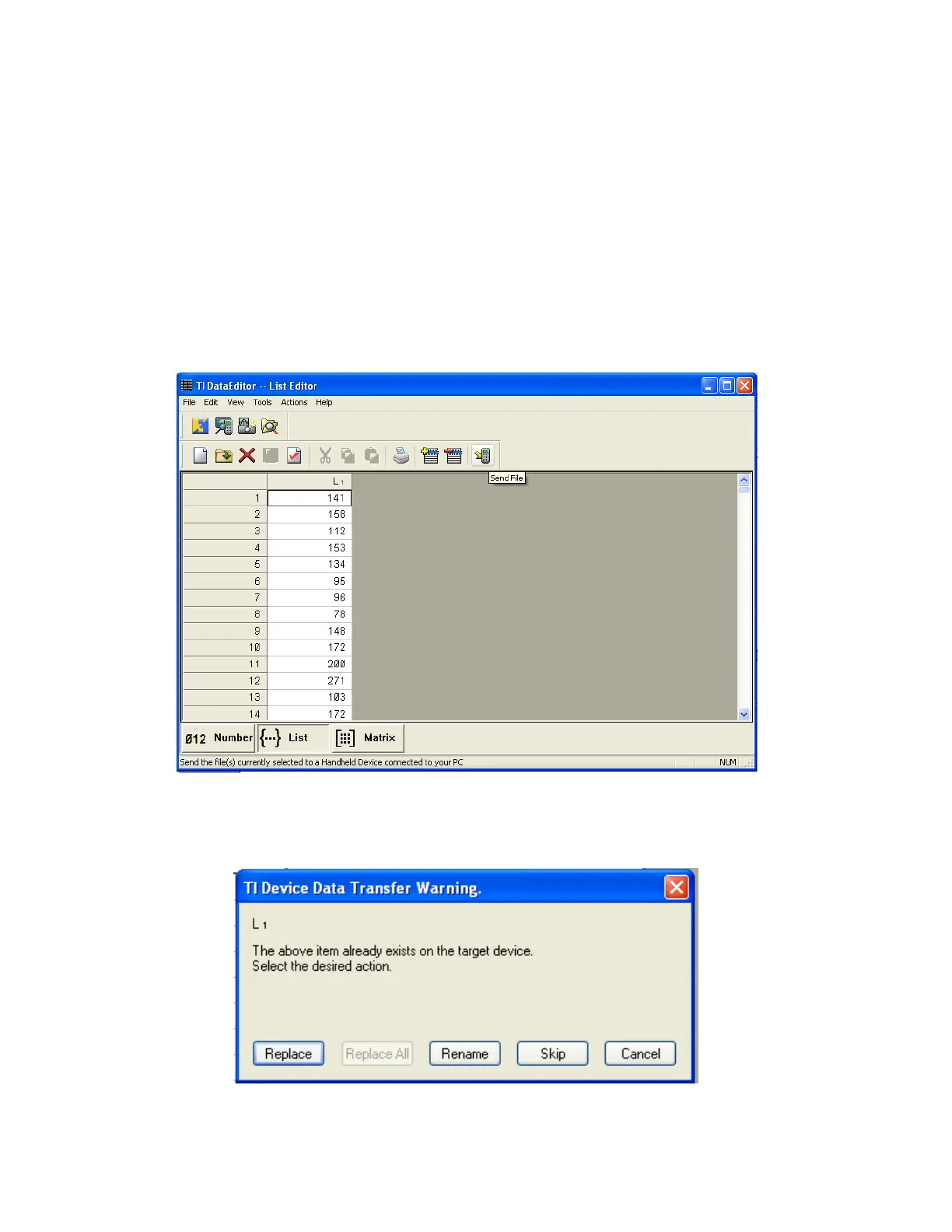
exercises, and ta are tables. In the example below, I have opened a file from Chapter 1 of the
Basic Practice of Statistics for exercise 11 about blood glucose levels. Notice that it headed as
L1.
To transfer the file to the calculator, press the Send File icon (at top right). The transfer should
start automatically, after the software locates your calculator. You may see a warning loke the
one below:














 To Next Page