Working with Lists 11
On an 89, the procedure is analogous, but access the LIST OPS menu by pressing …©, then
select option 5.
Note: To quickly check the values on a multi-screen list you can press the green ƒ key
followed by either the } or † key. This will allow you to jump up or down from one page
(screen) to another. The green arrows on the keyboard near the } and † keys are there to
remind you of this capability. On a TI-89, instead of the ƒ key, press ¥.
Sorting Lists (TI-83/84)
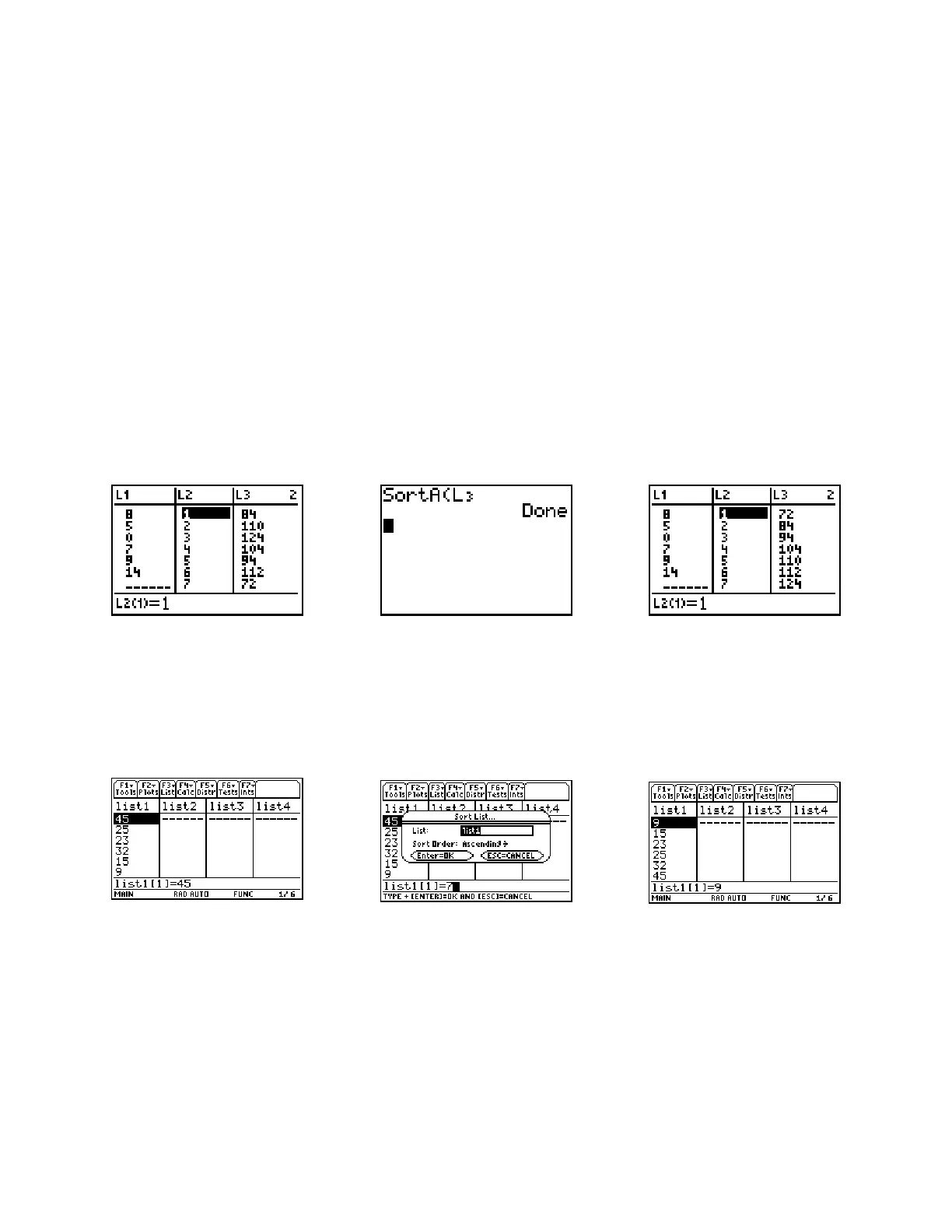
Lists may be sorted in either ascending (smallest to largest value) or descending order. The
resulting list will replace the original list. On the main … menu select either 2:SortA( or
3:SortD(. The command will be transferred to the home screen. Enter the name of the list to be
sorted (yn where n is the number of the list). Execute the command by pressing Í. The
example below sorts list L3.
Sorting Lists (TI-89)
While in the List Editor, press … for the List menu, press D followed by Í or © to
select List Ops, then press Í to Select 1:Sort List, y¹ (Var-Link) and use the
arrows to select the list to be sorted. Press the right arrow if necessary to change the sort order
(use B to activate the menu choices). Press Í to carry out the command.














 To Next Page