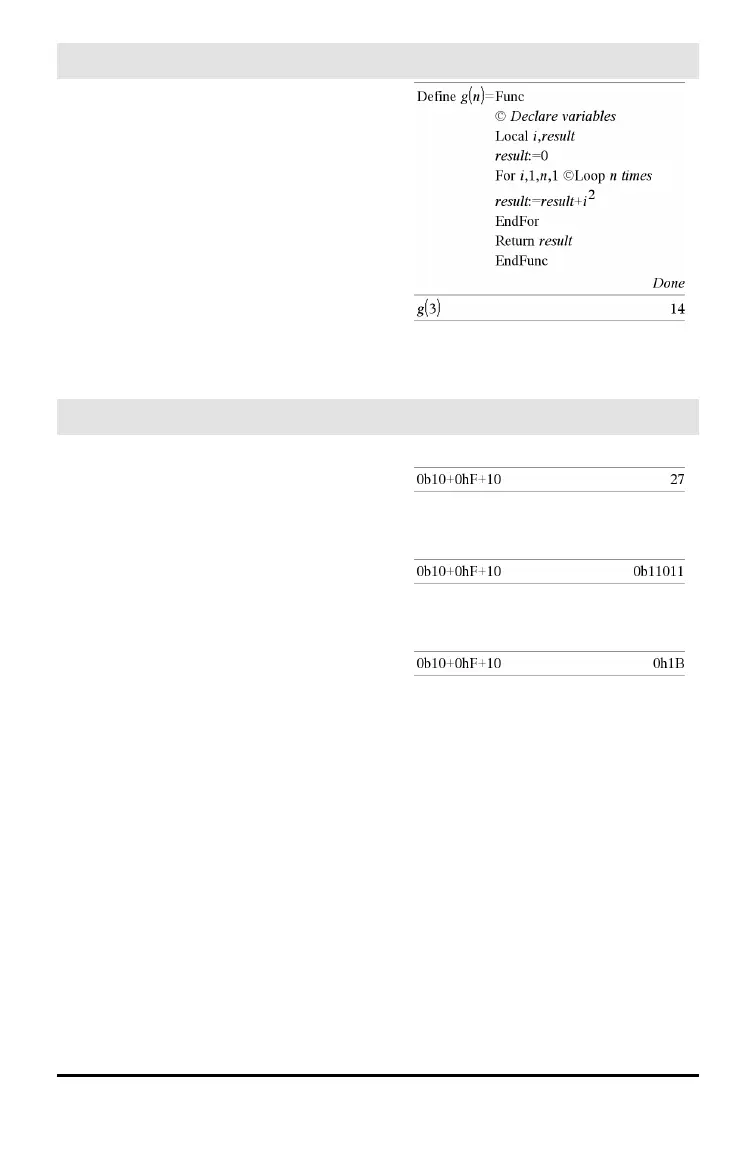
© (comment)
/k keys
© [text]
© processes text as a comment line,
allowing you to annotate functions and
programs that you create.
© can be at the beginning or anywhere in
the line. Everything to the right of ©, to the
end of the line, is the comment.
Note for entering the example: For
instructions on entering multi-line program
and function definitions, refer to the
Calculator section of your product
guidebook.
0b, 0h
0B keys, 0H keys
0b binaryNumber
0h hexadecimalNumber
Denotes a binary or hexadecimal number,
respectively. To enter a binary or hex
number, you must enter the 0b or 0h prefix
regardless of the Base mode. Without a
prefix, a number is treated as decimal
(base10).
Results are displayed according to the Base
mode.
In Dec base mode:
In Bin base mode:
In Hex base mode:
Symbols 231


 To Next Page
 Loading...