2322
Wireless Thermo-Hygrometer
Wireless Thermo-Hygrometer
7.1.2 Humidity alarm
• HI AL and 90 % (default IN: 80%) or the last adjusted upper humidity limit appear on
the display (channel 1-3 and internal sensor).
• Press the CHANNEL / + or MIN/MAX / – button to adjust the desired upper humidity
limit.
• Press and hold the ALARM / SET SET button after setting the value when still flashing to
activate the alarm function.
• The alarm symbol appears on the display.
• Confirm the setting with the ALARM / SET button.
• LO AL and 30 % (default IN: 40%) or the last adjusted lower humidity limit appear on
the display.
• Press the CHANNEL / + or MIN/MAX / – button to adjust the desired lower humidity limit.
• Press and hold the ALARM / SET bSET button after setting the value when still flashing
to activate the alarm function.
• The alarm symbol appears on the display.
• Set the alarm for the additional transmitters and for the internal sensor in the same way.
• Repeat the above steps until you have set and activate the desired alarms.
7.2 Display of the adjusted alarm values
• Press the ALARM / SET button in normal mode to show the adjusted upper alarm limits
(channel 1-3 and internal sensor).
• Press again the ALARM / SET button in normal mode to show the adjusted lower alarm
limits (channel 1-3 and internal sensor).
• Press again the ALARM / SET button to return to normal display.
7.3 Case of alarm
• In the case of an alarm the corresponding symbol will be flashing and an alarm sound is
activated. Stop the alarm tone with any button.
7.3 Delete the alarm
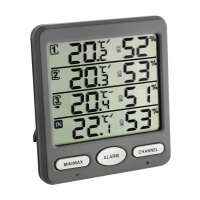
• Press the CHANNEL / + button until the arrow appears on the desired channel.
• Press and hold ALARM / SET button for 3 seconds.
• HI AL and the last adjusted upper temperature limit is indicated.
• Press and hold the ALARM / SET button to deactivate the alarm function.
• The alarm symbol disappears on the display.
• Confirm the setting with the ALARM / SET button.
• Repeat the above steps until all alarms are deactivated.
• Press and hold the MIN/MAX / – button to delete the maximum values of the currently
selected channel.
• Press the MIN/MAX / – button again.
• MIN appears on the display.
• On the display appear the minimum values since the last reset.
• Press and hold the MIN/MAX / – button to delete the minimum values of the currently
selected channel.
• Press the MIN/MAX / – button again to go back to the display of the present values.
7. Settings
• The device will automatically quit the setting mode if no button is pressed for a long
period of time.
• Press and hold the MIN/MAX / – or the CHANNEL / + button for a fast running.
7.1 Setting of the alarm for the temperature and humidity
7.1.1 Temperature alarm
• Press the CHANNEL / + button until the arrow appears on the desired channel (channel
1-3 and internal sensor).
• Press and hold ALARM / SET button for 3 seconds.
• HI AL and 60 °C (default IN: 35°C) or the last adjusted upper temperature limit appears
on the display.
• Press the CHANNEL / + or MIN/MAX / – button to adjust the desired upper temperature
limit.
• Press and hold the ALARM / SET button after setting the value when still flashing to
activate the alarm function.
• The alarm symbol appears on the display.
• Confirm the setting with the ALARM / SET
button.
• LO AL and -20°C (default IN: 10°C) or the last adjusted lower temperature limit appear
on the display.
• Press the CHANNEL / + or MIN/MAX / – button to adjust the desired lower temperature
limit.
• Press and hold the ALARM / SET button after setting the value when still flashing to
activate the alarm function.
• The alarm symbol appears on the display.
• Confirm the setting with the ALARM / SET button.
TFA_No. 30.3054_Anleit_03_23 06.03.2023 15:15 Uhr Seite 12


 To Next Page
 Loading...